4.1 Set Program
Uptofourprograms can be created.
Touchingbuttonwillgobackto
the home screen from programming setting pages.
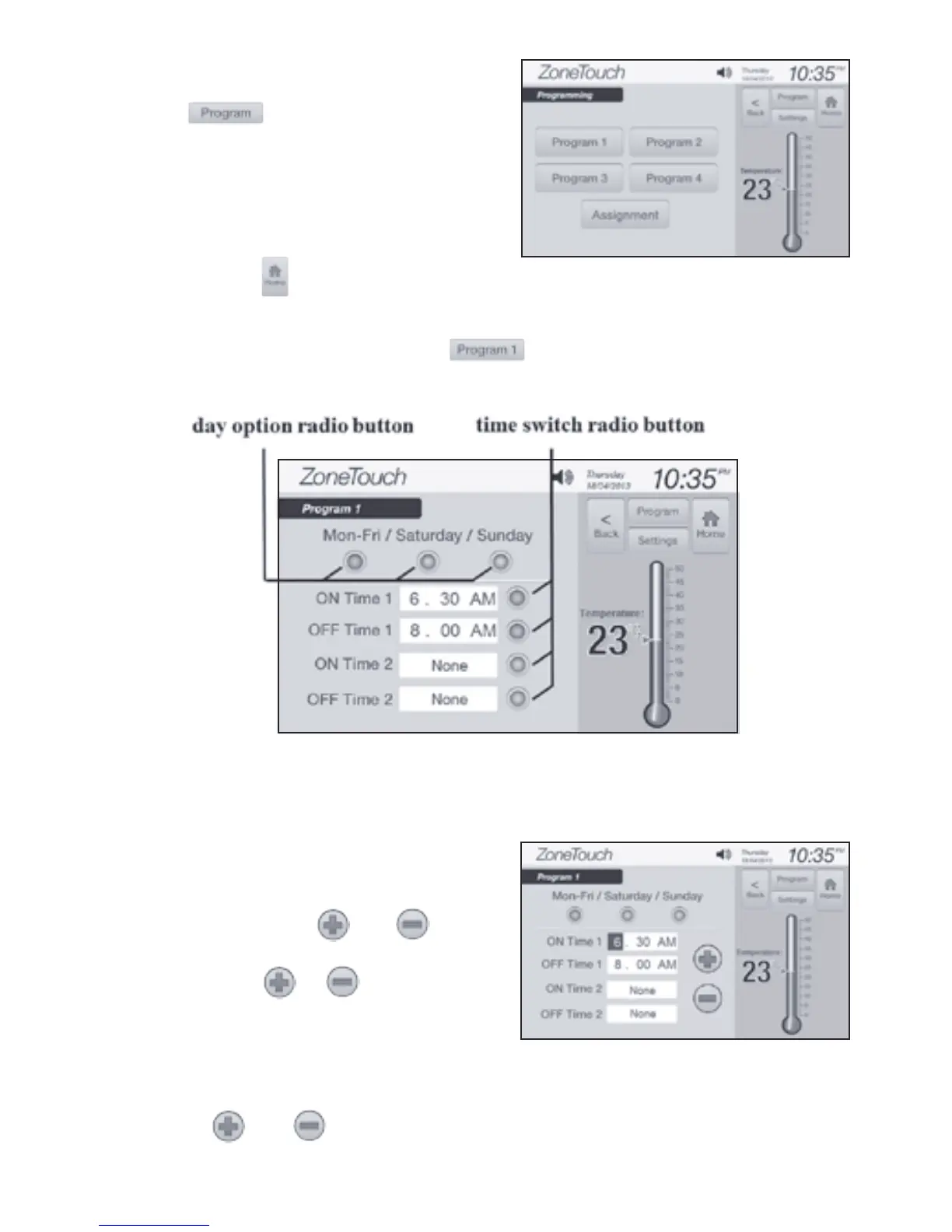
a) Touch Program buttons (e.g. )on‘programming’screen(Figure4)
toenterthescreen(Figure5)toselectscenariosandadjusttheeventtimes.
ZONEMASTER ZONETOUCH V2 ZONE CONTROL SYSTEM - User Manual
6
Touch the button on the home screen
toenter‘Programming’screen(Figure4).
Figure 4.
Figure 6.
b) TouchadayoptionradiobuttontoselectMonday-Friday,Saturdayor
Sundayprogramtomodify.Touchthetimeswitchradiobuttonontheright
toenable/disableON/OFFtime.
c) Touchthehour,minuteorAM/PM
eldonthescreentohighlightit,
and then the and buttons
willappearonthescreen(Figure6).
Touchorbuttonstoadjust
the time.
NOTE: Afteranediteldis
highlighted,touchingthateldagain
will quit from the editable status and
the and will disappear.
Figure 5



 To Next Page