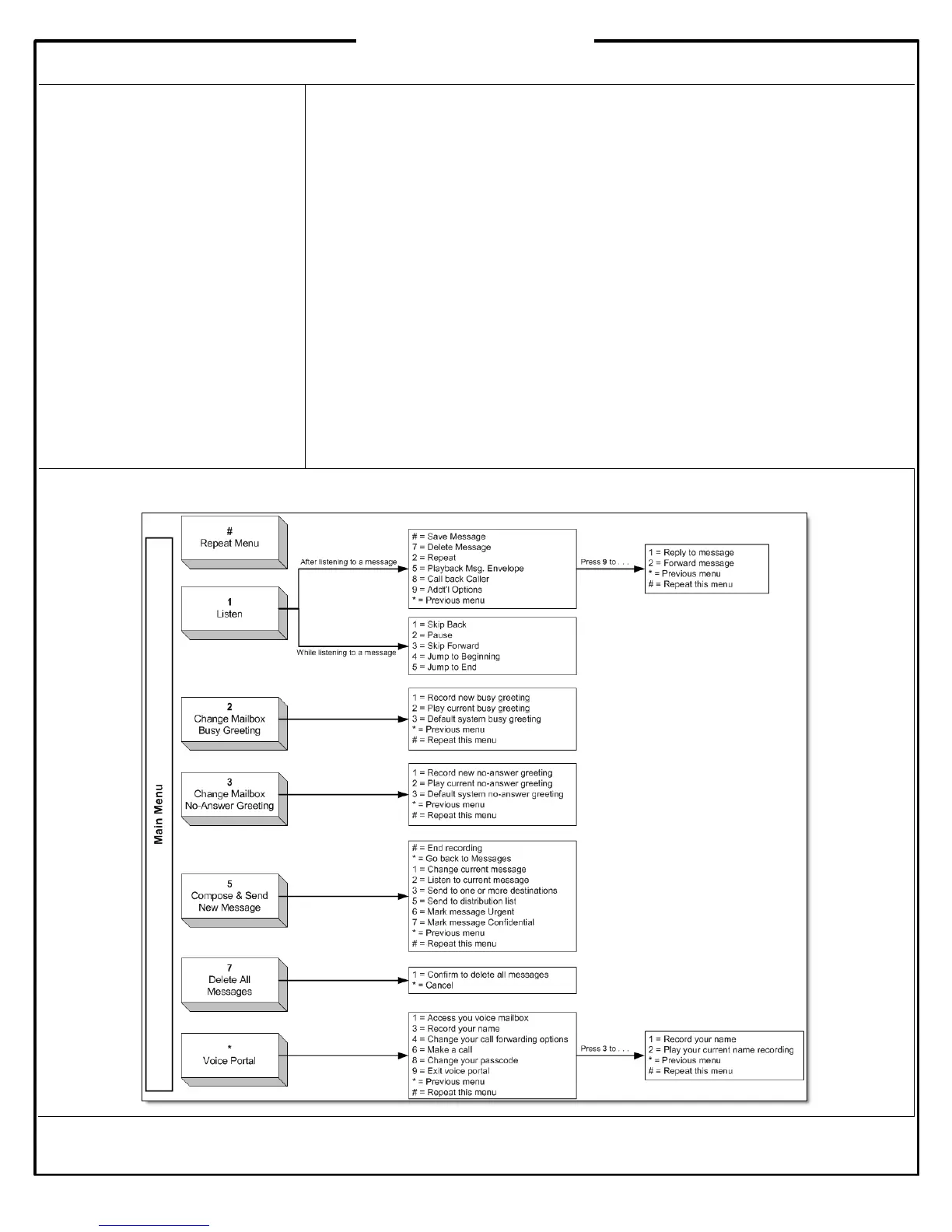
Accessing Voice Mail
The first time you access your voice
mailbox, the system will prompt you
to record a name greeting and
change your password.
Voice Mail Extension:___________
Default Passcode:______________
Setting Up Your Voice Mailbox
When you access your voice mailbox for the first time, be sure to change or set up
the following options:
Change your passcode (PIN)
Record your first and last name
Record a no-answer greeting and a busy greeting
Voice Mail Indicators
When you have a new voice mail message, the following indicators are active:
Flashing red LED
Stutter dial tone
Envelope icon next to extension on LCD
Accessing Voice Mail from Your Office Phone
1. Press the Messages button.
2. Follow the voice prompts to access your messages.
Accessing Voice Mail from Another Phone or Outside the Office
1. Dial your extension (inside the office) or direct dial number (outside the office).
2. Let the call ring to voice mail, and then press *.
3. Enter your passcode and then # to access your voice mailbox.






 To Previous Page