- 41 -
Settings of R-PAC model (use of Digital Controller)
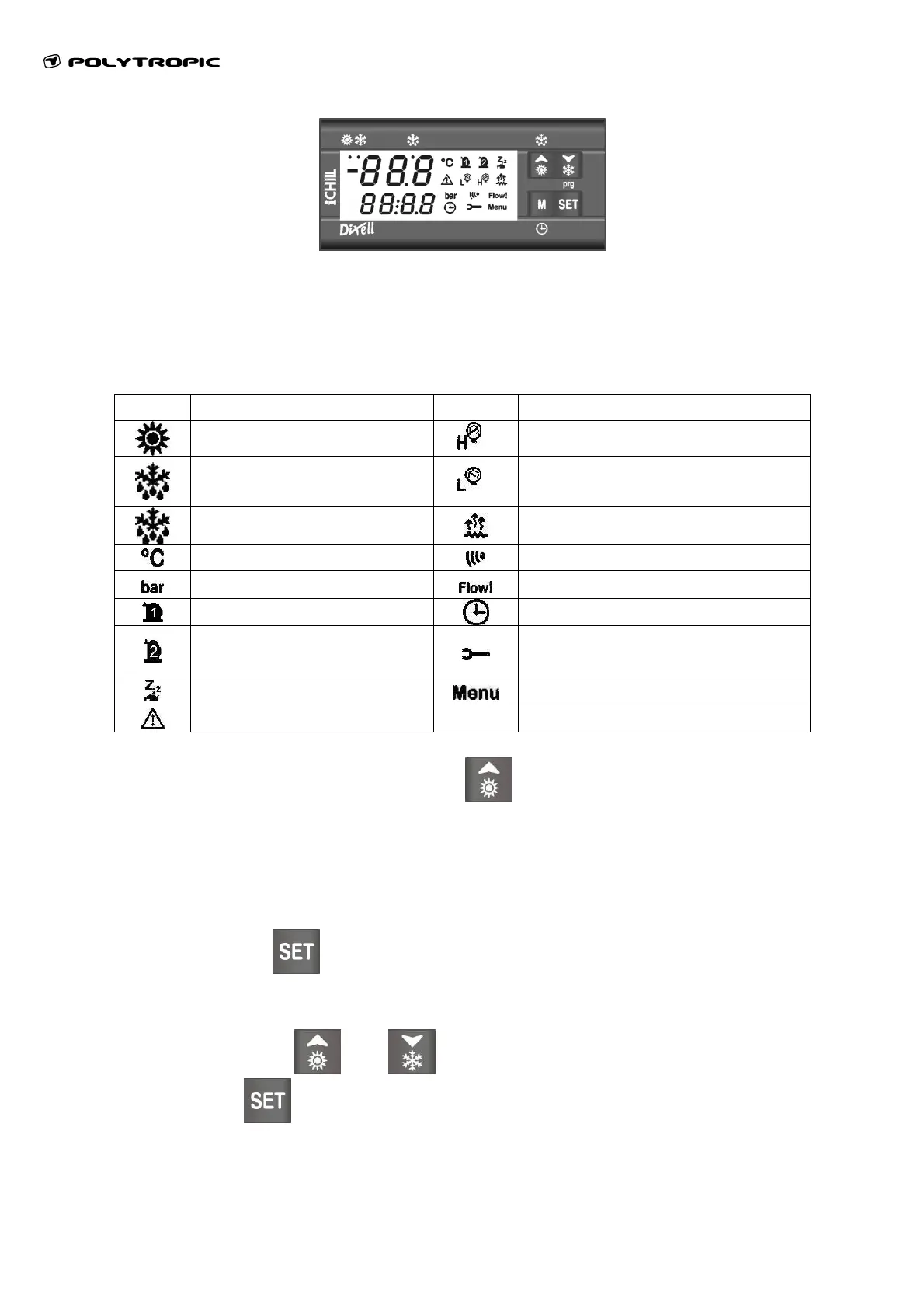
The display is divided in three parts:
Up left: Display the inlet temperature of water
Down left: Display the condenser temperature
Right : Icones zone
Icon Meaning Icon Meaning
(Lighted)Heating Mode
P
High Pressure Alarm
(Blinking) Delay before
defrosting
P
Low Pressure Alarm
(Lighted) Defrosting
Heat anti-ice of evaporator
Celsius Degrees
Infra red (not used)
Bar
Flow Control in progress
Compressor 1
Delay before defrost
Compressor 2 (not
used)
Maintenance request
Stand-by Mode
Menu activated
Alarm
At the first start up, it is necessary to press
to start up the machine.
User parameters modification:
Adjustment of water temperature settings:
Keep pressing for 3 secs.
• The display shows “SetH” and the value blinks.
• Adjust with
and .
• Press
to confirm all settings.



 To Next Page