Version 2.1
Update: April 2016
PONSEL Mesure – Aqualabo Contrôle
35 Rue Michel Marion – 56850 CAUDAN, FRANCE
Tel.: +33(0)2 97 89 25 30 – Fax: +33(0)2 97 76 55 72
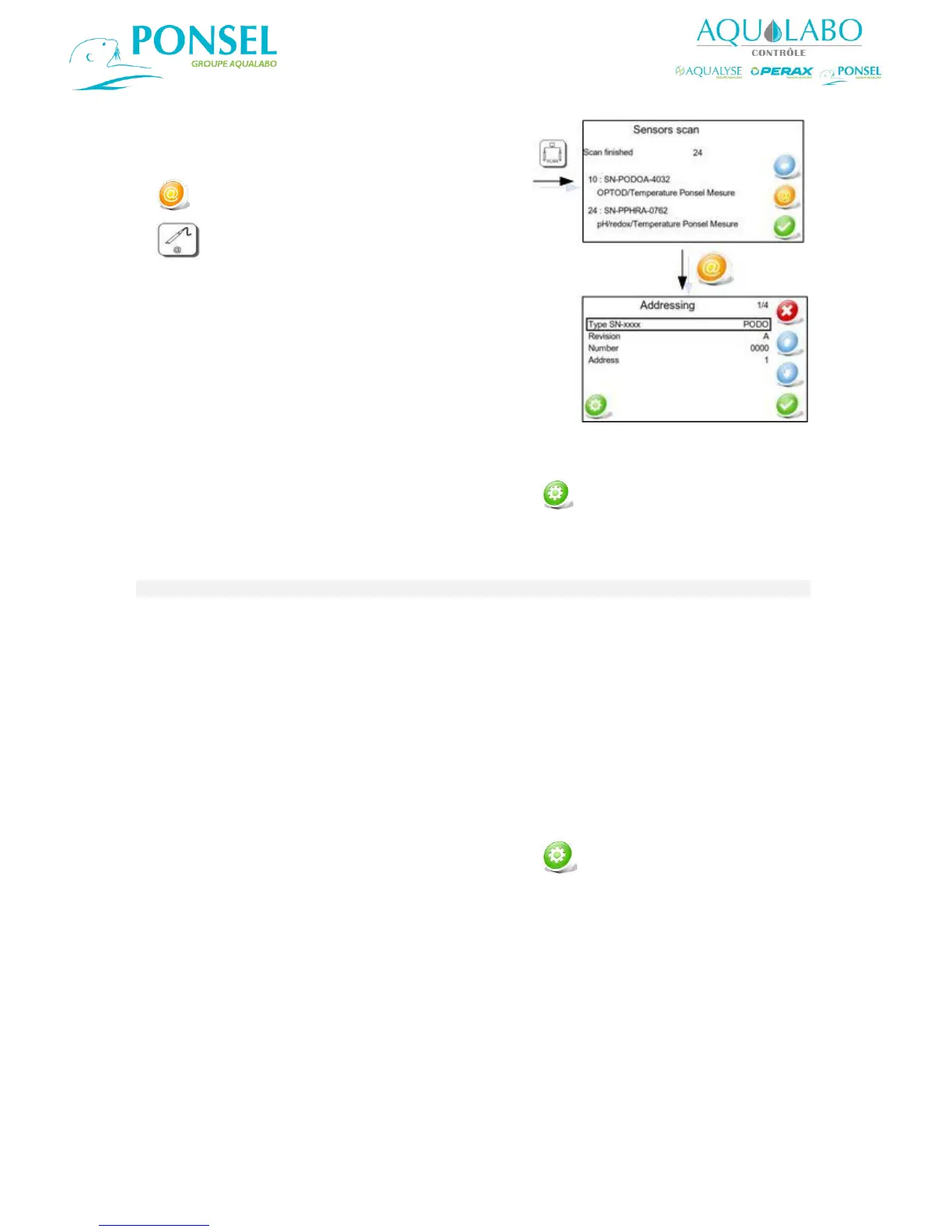
Addressing of the digital sensors.
The first 3 lines of the "Addressing" window are used to define the serial number of the sensor affected
by the change of address.
After configuring the Serial No. and address, confirm with the icon.
The sensor's serial number is engraved on the body of the sensor and comprises the following
information:
PODO for an OPTOD sensor
PNEP for a Turbidity sensor
PC4E for a C4E sensor
PPHR for a PHEHT sensor
PORP for an ORP sensor
PTUR for a VB5 – MES 5 sensor
Represented by a letter (A in the example above)
A 4-digit number (0000 in the example above)
After configuring the Serial No. and address, confirm with the icon. The change made to the
Modbus address becomes effective when the "Communication completed successfully" message
appears.
To access the "Addressing" menu, select the
icon in the Sensors scan window or select the
icon in the Numeric input settings screen.


 To Next Page