24
:KHQPDNLQJODVHUOLQHDGMXVWPHQWV
NHHS¿QJHUVDZD\IURPWKH212))
WULJJHUVZLWFKWRSUHYHQWDFFLGHQWDO
VWDUWLQJDQGSRVVLEOHVHULRXVLQMXU\
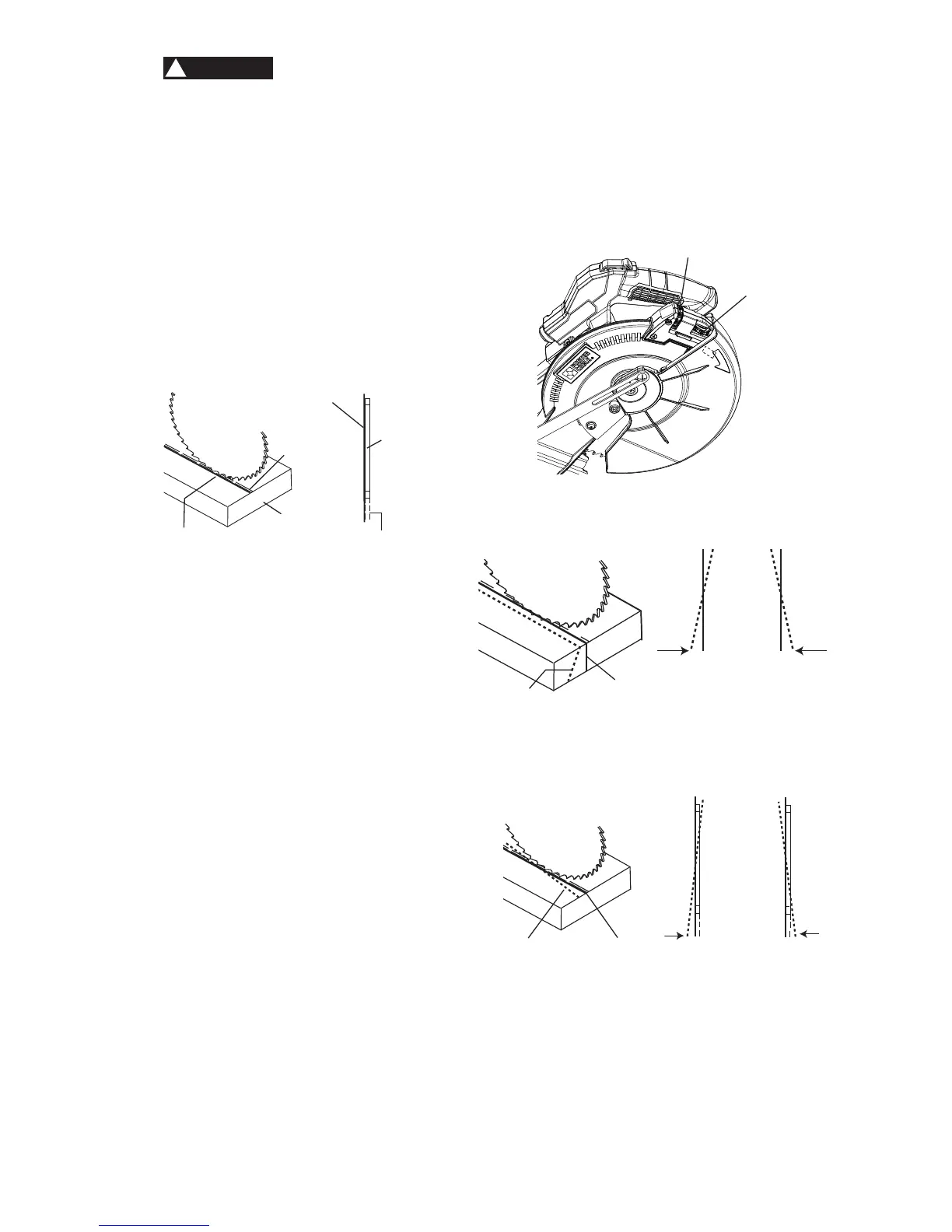
5. Looking at the front of the board, if the
laser line is not parallel to the “pattern
line” please follow the instructions listed
below under “Front Line” paragraph.
6. Looking at the top of the board, if the
laser line is not parallel to the “pattern
line” please follow the instructions listed
below under “Top Line” paragraph.
)LJ=
B. $GMXVWLQJWKH3RVLWLRQRIWKH/DVHU
/LQH)LJ$$%%&&
Front Line (Fig. AA, BB)
If the laser line is angled from left to right,
turn the laser vertical adjustment knob (1)
counterclockwise to align the laser line
parallel with pattern line. If the laser line
is angled from right to left, turn the knob
clockwise to align the laser line parallel with
pattern line.
Top Line (Fig. AA, CC)
If the laser line is angled from left to right,
turn the laser horizontal adjustment knob (2)
clockwise to align the laser line parallel with
pattern line. If the laser line is angled from
right to left, turn the knob counterclockwise to
align the laser line parallel with pattern line.
After performing the above adjustments,
visually check that both the front and top laser
lines are parallel with pattern line.
WARNING
!
NOTE:
Ɣ /DVHUOLQHLVFDOLEUDWHGDQGVHWXSDWWKH
factory to project to the left of the blade.
Ɣ ,I\RXKDYHDQ\SUREOHPRUTXHVWLRQV
concerning the laser guide, call the
Porter-Cable Customer Care Center at
(888) 609-9779 .
)LJ$$
)LJ%%
)LJ&&
TOP VIEW
Laser line
Cutting line
Blade
Laser line
Workpiece
Cutting
line
1
2
Laser line
Pattern line
Counterclockwise Clockwise
Counterclockwise Clockwise
Laser line
Pattern line





 To Next Page