www.posey.com 1.800.447.6739
KeepSafe Essential
15
SETTING TONE
Setting Alarm Tone
The KeepSafe Essential has five (5) available tones. This allows you to
differentiate between patients/residents and other equipment alarms.
To Select Tone:
1. Ensure alarm is on and magnet is on
face plate.
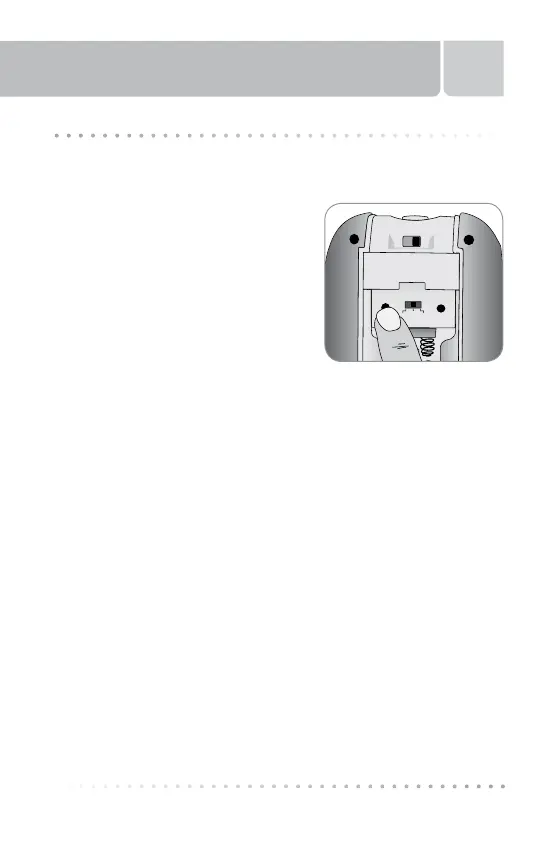
2. Remove the battery compartment door
by sliding down to gain access to the
programming buttons.
3. Press TONE button (Fig. 5) to scroll
through the tone selections.
4. Alarm mode must be set to either
“Voice and Tone” or “Tone” in order to
hear the selection.
5. Each time you press the button, tone will change and a two (2)
second sample plays. The last sample heard is the tone utilized
for the alarm when the magnet is removed from the face plate,
depending on which monitoring mode is selected.
6. Replace the battery door and slide shut, locking into place.
NOTE: Cat. 8373NP does NOT have an ON/OFF switch. To set Alarm
Tone for Cat. 8373NP, follow all steps above except step 1.
Tone Volume
Voice
&
Tone
VoiceTone
Qty 4AAA Alkaline
ANSI-24A IEC-LR03
Fig. 5



 To Next Page