www.posey.com 1.800.447.6739
KeepSafe Essential
17
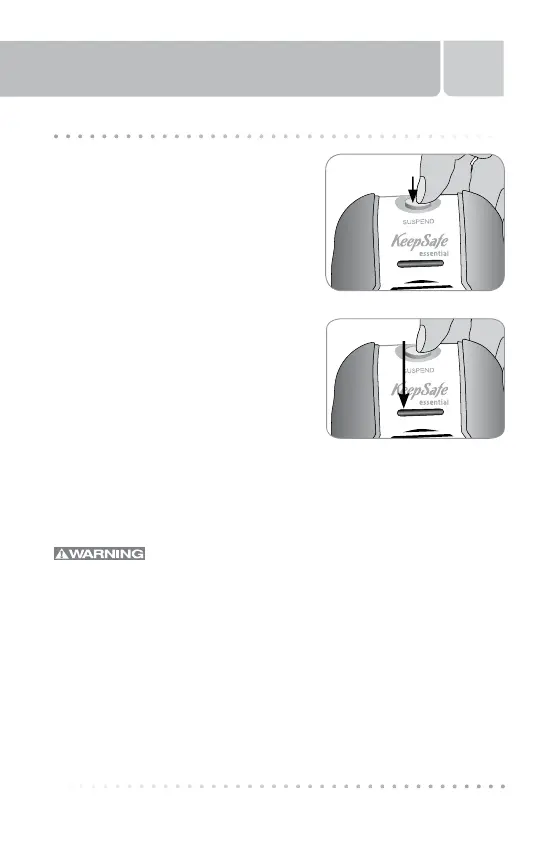
The SUSPEND Button
The SUSPEND feature silences the
alarm until the magnet is replaced on
the magnet plate.
To Place the Alarm on SUSPEND:
1. With the magnet disconnected from
the front of the alarm (as in an
unauthorized patient/resident exit),
press the SUSPEND button on the
top of the alarm (Fig. 7) until the
monitoring indicator LED flashes RED
(Fig. 7a).
2. As soon as the magnet is reattached
to the front of the alarm, the alarm
automatically reverts back to monitor
mode. You will hear a “beep,”
indicating the alarm is activated and
monitoring. The monitoring indicator
LED light will be flashing green, indicating the alarm is in monitoring
mode.
3. To take the alarm out of SUSPEND, reattach the magnet.
Test the alarm and magnet for proper operation
prior to putting in service with a patient/resident, and each
time before leaving the patient/resident unattended. If the
alarm and/or magnet do not function properly, remove the
alarm and magnet from service and replace them with a
properly functioning alarm and/or magnet. Ensure the LED,
indicating monitoring, is blinking green.
Fig. 7
SUSPEND Button
Indicator LED
Fig. 7a
THE SUSPEND BUTTON



 To Next Page