www.posey.com 1.800.447.6739
KeepSafe Essential
16
Adjusting Alarm Volume
There are two (2) alarm volume settings: low and high. These allow you
to select the right volume for facility and/or patient/resident needs.
All volume settings are within OSHA standards. For maximum staff alert
in noisy areas, use HIGHEST (loudest) volume setting.
ALWAYS check to ensure staff can hear alarm at
the furthest possible distance before leaving patient/resident
unattended.
NEVER place alarm closer than two feet from
patient’s/resident’s ear. Doing so may cause hearing loss or
other injury. For more information, see: OSHA OCCUPATIONAL
NOISE EXPOSURE STANDARDS 1910.95.
To Change Volume:
1. Ensure alarm is on and magnet is on
face plate.
2. Remove the battery compartment door
by sliding down to gain access to the
programming buttons.
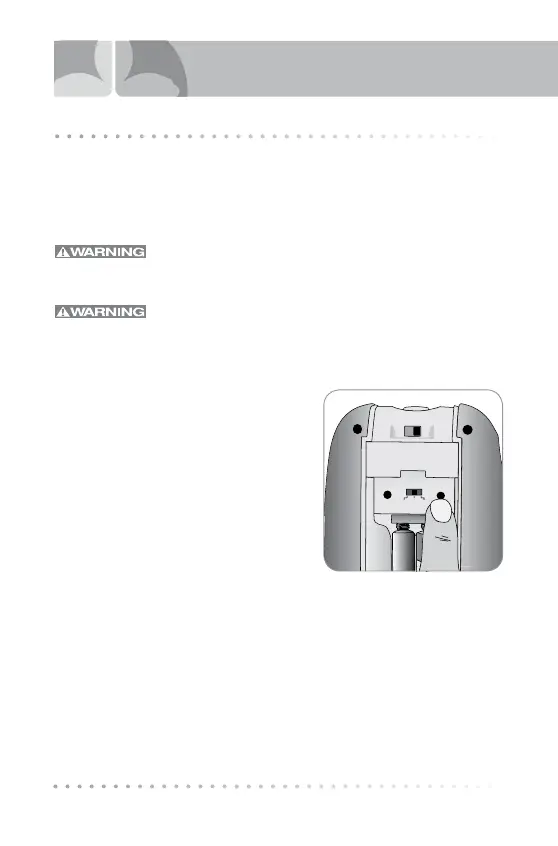
3. Press VOLUME button (Fig. 6) to scroll
through both the volume selections.
4. Alarm mode must be set to either
“Voice and Tone” or “Tone” in order to
hear the selection.
5. Each time you press the button, the volume changes and a two (2)
second sample plays.
6. Continue to press the VOLUME button until you hear the desired
volume. The last sample heard is the volume in use.
7. Replace the battery door and slide shut, locking into place.
NOTE: Cat. 8373NP does not have an ON/OFF switch. To set Alarm
Volume for Cat. 8373NP, follow all steps above except step 1.
Fig. 6
Tone Volume
Voice
&
Tone
VoiceTone
Qty 4AAA Alkaline
ANSI-24A IEC-LR03
ADJUSTING VOLUME


 To Next Page