5
When to Replace Paper Roll
When the printer gives a paper out signal or a
red line appears on the thermal sensitive
paper, it is time to replace the paper roll. Do
not wait till the print engine is dragging the
paper roll at the very end. Remove the
leftover and replace the old paper roll with a
new paper roll as guided above to prevent the
printer from excessive paper dust and lower
the possibility of consequent paper jam.
Spacer
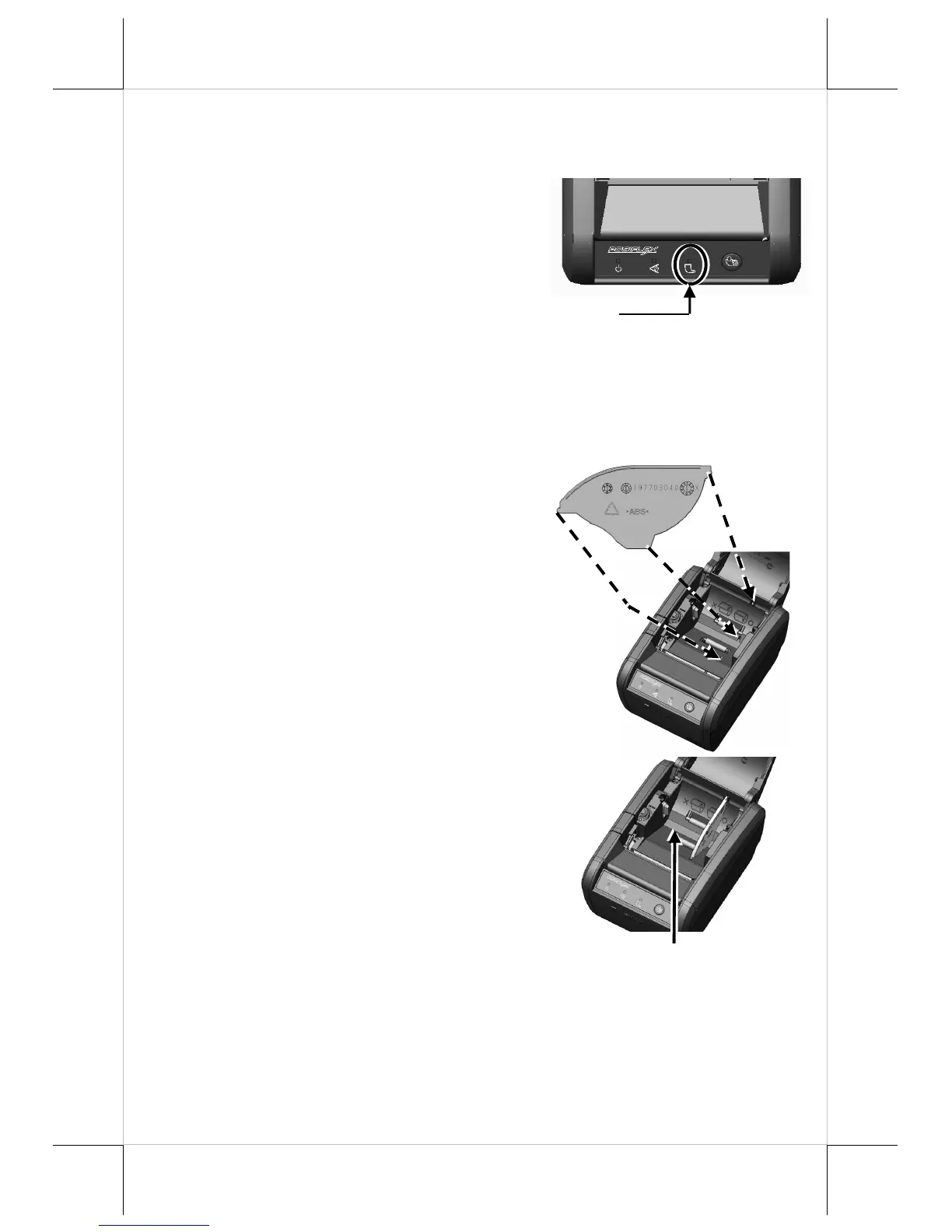
Plate Installation for Paper Roll of 58mm Width
Before installing the 58mm-width paper roll,
please refer to the figure shown at the right
for mounting the spacer plate to the paper roll
compartment of the printer.
Note that the smooth side is toward the paper
roll.
Insert the noted corners of the spacer plate
into the 3 dents inside the paper roll
compartment as arrowed in numeric order.
Then the 58mm-width paper roll compartment
is formed.
58mm-width Compartment
Paper-out signal















 To Next Page