Istruzioni per l’uso e manutenzione
Cod. OQ7.5ARG114 – GB
Emiss. 19-01-11 Rev. 0 - Agg. /
32
POWER SYSTEM SRL
Via dell’Emigrante, 11/13 - 36040 Brendola (VI) Italia
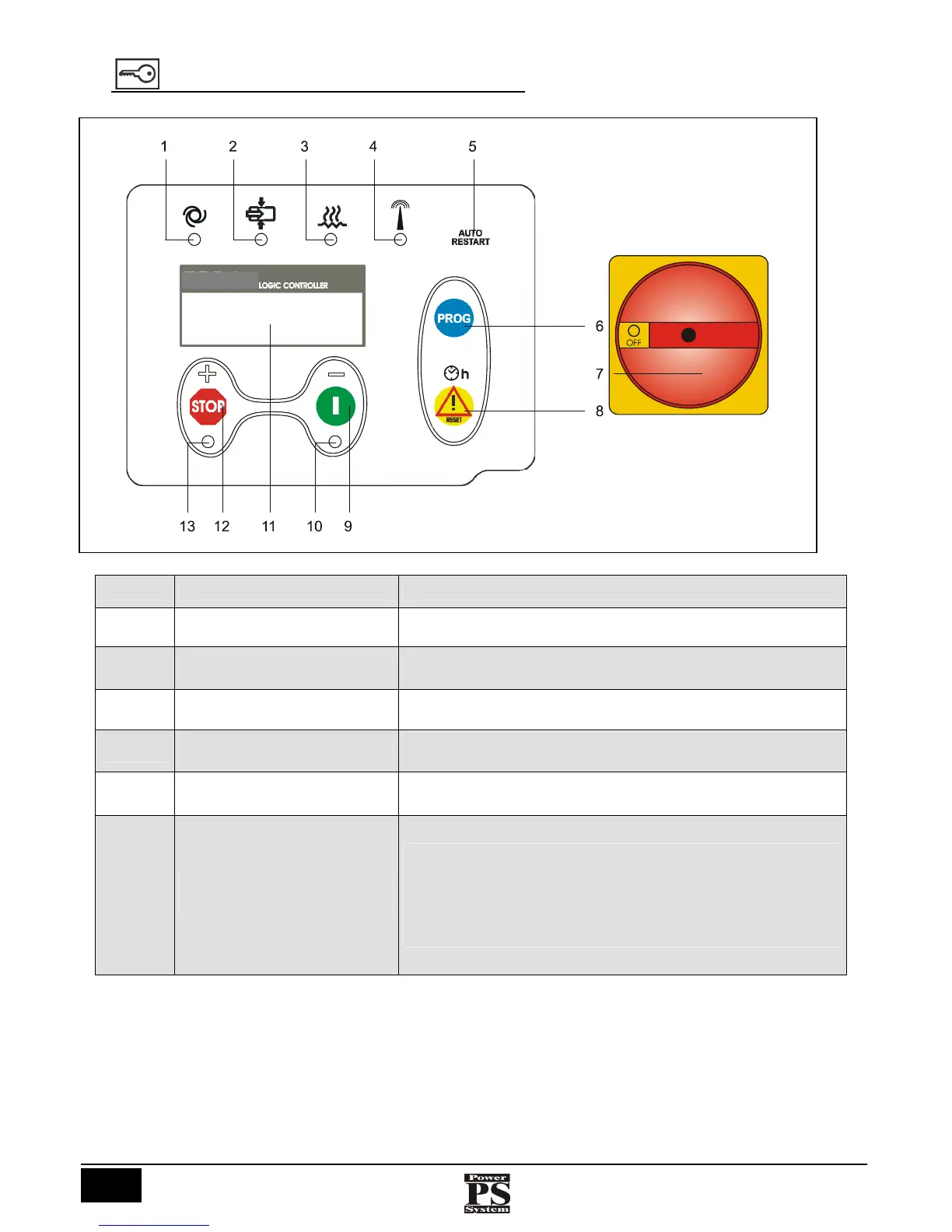
17 CONTROL PANEL FOR THE BOARD EPS4.3
RIF. DENOMINATION FUNCTION
1
Led green Rotating motor.
2
Led green Active loading electrovalve
3
Led green Oil heater operating.
4
Led yellow
Remote control enable
5
Led white
“AUTO RESTART”
Automatic restart enabled.
6
Blue “PROG” button
(Programming)
Pressing it once allows you to enter the programming parameters menu.
Pressing it again allows you to scroll through the various programming
menus. Holding it down on the desired menu allows you to change the
set parameters by pressing the “+” and “-” keys. Press it again to confirm
the change. To quit, hold down the key for a longer time. The system
quits programming automatically after 80 sec.
EPS4.



 To Next Page