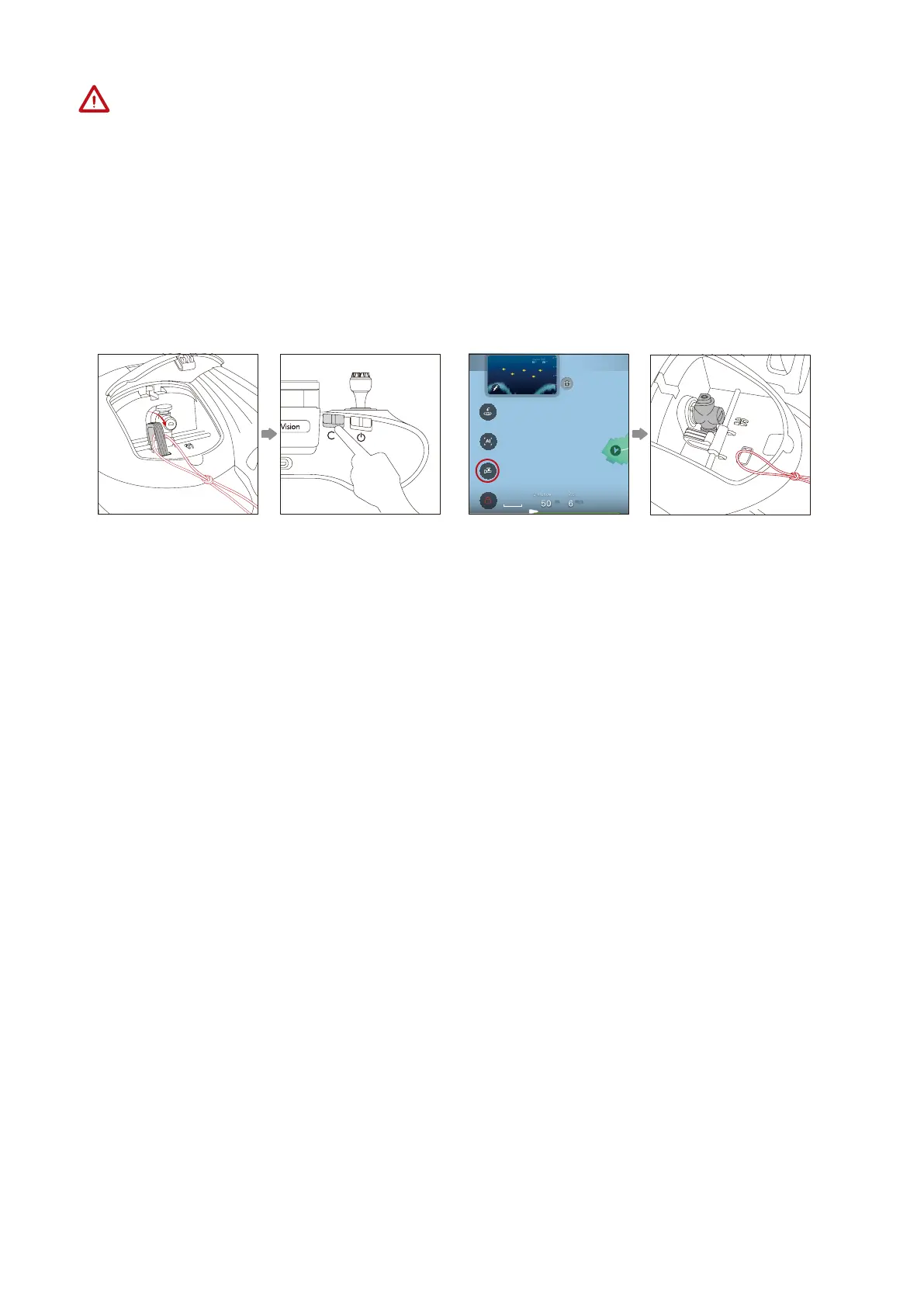
1. Fasten the rope to the payload system.
2. Press and hold the Custom button on the remote controller or touch the Unhook/Bait
button in the App to execute the unhook operation.
3. Unhook operation done: Short press the custom button on the remote controller or
touch the Unhook/Bait button in the App to resume the hook to its initial position.
PowerDolphin has a payload system at its tail, which can tie things with a rope and release
them in the specified location.
• Payload System
After removing and using the microSD card, remember to secure the rubber plug into
place before the next sailing.
m
m/s
5m
Or
• Sailing Mode
• Underwater Mode: The maximum speed is limited so the electric joint camera can be
adjusted for different angles to offer multiple views. These functions are suitable for
low-speed, underwater scenarios.
• Normal Mode: The maximum speed is unlimited. The electric joint camera is set to its
initial position and cannot be adjusted. This function is suitable for high-speed enjoy-
ment and water-surface FPV scenarios.
• Cruise Mode: The cruise control function allows for unlimited maximum speed. The
electric joint camera is set to its initial position and cannot be adjusted.
1. To enter Cruise mode: Hold the throttle stick in a position for 2 seconds and then
release.
9



 To Next Page