12
16
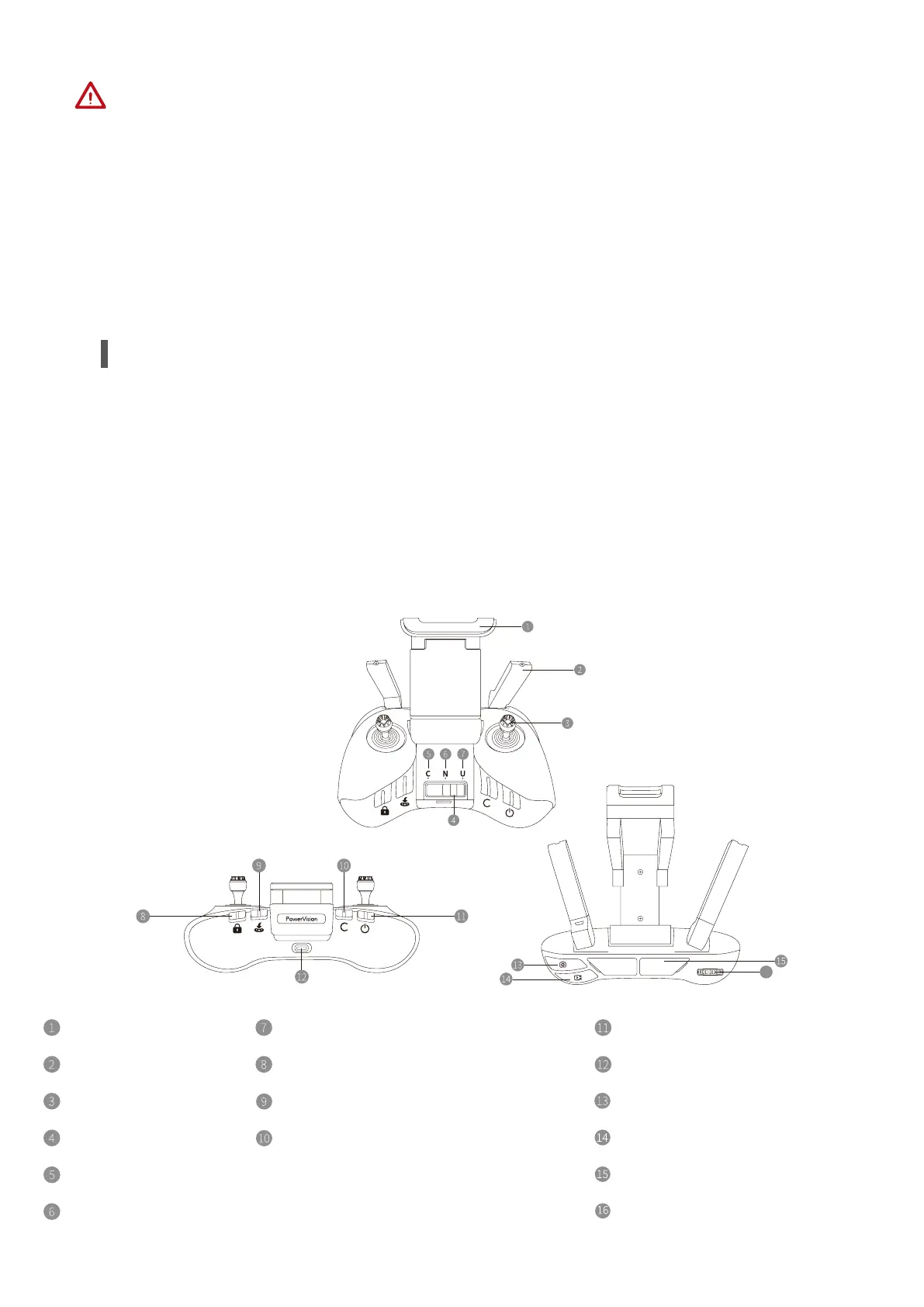
Mobile device stand
Antenna
Control stick
Mode buttons
Cruise mode (C)
Normal mode (N)
Power button
Charging port (Micro USB)
Photo button
Video button
Image transmission port (USB)
Camera joint control thumbwheel
Underwater mode (U)
Lock/Unlock button
Smart return button
Custom button
(Unhook/Bait button by default; can
be customized in the App)
You can use the remote controller to operate your PowerDolphin wirelessly, and display
real-time low latency high resolution image’s back to your mobile device through the
Vision+ 2 App. In addition, the collapsible mobile device stand folds right into the remote
and can hold most size iOS and android mobile phone.
• Overview
Get to Know the Remote Controller
1. The self-righting procedure is not applicable if the payload system is being used.
2. The self-righting procedure is not applicable if the locked device rolls over when it is
thrown into the water.
3. The self-righting function may be subject to factors, such as water conditions (sea scale,
obstacles in waters, etc.) and blade wear conditions. In these situations, the self-righting
function is not 100% feasible. If self-righting fails, please do it manually.



 To Next Page