Operation
24
Powerware
®
5115 Tower UPS (500–1400 VA) U ser’s Guide S 05146640 Rev C www.powerware.com
Standby Mode
When the UPS is turned off a nd remains plugged into a power outlet, the
UPS is in Standby mode. All indicators are off and power is not available
to your equipment. The battery recharges when necessary.
NOTE For 220–240V models, the output receptacles may remain
electrically live (up to 110–120V). Unplug the UPS to ensure power is n ot
available t o the output receptacles.
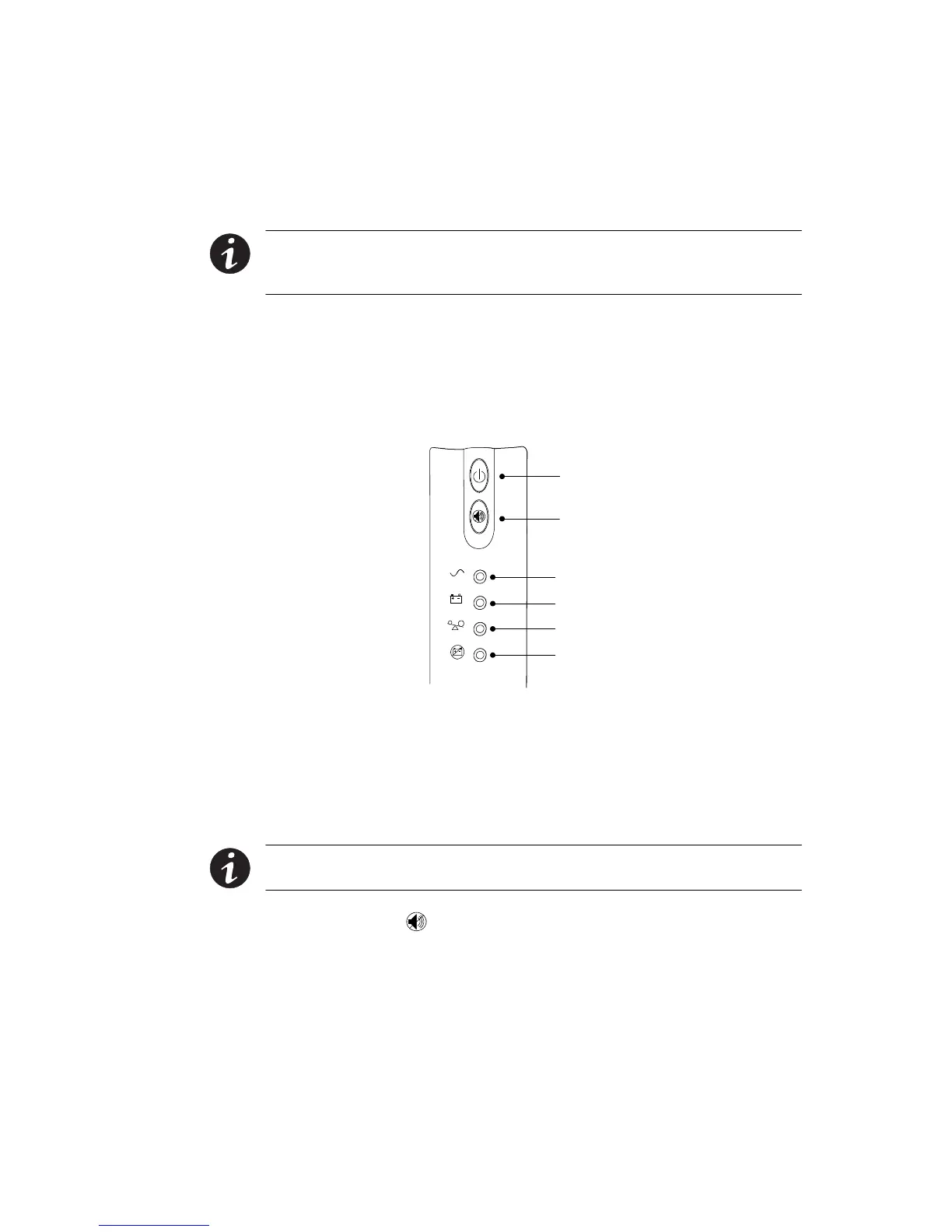
UPS Front Panel
The UPS front panel indicates the UPS status and also identifies potential
power problems. Figure 11 shows the UPS front panel indicators and
controls.
On/Off Button
Test/Alarm Reset Button
Power On Indicator (Green)
On Battery Indicator (Yellow)
Overload Indicator (Red)
Service Indicator (Red)
Figure 11. UPS Front Panel
If the alarm beeps or a UPS alarm indicator stays on, see Table 9 on
page 40 to identify and correct the problem.
Initiating the Self-Test
NOTE The batteries must be fully charged and the UPS must not be in
Battery mode to perform the self-test.
Press and hold the button for three seconds to initiate the self-test. If
the UPS finds a problem, an LED indicates where the problem is. For
more information, see “Troubleshooting” on page 39.












 To Next Page