EasyManua.ls Logo

Powerware 5115 - UPS Rear Panels

Powerware 5115
54 pages
Print Icon
To Next Page IconTo Next Page
To Previous Page IconTo Previous Page
Loading...
Installation
19
Powerware
®
5115 Tower UPS (500–1400 VA) U ser’s Guide S 05146640 Rev C www.powerware.com
UPS Rear Panels
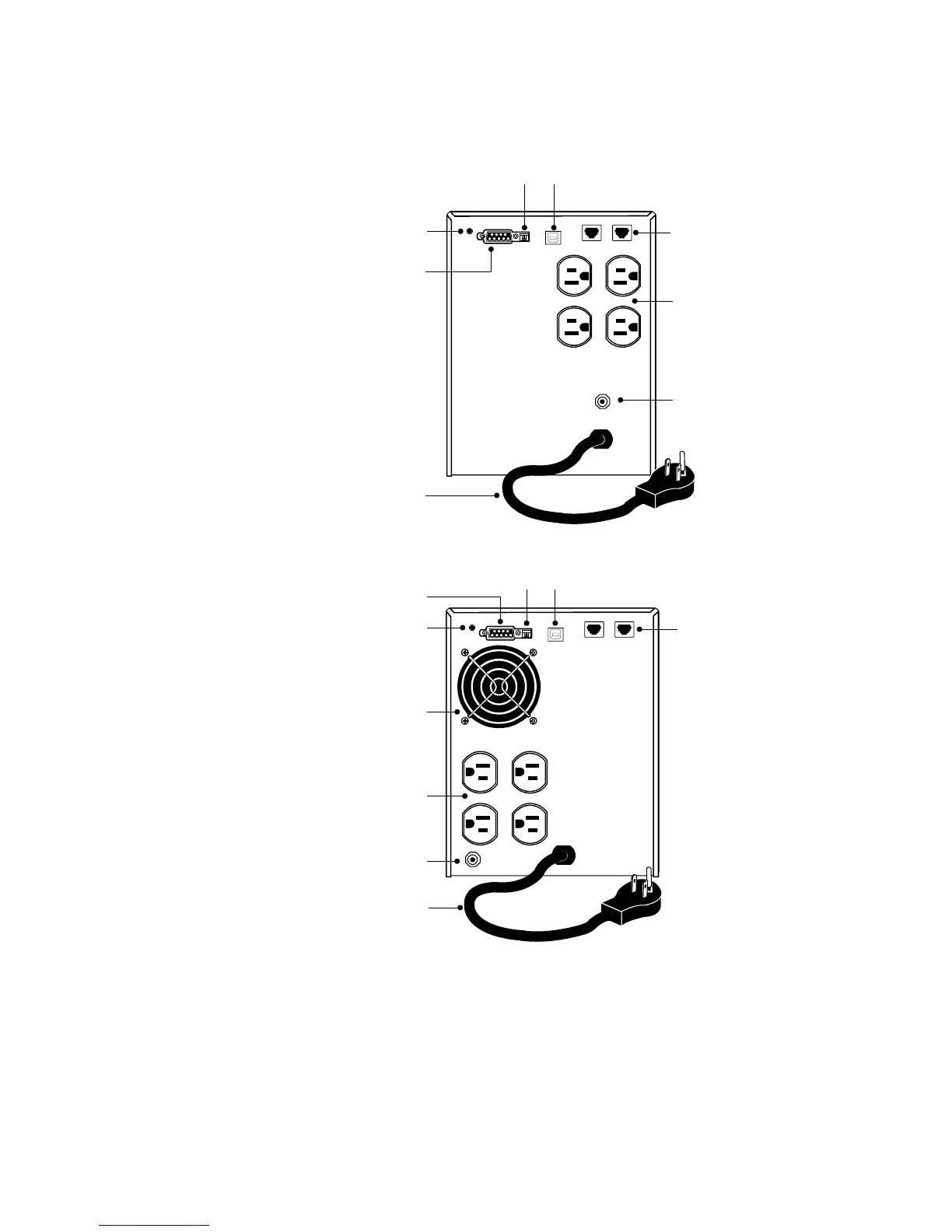
This section shows the rear panels of the Powerware 5115 models.
Communication Port
Four 5-15 Receptacles
6-ft Power Cord
with 5-15 Plug
DIP Switches
Network Transient
Protector
Site Wiring Fault
Indicator
USB Port
Input Overcurrent
Protector
Figure 3. 500 VA, 120V Rear Panel
Four 5-15 Receptacles
6-ft Power Cord
with 5-15 Plug
Network Transient
Protector
Fan
Communication Port
DIP Switches
Site Wiring Fault
Indicator
USB Port
Input Overcurrent
Protector
Figure 4. 750 VA, 120V Rear Panel

Other manuals for Powerware 5115

Related product manuals