EasyManua.ls Logo

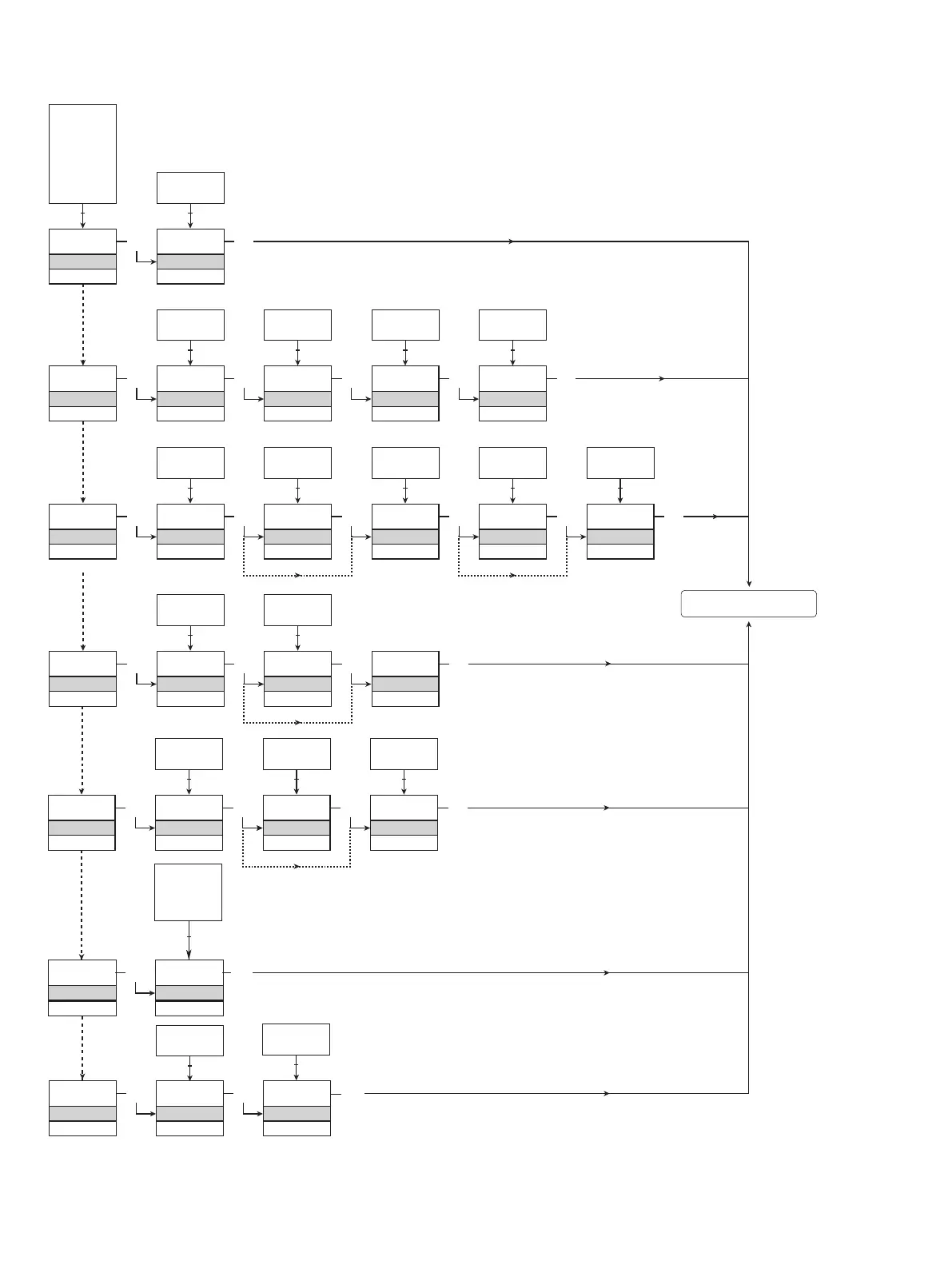
PR electronics 4116 - Configuration Routing: Advanced Options; Memory, Display, and TAG Setup Paths; Process Calibration and Simulation Paths; Password, Language, Latch Configuration Paths

PR electronics 4116
35 pages
Print Icon
To Next Page IconTo Next Page
To Previous Page IconTo Previous Page
Loading...
SAVE
MEMORY
Txt 44
3
SAVE
LOAD
1 2
MEM
SETUP
Txt 43
MEM
DISP
CAL
SIM
PASS
LANG
LATC
1 2
3
DISP
SETUP
Txt 43
3
3
CONTRA
Txt 45
3
9
0
1 2
9
LIGHT
Txt 46
3
9
0
1 2
VALVE 5
Txt 47
3
9
A
1 2
A.OUT
LINE 3
Txt 48
3
TAG
A.OUT
1 2
CAL
SETUP
Txt 43
3
YES
CAL.LO
Txt 49
3
YES
NO
1 2
2.0
%
Txt 61
3
100.0
0.0
1 2
NO
YES
CAL.HI
Txt 50
3
YES
NO
1 2
90.0
%
Txt 62
3
100.0
0.0
1 2
NO
YES
USE.CAL
Txt 60
3
YES
NO
1 2
SIM
SETUP
Txt 43
3
YES
EN.SIM
Txt 51
3
YES
NO
1 2
25.0
%
Txt 52
3
100.0
0.0
1 2
NO
REL.SIM
Txt 53
3
LANG
SETUP
Txt 43
3
UK
LANGUA
Txt 59
DE, DK,
ES, FR,
IT, SE,
UK
PASS
SETUP
Txt 43
3 3
YES
EN.PASS
Txt 54
YES
NO
1 2
NO
0000
NEW.PAS
Txt 55
3
9999
0000
1 2
YES
EN.FAST
Txt 56
3
YES
NO
1 2
2.0
LATC
SETUP
Txt 43
3
NO
R1.LATC
Txt 64
33
NO
R2.LATC
Txt 64
3
YES
NO
1 2
YES
NO
1 2
1 2
26 4116V105-UK
Routing diagram, advanced settings (ADV.SET)
To default state 1.0
2.0 In the submenu simulation (SIM) you must press 3
to return to the default state 1.0.

Related product manuals