EasyManua.ls Logo

Precor 515e - Using the Precor 515 E Precision Ski Machine; Understanding the Electronic Console

Precor 515e
23 pages
Print Icon
To Next Page IconTo Next Page
To Previous Page IconTo Previous Page
Loading...
Using
the
Precor
515e
Precision
Ski
Machine
In
addition
to
providing
an
excellent
cardiovascular,
low-impact
workout,
one
of
the
advantages
of
the
515e
Precision
Ski
Machine
is
that
it
is
simple
to
use.
With
very
little
time
or
practice,
you
can
learn
how
to
use
it
safely
and
effec¬
tively.
This
section
provides
information
about
the
following:
using
the
electronic
console
pausing
your
workout
setting
up
a
pacer
ending
a
workout
At
the
end
of
this
section,
you
will
find
instructions
for
working
out
on
the
515c
ski
machine.
These
instructions
lead
you
through
the
process
of
using
the
ski
machine,
from
practicing
with
the
hand
pulley
system
to
mastering
the
kick
and
glide
motions.
Understanding
the
Electronic
Console
Once
you
have
assembled
your
515e
ski
machine,
it
is
ready
to
use.
No
complex
instructions
or
mandatory
programming
steps
are
required
to
operate
the
ski
machine—the
electronic
display
is
there
only
for
reference.
It
provides
motivating
feedback
about
your
workout
to
help
you
monitor
your
progress
and
meet
your
fitness
goals.
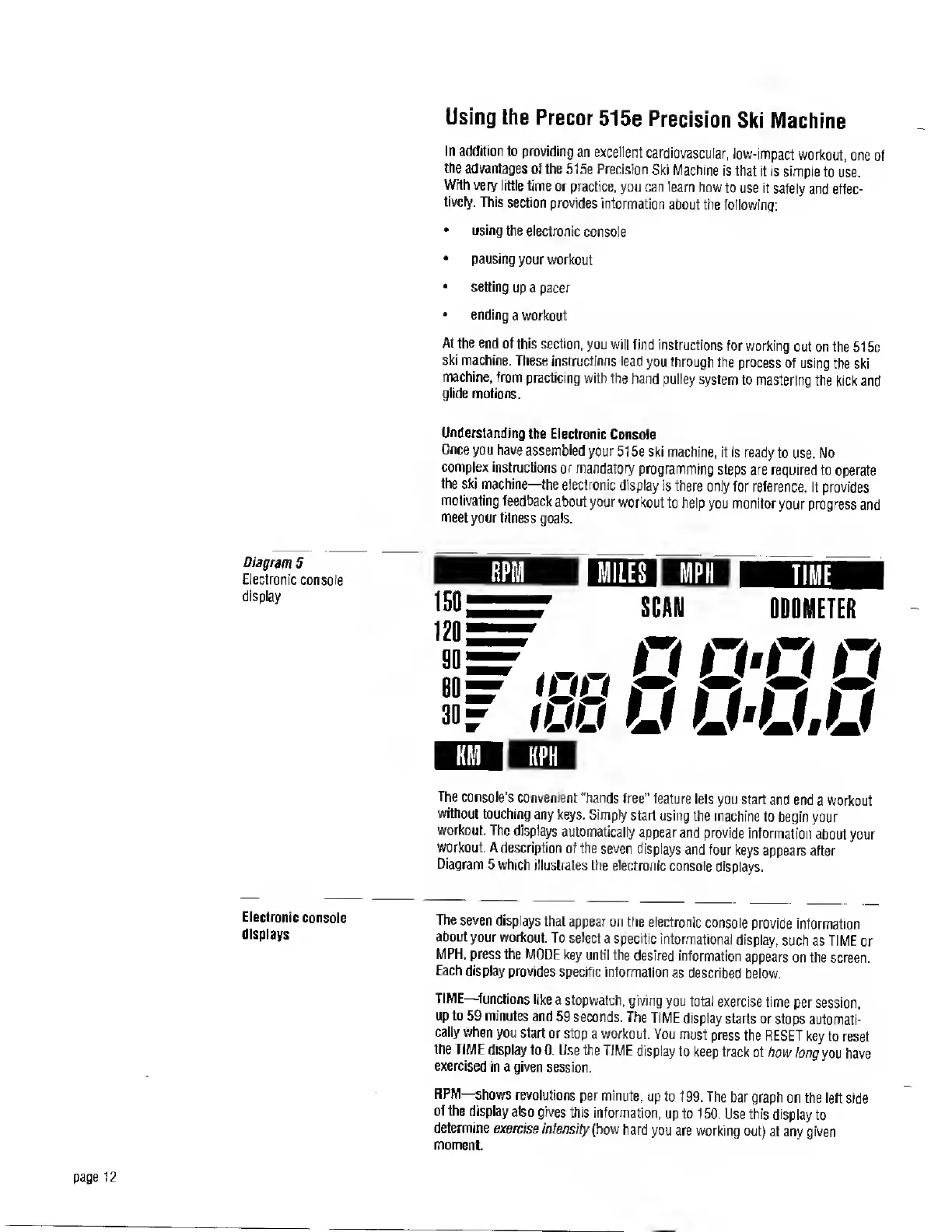
Diagram
5
Electronic
console
display
The
console’s
convenient
"hands
free"
feature
lets
you
start
and
end
a
workout
without
touching
any
keys.
Simply
start
using
the
machine
to
begin
your
workout.
The
displays
automatically
appearand
provide
information
about
your
workout.
A
description
of
the
seven
displays
and
four
keys
appears
after
Diagram
5
which
illustrates
the
electronic
console
displays.
Electronic
console
displays
The
seven
displays
that
appear
on
the
electronic
console
provide
information
about
your
workout.
To
select
a
specific
informational
display,
such
as
TIME
or
MPH,
press
the
MODE
key
until
the
desired
information
appears
on
the
screen.
Each
display
provides
specific
information
as
described
below.
TIME—
functions
like
a
stopwatch,
giving
you
total
exercise
time
per
session,
up
to
59
minutes
and
59
seconds.
The
TIME
display
starts
or
stops
automati¬
cally
when
you
start
or
stop
a
workout.
You
must
press
the
RESET
key
to
reset
the
TIME
display
to
0.
Use
the
TIME
display
to
keep
track
of
how
long
you
have
exercised
in
a
given
session.
RPM—
shows
revolutions
per
minute,
up
to
199.
The
bar
graph
on
the
left
side
of
the
display
also
gives
this
information,
up
to
150.
Use
this
display
to
determine
exercise
intensity
(how
hard
you
are
working
out)
at
any
given
moment.

Related product manuals