EasyManua.ls Logo

Precor 515e - Page 8

Precor 515e
23 pages
Print Icon
To Next Page IconTo Next Page
To Previous Page IconTo Previous Page
Loading...
b.
Locate
the
cable
wire
inside
the
column
support.
c.
Gently
pull
the
cable
out
of
the
column
support
and
unwind
it.
d.
Position
the
upper
assembly
over
the
upright
support.
Note:
The
electronic
display
should
be
facing
forward
with
the
support
pad
toward
the
rear
of
the
unit.
e.
Feed
the
cable
down
into
the
upright
support
as
shown
in
Diagram
3
Check
to
make
sure
that
the
cable
is
near
the
base
because
you
will
need
to
access
it
from
the
base
of
the
upright
support
in
step
7.
f.
Carefully
slide
the
column
support
of
the
upper
assembly
onto
the
upright
support,
taking
care
not
to
pinch
the
cables.
Important:
Cables
pinched
or
otherwise
damaged
by
improper
installation
will
not
be
covered
by
the
warranty.
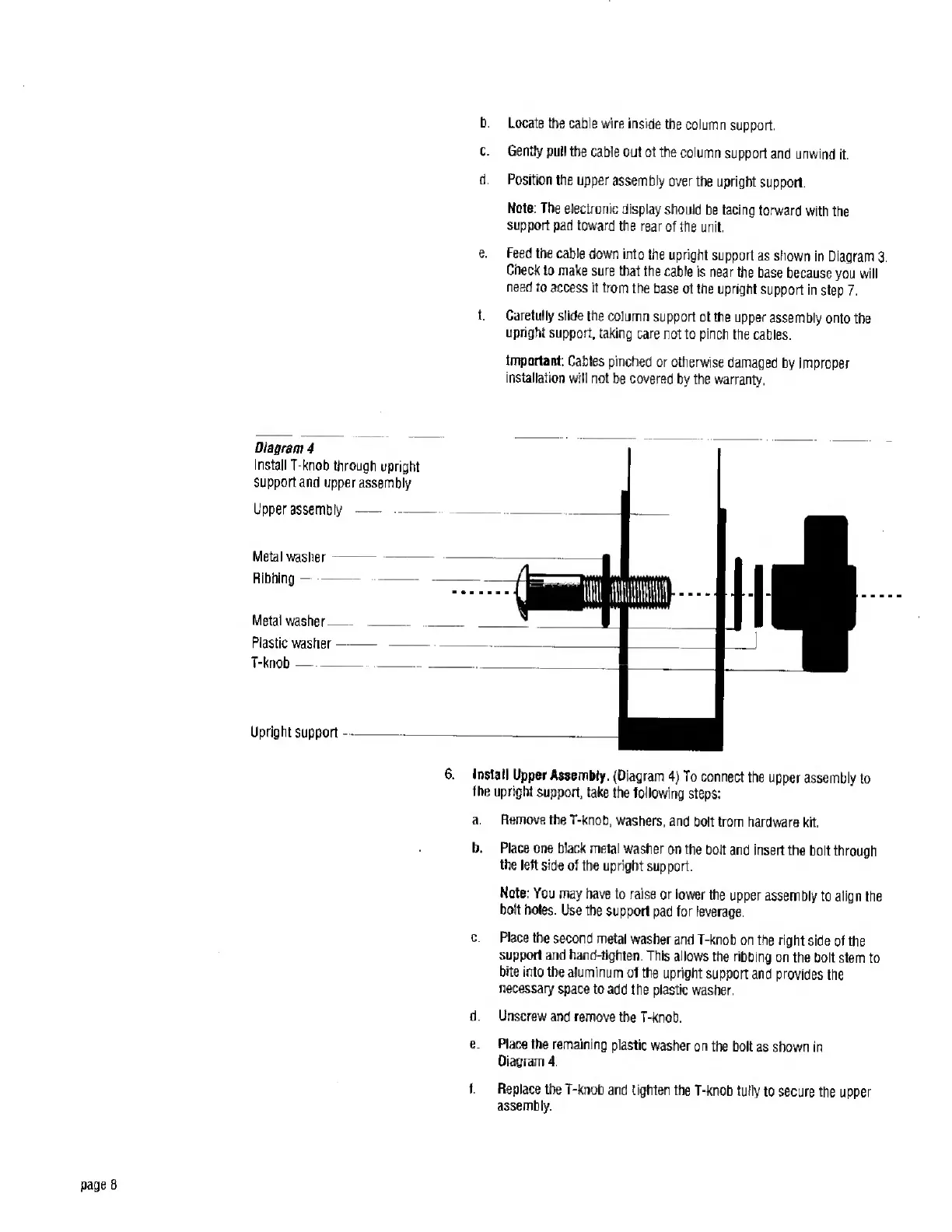
Diagram
4
Install
T-knob
through
upright
support
and
upper
assembly
Upper
assembly
Metal
washer
Ribbing-
Metal
washer-
Plastic
washer
T-knob
Upright
support
-
6.
Install
Upper
Assembly.
(Diagram
4)
To
connect
the
upper
assembly
to
the
upright
support,
take
the
following
steps:
a.
Remove
the
T-knob,
washers,
and
bolt
from
hardware
kit.
b.
Place
one
black
metal
washer
on
the
bolt
and
insert
the
bolt
through
the
left
side
of
the
upright
support.
Note:
You
may
have
to
raise
or
lower
the
upper
assembly
to
align
the
bolt
holes.
Use
the
support
pad
for
leverage.
c.
Place
the
second
metal
washer
and
T-knob
on
the
right
side
of
the
support
and
hand-tighten.
This
allows
the
ribbing
on
the
bolt
stem
to
bite
into
the
aluminum
of
the
upright
support
and
provides
the
necessary
space
to
add
the
plastic
washer.
d.
Unscrew
and
remove
the
T-knob.
e.
Place
the
remaining
plastic
washer
on
the
bolt
as
shown
in
Diagram
4.
f.
Replace
the
T-knob
and
tighten
the
T-knob
fully
to
secure
the
upper
assembly.

Related product manuals