MAX PRO 18
©
Operator Manual
Original Printed in English
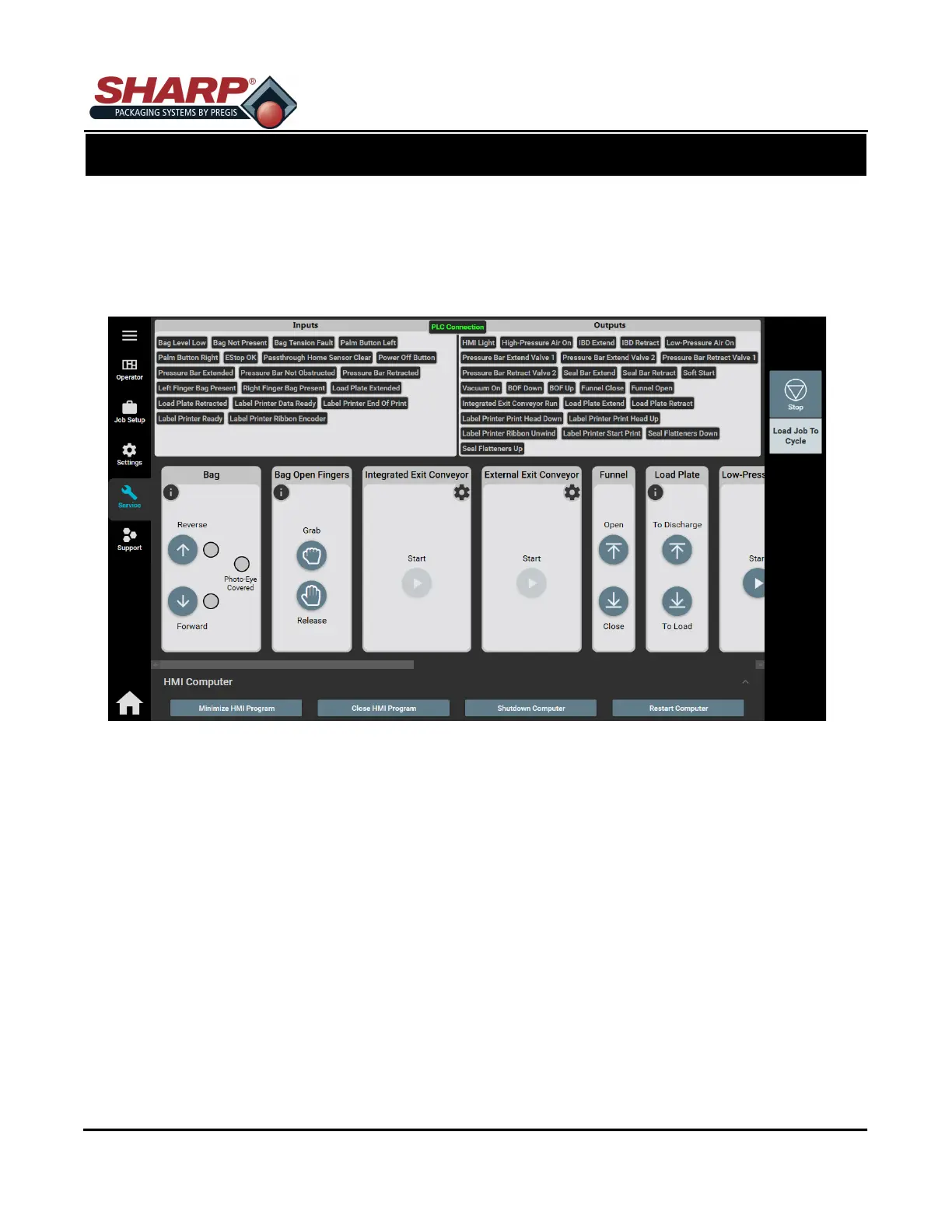
FIELD SERVICE BUTTON
Pressing the FIELD SERVICE button from the Home Screen opens the Service Screen. This screen display the
Inputs and Outputs that are active (Highlighted Green) on PLC. This screen allows a User to manually trigger
Bag Position, Bag Open Fingers, Integrated Exit Conveyor, Load Plate, Low-Pressure Air, High-Pressure Air,
Pass-Thru, Pressure Bar, Printer, Seal Bar, Seal Flatteners and Vacuum. Access to this screen is password pro-
tected.
HMI COMPUTER
Minimize HMI Program: This button will minimize the HMI program, but leaves Operating System open.
Close HMI Program: This button closes the HMI program.
Shutdown Computer: Closes the HMI program and shuts down the PC.
Restart Computer: Closes the HMI program and restarts the PC.
SCREEN NAVIGATION
SECTION 2 - CONTROLS
2-14



 To Next Page