MAX-PRO Operator Manual
Original Printed in English
MACHINE ADJUSTMENTS
SECTION 3 - SET-UP & OPERATION
3-3
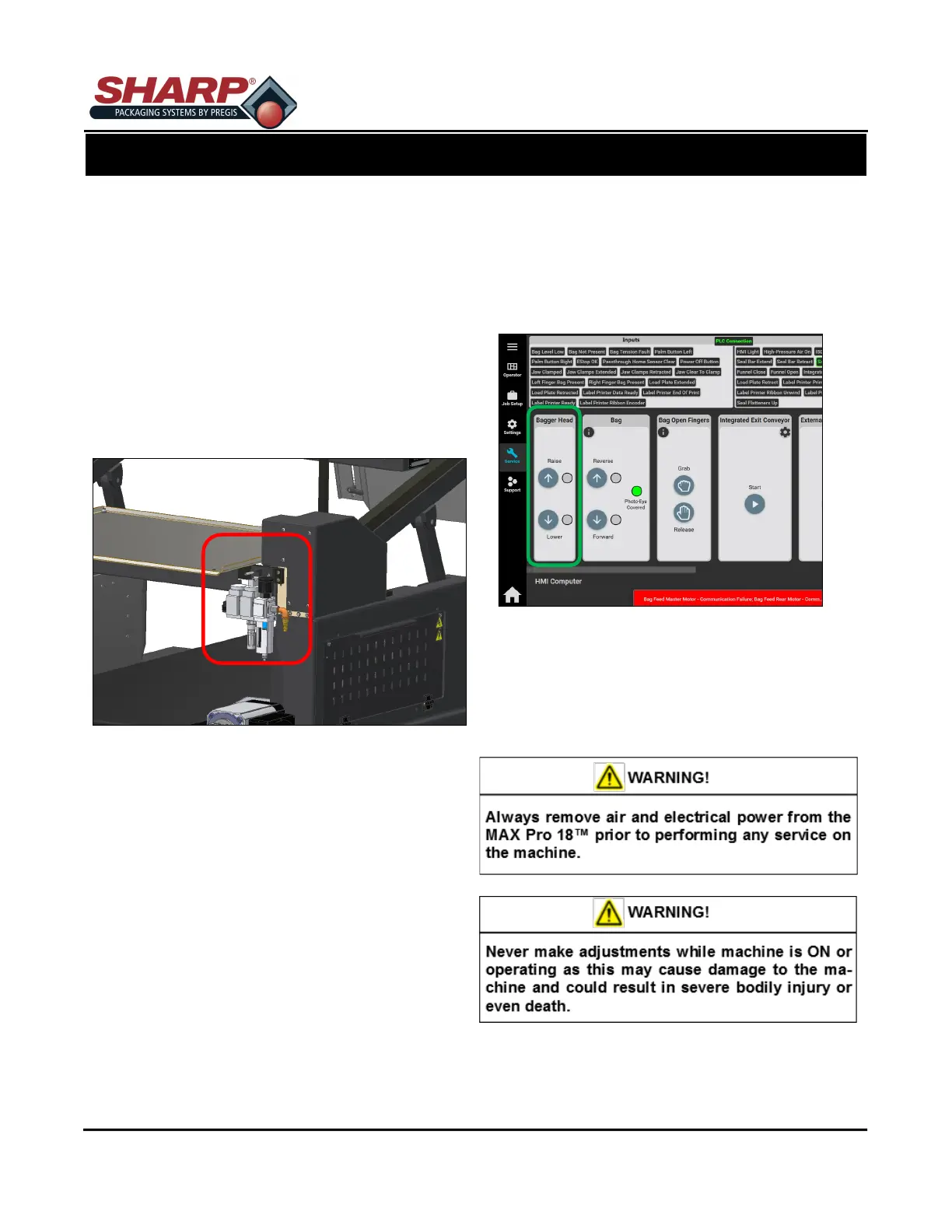
AIR SUPPLY
The Sharp MAX-PRO has a filter/regulator equipped
with a male end 1/4” nominal flow NPT air quick dis-
connect plug. The machine requires 100 PSI
(regulated to 80 PSI) of non-lubricated clean dry air at
5 SCFM. Connect the air supply line to the machine
using a MIL-C-4109E or equivalent disconnect cou-
pling.
NOTE: Do not use a lubricator or lubricated air on
the machine. Damage to valves and cylinders will
occur.
1. Connect Air Hose to Regulator.
2. Unlock Cap on Regulator
3. Adjust to 80 PSI.
4. Lock Cap on Regulator.
HEIGHT ADJUSTMENT
Machine height can be adjusted to allow manual load-
ing at a convenient height.
1. Navigate to Service Screen.
2. Locate the ‘Bagger Head’ window.
3. Adjust height to desired position. Head will remain
level.
HEAD ROTATION
Rotating the Head Assembly allows for easier access
the bottom of bagger.
NOTE: Make sure the cables and hoses are not
binding and are free from obstructions when Head
Assembly is being rotated.



 To Next Page