EasyManua.ls Logo

PRESONUS Quantum2626 - Page 25

PRESONUS Quantum2626
54 pages
Print Icon
To Next Page IconTo Next Page
To Previous Page IconTo Previous Page
Loading...
23
5
5.1
Aggregating Devices
macOS
Quantum 2626
Owner’sManual
Computer
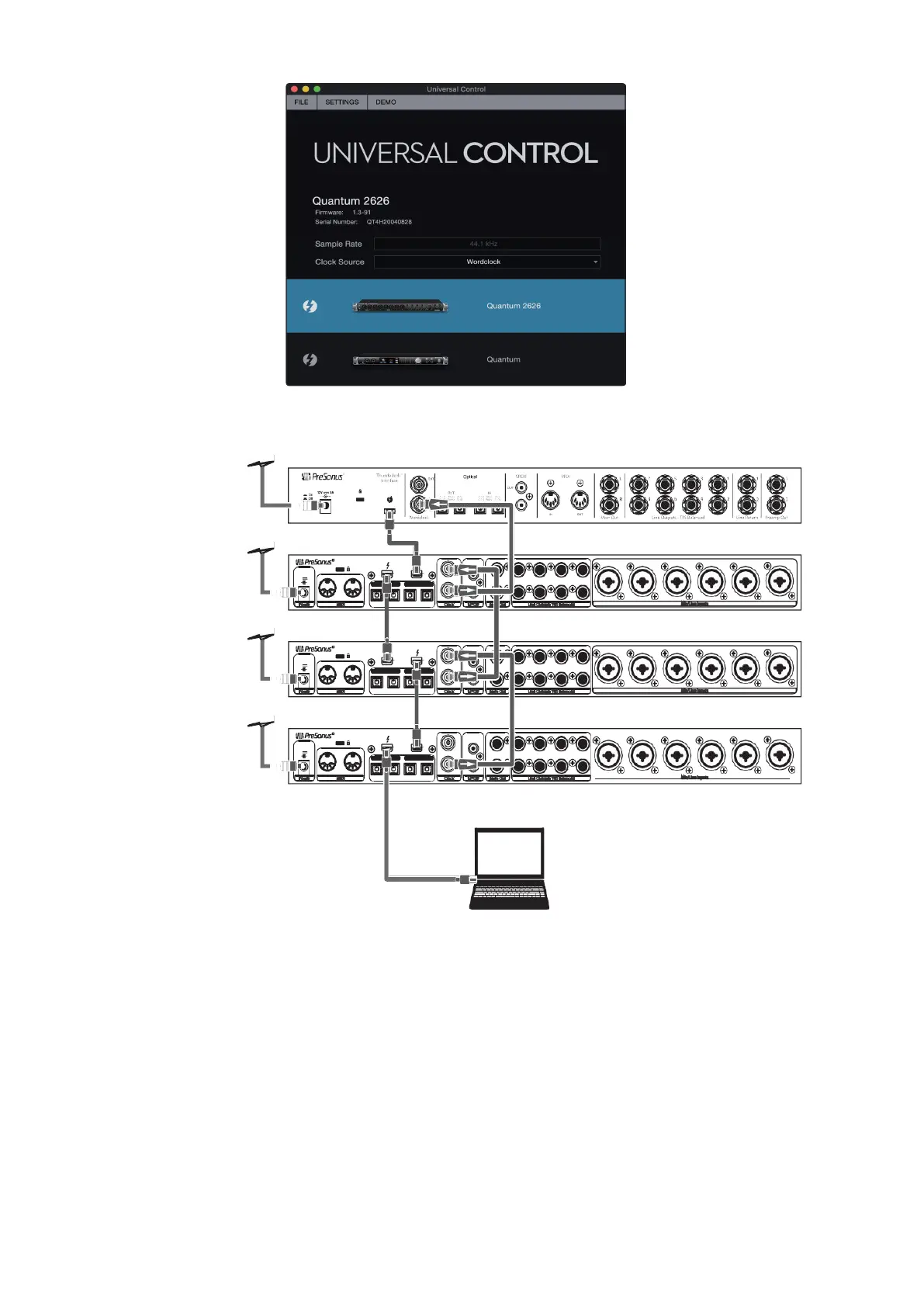
Your Quantum system is now ready to use. Note that if you’re only
aggregating two Quantum-series interfaces, and your Mac has two
Thunderbolt ports, you can simply connect both of your Quantum-
series interfaces directly to the Mac rather than connecting them to
each other.
现在你的
Quantum
系统可以使用了。请注,如果你只聚合两个
Quantum
系列接口,而你的
Mac
有两
Thunderbolt
端口,你可以
单地将两
Quantum
系列接口直接连接
Mac
上,而不是将它们
相互连接
Quantum 2626 (Secondary)
Quantum #3(Secondary)
R
Q
UANTUM
OUT
IN
L
7 5
3 1
8
7
6
5
4
3
IN
12V 5A
IN
- +
OUT
25 -3 2 48 kH z 17 -2 4 19 -2 6 48 kH z 11-1 8
OUT IN
OUT
R
8 6
4 2
Power
MIDI
21-24 96kH z 17-2 0 15-18 96kHz 11-1 4

Clock
S/PDIF Main Out
Line OutputsTRS Balanced
Quantum #2(Secondary)
R
Q
UANTUM
IN
L
7 5
3 1
8
7
6
5
4
3
IN
12V 5A
IN
- +
OUT
OUT
25 -3 2 48 kH z 17 -2 4 19 -2 6 48 kH z 11-1 8
OUT
R
8 6
4 2
OUT
IN
Power
MIDI
21-24 96kH z 17-2 0 15-18 96kHz 11-1 4

Clock
S/PDIF Main Out
Line OutputsTRS Balanced
Quantum #1 (Primary)
R
Q
UANTUM
IN
L
7 5
3 1
8
7
6
5
4
3
IN
12V 5A
IN
- +
OUT
OUT
25 -3 2 48 kH z 17 -2 4 19 -2 6 48 kH z 11-1 8
OUT IN
OUT
R
8 6
4 2
Power
MIDI
21-24 96kH z 17-2 0 15-18 96kHz 11-1 4

Clock
S/PDIF Main Out
Line OutputsTRS Balanced
Mic/Line Inputs
Mic/Line Inputs
Mic/Line Inputs

Related product manuals