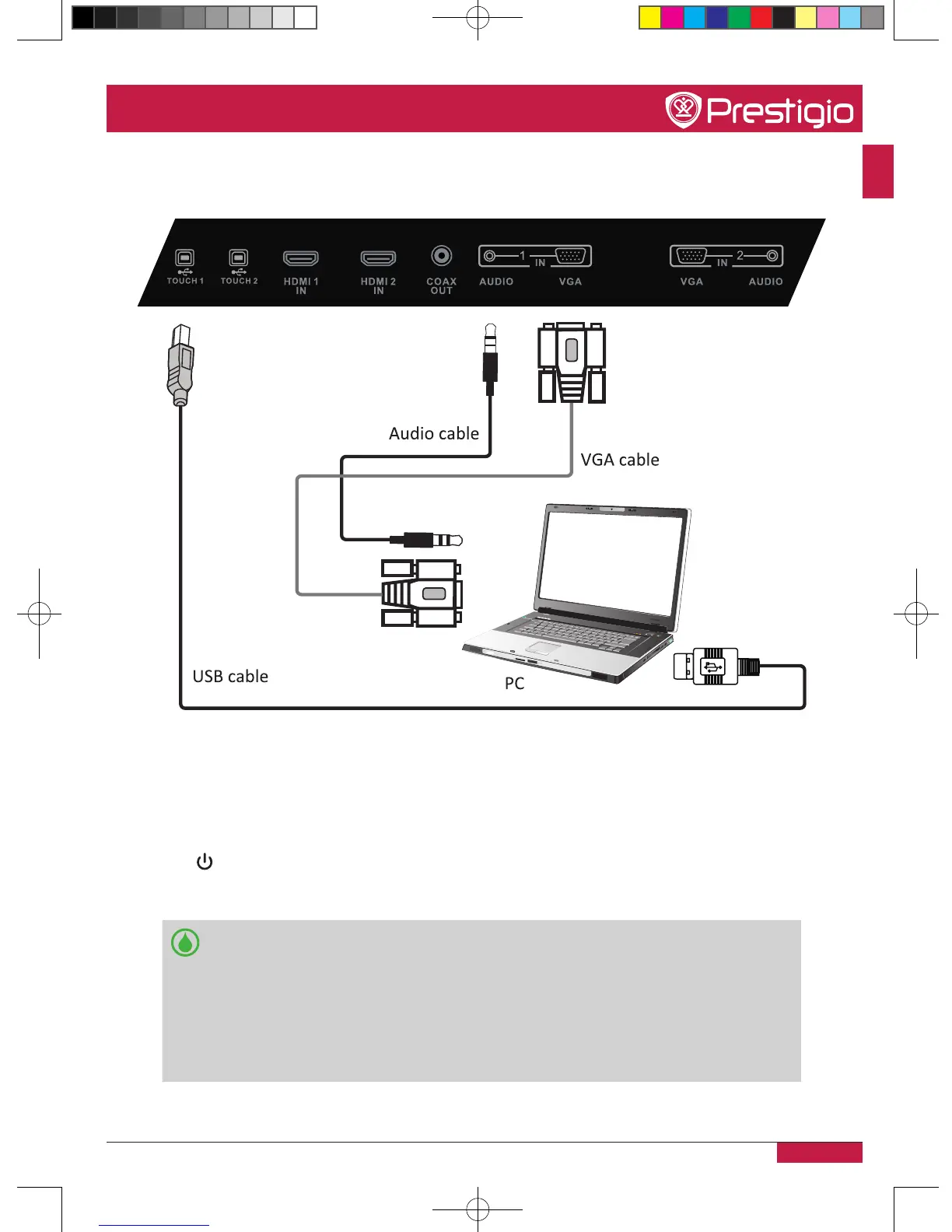
Connected with an external computer
1� Connect a VGA cable (15pin) between the VGA and external PC� Connect an audio cable
between the PC and audio at the same time�
2� Connect a USB cable between the external PC and USB terminal�
3� Plug the POWER cord and switch it on from the rear panel�
4� Start-up the external computer (Setup the touch driver)�
5� Press to turn the power on�
6� Press INPUT switch to PC source�
•The best resolution of external computer input is 1920*1080�
•The unit can connect with the external PC via HDMI�
•Suggest Configuration of computer:
- 2�0GHZ Processor, 1GB Memory/More than 256 color display card
- 1GB Available Hard Drive
- VGA-OUT/HDMI-OUT, Audio-OUT, USB Interface
- Support Resolution 800*600,1024*768
PMB554H847,707,657_QSG_ EN_no TV.indd 17 2013/10/15 14:29:04



 To Next Page