
 Need help?
Do you have a question about the Primera AP362 and is the answer not in the manual?
Procedure for applying a single label to a container using the applicator.
Instructions for applying two labels to the same container on AP362 models.
Formula and method to calculate the correct distance between two labels.
How to use the label counting feature on the AP362 model.
How to switch between metric and imperial units for measurements.
How to set the container roller motor to run after or stop after applying a label.
Solutions for problems like crooked labels, motor stalling, and small containers.
Routine maintenance tasks including cleaning sensors and lubricating bearings.
The Primera AP360/AP362 Label Applicator is a versatile device designed for applying labels to various containers such as bottles, cans, and jars. This manual covers two models: the AP360 and the AP362. The primary distinction is that the AP362 includes a Control Panel, enabling users to count labels and apply two labels to the same container, features not available on the AP360.
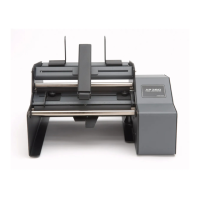
The Label Applicator automates the process of applying labels to cylindrical and many tapered containers. It is equipped with several key components that facilitate precise and efficient labeling. The Roll Bar and Roll Guides manage the label stock roll, ensuring it feeds smoothly. The Roll Drag Arm applies downward pressure on the inside of the label roll core, which helps prevent alignment issues as the roll diminishes. The Liner Idler Roller and Liner Drive Roller work in conjunction to feed the label stock, while the Peel Edge separates the label from its liner just before application.
For container handling, the device features Container Idler Rollers and Container Drive Rollers that rotate the container during labeling. A Container Pressure Arm can be used to hold containers against these rollers, though its use is optional depending on the container type and weight. Container Guides help position the container accurately relative to the label stock, ensuring consistent label placement. The Label Sensor Flag, positioned on the Label Sensor Bracket, detects the presence of labels, crucial for accurate feeding and application.
The AP362 model's Control Panel enhances its functionality by allowing users to count applied labels and to apply two labels to a single container. This two-label mode is particularly useful for products requiring front and back labels. The device can store up to nine different distances between two labels in its memory (F1-F9), making it easy to switch between various two-label configurations without constant readjustment. The distance values can be set in either inches or centimeters, with a range of 0.01 to 9.99 inches (0.25 mm to 253.7 mm) or 00.1 cm (1mm) to 25.4 cm, respectively.
Setting up the Label Applicator involves several steps. First, the Roll Bar, Roll Guides, and Roll Drag Arm need to be assembled. The Roll Guides and Roll Drag Arm are magnetically held in place and are adjustable. The label stock roll is placed on the Roll Bar, with the loose end feeding underneath the roll. It's important to ensure the Roll Guide Uprights do not pinch the label stock roll, allowing for free-play. The Roll Drag Arm's rounded tip should be centered inside the label roll core to maintain consistent downward pressure.
Once the label stock is positioned, the loose end is fed into the Feed Area from the back of the applicator, emerging just underneath the Peel Edge. Approximately 12 inches of label stock should be pulled out beyond the Peel Edge. The stock is then fed between the Liner Idler Roller and the Liner Drive Roller. For this step, the Liner Idler Roller should be in the unclamped position. After feeding, the label stock is adjusted so the Peel Edge is between two labels, and the Liner Idler Roller is pushed into the clamped position. The Label Sensor Flag should also be roughly centered on the label stock.
Loading the container involves lifting the Container Pressure Arm to a height above the container. The Container Idler Roller has four optional positions, provided by notches in the side plates, allowing adjustment for different container diameters. Smaller diameter containers require the rollers to be positioned closer together to ensure proper label application. The container is then placed on the Container Idler Roller and Container Drive Roller, oriented according to the label's design. Container Guides are adjusted to achieve the desired label placement, and secured with Thumb Screws. For containers with a neck, such as wine or soda bottles, only one Container Guide should be used, moved to the far side of the labeling area. For non-tapered containers, both guides can be utilized. The Container Pressure Arm is then adjusted to apply sufficient downward pressure on the container, especially important for smaller, lighter items.
To apply labels, the unit is powered on, and the container is placed on the rollers. Pressing the Foot Switch initiates the labeling process. For the AP362, the two-label mode allows for applying two labels with a single press of the Foot Switch. The distance between these two labels can be configured via the Control Panel. The unit also features a label counter on the AP362, which displays the number of labels applied and can be reset by holding the Recall/Reset Button for five seconds. The AP362 can switch between metric and English units of measure by holding specific buttons during power-on. Additionally, the container roller motor can be set to either "Run After Apply" (default, for increased speed) or "Stop After Apply" (for precise label placement).
Regular maintenance helps ensure the longevity and optimal performance of the Label Applicator. One common issue is label edges folding over or catching on the sensor. This can be caused by adhesive buildup on the sensor flag. Periodically cleaning the top of the sensor with a Q-tip and alcohol is recommended. It's also important to ensure the sensor is positioned in the middle of the label stock.
When the device is not in use, leaving the Liner Idler Roller in the unclamped position is advised. This prevents permanent indentations from forming on the Liner Drive Roller, which could affect label feeding over time.
Lubrication of bearings is another important maintenance task for heavy users. Primera recommends oiling the four bearings associated with the Liner Drive Roller and Liner Idler Roller after every 50,000 containers labeled. These bearings are factory-lubricated with special grease, so initial oiling is only necessary after significant use. One drop of machine oil or motor oil per bearing is sufficient. This optional maintenance can extend the life of the applicators for users who operate the device for several hours daily.
Troubleshooting common issues is also covered. If labels are applied crooked, checking for container taper and adjusting the container idler roller angle can help. Ensuring the Roll Guides are positioned close to the roll without pinching it, and allowing the label stock to "settle-in" over several labels, can also improve alignment. For heavier rolls, proper positioning on the Roll Guides with magnetic portions facing in is crucial. For lighter rolls, the Roll Drag Arm must be in place.
For motor stalling with wider labels (6" or 15.3 cm and wider), the AP360/AP362 has a half-speed mode that provides more power. This mode is activated by holding down the Foot Switch while switching on the unit and reverts to default speed when switched on without holding the Foot Switch. If the unit is running slow, ensure the foot switch is not depressed during boot-up.
For small diameter containers that get pushed off the rollers, manually adding pressure to the arm during application can prevent this. If bubbles or wrinkles appear on labels, it may be due to the container not being perfectly round or smooth. In such cases, smoothing the labels by hand as the container rotates, without using the container pressure arm, can help achieve a smoother application.
 General
| Connectivity | USB, Ethernet |
|---|---|
| Media Types | Labels, Tags |
| Label Gap | 0.125" (3mm) |
| Power | 100-240V, 50/60Hz |
| Supported Label Materials | Paper, Polyester, Polypropylene |
| Label Sensor | Adjustable gap and black mark sensing |

 To Next Page










