EasyManua.ls Logo

Prince Castle EHB34A - User Manual

Prince Castle EHB34A
24 pages
Print Icon
To Next Page IconTo Next Page
Loading...
Operation
Manual
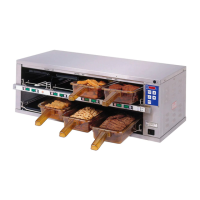
Extend Holding Bin
EHB Series
LIMITED WARRANTY
This product is warranted to be free from defects in material and/or workmanship
for a period of 3 years (repair parts) and 2 years (service labor) from date of origi-
nal installation, not to exceed 30 months from the date of manufacture.
Any component which proves to be faulty in material and/or workmanship will be
replaced or repaired (at the option of Prince Castle LLC) without cost to the cus-
tomer for parts and labor. This warranty covers on location service (i.e. trip charges
and or mileage). Travel mileage is limited to 100 miles (200 Kilometers) round trip
(one trip warranty) from an authorized service agency or its sub-service agency.
This warranty is subject to the following exceptions/conditions:
• Use of any non-genuine Prince Castle parts voids this warranty.
• All labor to be performed during regular work hours. Overtime premium
(the incremental amount) will be charged to the customer.
• Damage caused by carelessness, neglect and/or abuse
(e.g., dropping, tampering or altering parts, equipment damaged in shipment,
by fire, flood or an act of nature) is not covered under this warranty.
• All problems due to operation at voltages other than that specified on equipment
nameplates are not covered by this warranty. Conversion to correct voltage is the
customer’s responsibility.
• This equipment must be serviced by Prince Castle Authorized Service Agency
or a Prince Castle Service Technician during the warranty period.
Note: When connected to the Kitchen Minder, the Transfer and Menu
functions are disabled on the button bar.
355 EAST KEHOE BLVD. ~ CAROL STREAM, IL, 60188, USA
PHONE: 630-462-8800 ~ TOLL FREE: 1-800-PCASTLE
FAX 630-462-1460 ~ WWW.PRINCECASTLE.COM
TABLE OF CONTENTS
Model Identification . . . . . . . . . . . . . . . . . . . . . . . . . . . . . . . . . . . . . . 2
Model Specifications . . . . . . . . . . . . . . . . . . . . . . . . . . . . . . . . . . . . .2
Safety Information . . . . . . . . . . . . . . . . . . . . . . .. . . . . . . . . . . . . . . . .2
Configurations . . . . . . . . . . . . . . . . . . . . . . . . . .. . . . . . . . . . . . . . . . .3
Product Identification . . . . . . . . . . . . . . . . . . . . . . . . . . . . . . . . . . . . .4
Installation . . . . . . . . . . . . . . . . . . . . . . . . . . . . . . . . . . . . . . . . . . . . .4
Operation . . . . . . . . . . . . . . . . . . . . . . . . . . . . . . . . . . . . . . . . . . . . . .5
Standalone Mode. . . . . . . . . . . . . . . . . . . . . . . . . . . . . . . . . . . . . .6
Setting Product Location (Standalone Mode) . . . . . . . . . . . . . . . . . .7
Cleaning . . . . . . . . . . . . . . . . . . . . . . . . . . . . . . . . . . . . . . . . . . . . . . 7
Setting the Temperature . . . . . . . . . . . . . . . . . . . . . . . . . . . . . . . . . . 8
Calibrating the Heaters . . . . . . . . . . . . . . . . . . . . . . . . . . . . . . . . . . . 9
Changing the Hold and Cook More Times . . . . . . . . . . . . . . . . . . . .10
Changing Product Names . . . . . . . . . . . . . . . . . . . . . . . . . . . . . . . . .11
Changing Temperature Scale . . . . . . . . . . . . . . . . . . . . . . . . . . . . . .12
Adjusting Alarm Volume. . . . . . . . . . . . . . . . . . . . . . . . . . . . . . . . . . 12
Default Menu . . . . . . . . . . . . . . . . . . . . . . . . . . . . . . . . . . . . . . . . . . 13
Zone Layouts . . . . . . . . . . . . . . . . . . . . . . . . . . . . . . . . . . . . . . . . . ..13
Troubleshooting . . . . . . . . . . . . . . . . . . . . . . . . . . . . . . . . . . . . . . . . 14
Diagnostics . . . . . . . . . . . . . . . . . . . . . . . . . . . . . . . . . . . . . . . . . . . 15
Wiring Diagrams . . . . . . . . . . . . . . . . . . . . . . . . . . . . . . . . . . . . . . . .16-17
Exploded Views . . . . . . . . . . . . . . . . . . . . . . . . . . . . . . . . . . . . . . . ..18
540-537revG-EN 1 Printed in USA 04/16 © 2016
ATTENTION: Read the instructions before using the machine.

Other manuals for Prince Castle EHB34A

Questions and Answers

  • D
    Dr. Jacob WoodsAug 16, 2025
    How to troubleshoot no power issue in Prince Castle EHB34A Commercial Food Equipment?
    • P
      Paul LewisAug 16, 2025
      If your Prince Castle Commercial Food Equipment has no power, first ensure the power switch is in the ON position. Also, check that the power cord is properly connected to a working receptacle. The power switch may simply be off, or the power cord might not be correctly plugged in.
  • S
    savannahhernandezAug 19, 2025
    Why Prince Castle EHB34A is not heating up?
    • X
      xmeyerAug 19, 2025
      If your Prince Castle Commercial Food Equipment isn't heating up, begin by inspecting all wiring connections. Verify the outlet's voltage and amperage, ensuring it matches the required 208-240 VAC, 20 A. If the voltage is correct, consider replacing the power cord. It is possible that there is a loose connection on the power switch or heater, or that the power cord is wrong.
  • J
    Jamie PattersonAug 22, 2025
    What to do if Prince Castle EHB34A Commercial Food Equipment heats up but timer bars do not work?
    • K
      Katrina GloverAug 22, 2025
      If the unit heats up, but the timer bars on your Prince Castle Commercial Food Equipment aren't working, check the timer bar wiring connection. If the wiring is properly connected, the timer bars may be defective and need replacement.
  • J
    John KennedyAug 25, 2025
    What does it mean when Prince Castle EHB34A display flashes OPN and REL?
    • D
      David ColeAug 26, 2025
      If the display on your Prince Castle Commercial Food Equipment flashes 'OPN' and 'REL', test the heater resistance to isolate any malfunctioning heater(s). If necessary, replace the heater(s); otherwise, the PCB may need replacement. This issue is caused by an open relay, circuit, or an inoperable heater.
  • R
    rodney35Aug 28, 2025
    Why Prince Castle Commercial Food Equipment display flashes SHR and REL?
    • R
      Robert SmallAug 28, 2025
      If the display on your Prince Castle Commercial Food Equipment flashes 'SHR' and 'REL', test the heater resistance to isolate any malfunctioning heater(s). Replace the heater(s), replace the ribbon cable; otherwise replace PCB. This can happen due to a shorted relay, inoperable circuit, open heater, or an unplugged ribbon cable.
  • J
    Jennifer WalkerAug 31, 2025
    What does HHH mean on Prince Castle EHB34A display?
    • M
      michael36Aug 31, 2025
      If the display on your Prince Castle Commercial Food Equipment shows 'HHH' for an extended period and the heater surface temperature is hot, replace the PCB. This indicates abnormal operation where the temperature is above 300 °F (149 °C), and the diagnostic circuit is inoperable.
  • E
    Eric JohnsonSep 3, 2025
    What does HOLD mean on Prince Castle Commercial Food Equipment display?
    • A
      Andrea CombsSep 3, 2025
      If the display on your Prince Castle Commercial Food Equipment shows 'HOLD', wait until the message disappears. The 'HOLD' message on a 3X4 Bin display board means the 2 PC boards in the bin are communicating, which happens when the operator changes the bin address or during calibration.
  • D
    Douglas ThomasSep 6, 2025
    What does WAIT mean on Prince Castle EHB34A display?
    • G
      Gregory RossSep 6, 2025
      If your Prince Castle Commercial Food Equipment display shows 'WAIT', allow the process to complete. The 'WAIT' message appears in stand-alone mode when the operator changes the product profile.
  • M
    Mrs. Melissa Fuller DDSSep 9, 2025
    What does INIT mean on Prince Castle EHB34A Commercial Food Equipment display?
    • S
      Shelia PetersonSep 9, 2025
      If the display on your Prince Castle Commercial Food Equipment shows 'INIT', wait for the message to disappear. This message appears when switching from Kitchen Minder to stand-alone mode, indicating that the bin is learning Kitchen Minder menus.
  • K
    Kathleen LeeSep 12, 2025
    Why Prince Castle Commercial Food Equipment has no power?
    • R
      Robert MckenzieSep 12, 2025
      If your Prince Castle Commercial Food Equipment has no power, it could be due to the power switch being turned off or the power cord not being properly plugged in. To resolve this, turn the power switch to the ON position and ensure the power cord is securely connected to the correct receptacle.

Summary

Model Identification

Safety Information

Provides essential safety warnings and cautions for operating the unit.

Product Identification

Installation

Step-by-step guide for unpacking, inspecting, and connecting the unit.

Operation

Standalone Mode

Setting Product Location (Standalone Mode)

Setting the Temperature

Calibrating Heaters

Changing Hold and Cook-More Times

Changing Product Names

Changing Temperature Scale

Adjusting Alarm Volume

Troubleshooting

Diagnostics

Wiring Diagrams

Prince Castle EHB34A Specifications

General IconGeneral
BrandPrince Castle
ModelEHB34A
CategoryCommercial Food Equipment
LanguageEnglish

Related product manuals