The following settings are recommendations for your rst prints. Over time you can change
and modify them as you get more familiar with your printer as different 3D models often
require different settings for a more accurate and precise print. The reason for this is that your
3D printer is more like a tool than an appliance. Every 3D model is unique and often requires a
different “tool” to get the job done. So you will nd over time that certain settings work better
than others. It’s also worthy to note that the printers themselves often have their own
personalities and quirks as they have been assembled by hand. So expect to have small issues
here and there as time goes on. With that said, let’s get your software congured!
Note: The following screenshots are taken for both Mac and Windows. Be sure to complete all
of the settings elds to match exactly on your computer.
Congure Repetier Printer Settings
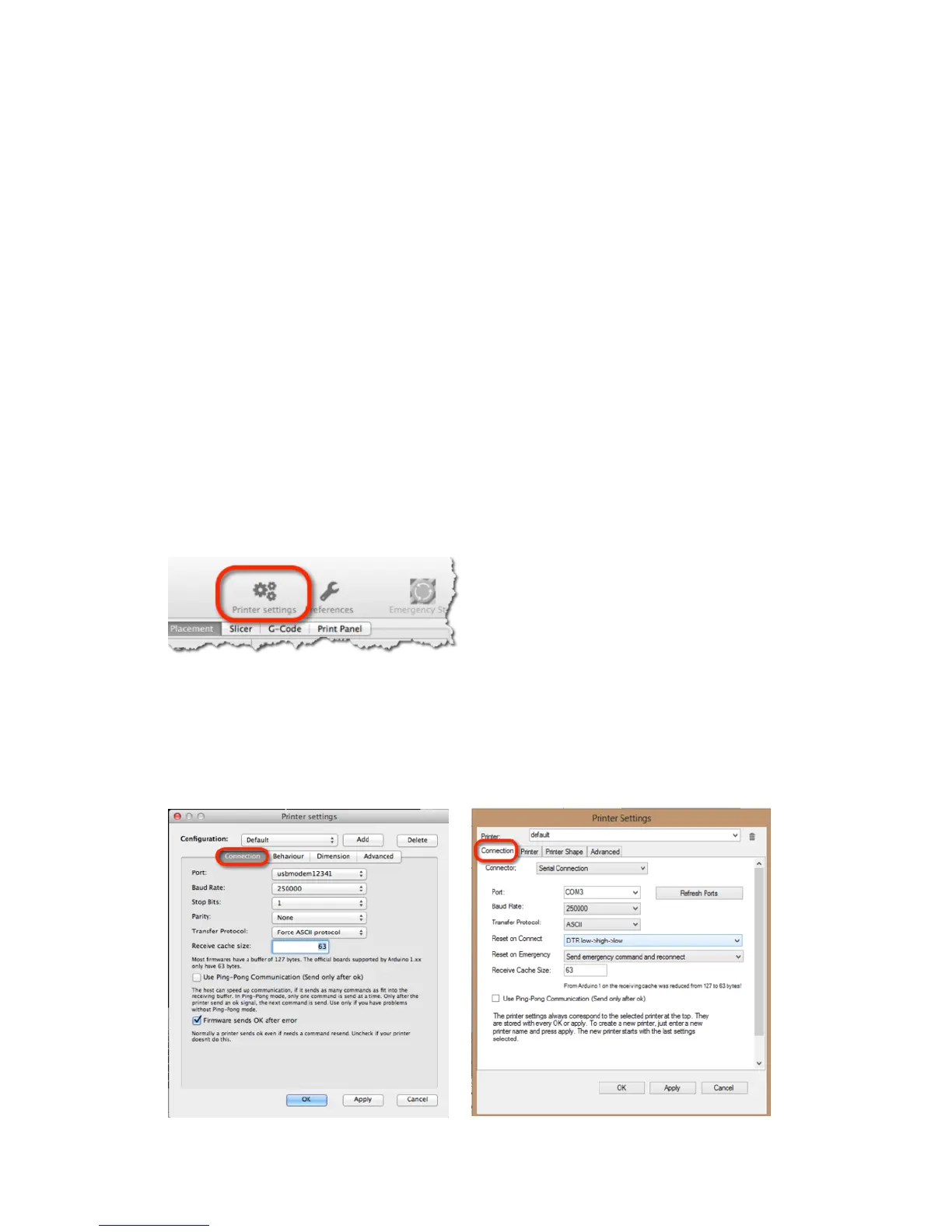
Open Repetier and click on Printer Settings at the top right for both Mac and Windows.
Connection
Select the port that matches your USB connection and set the Baud Rate to 250000. Click the
Add button and type “Simple” into the text eld that pops up. Change the cache size to 63 and
click Apply and then OK.
Mac Windows
9



 To Next Page