FS Reader – User & Service manual – 00.010 17
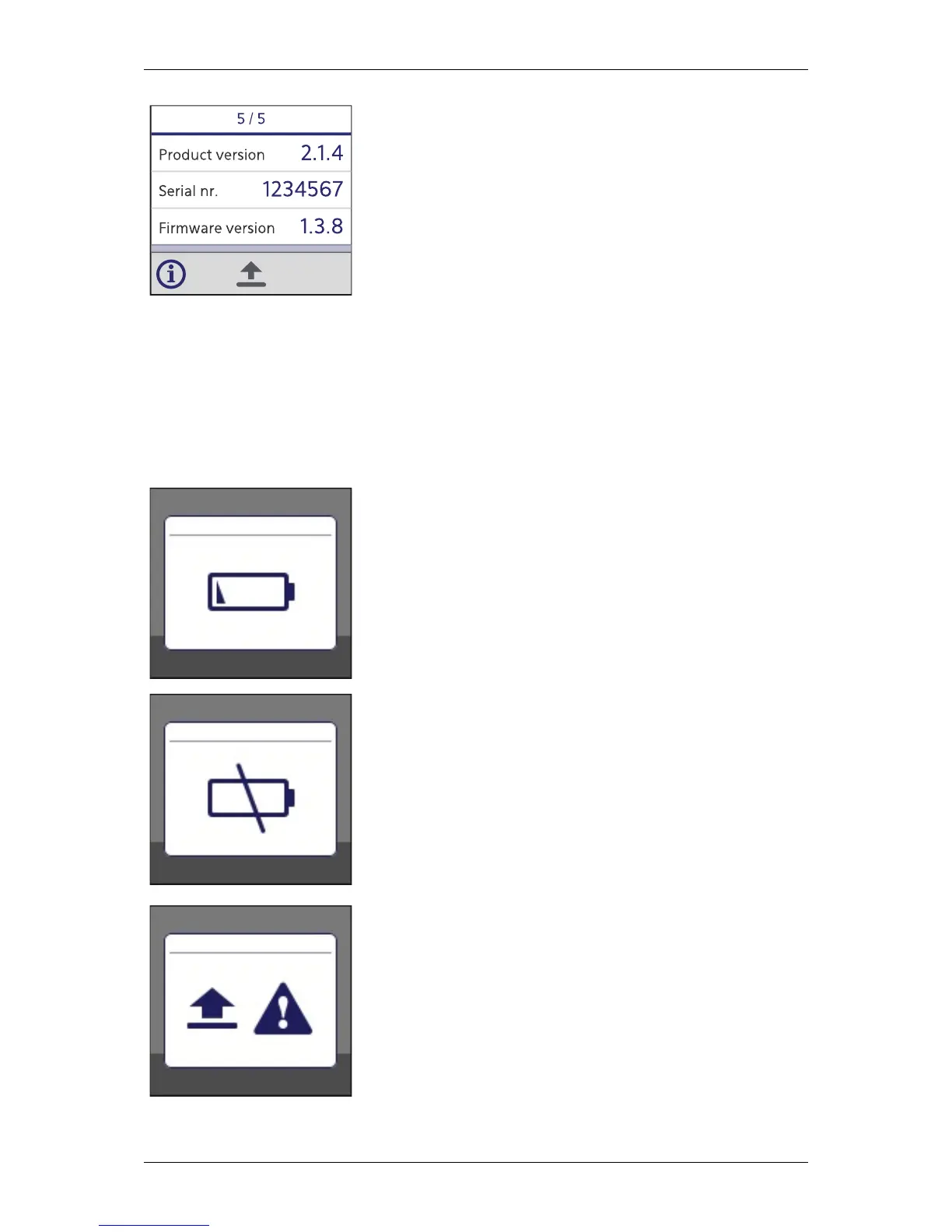
Product version:
Version of the electronics of the FS Reader.
Serial nr:
Serial number that identifies the FS Reader.
Firmware version:
Version of the firmware currently installed in the FS Reader.
Warning messages
The FS Reader can show several warning messages on the display; when these appear,
the FS Reader will also attract the attention of the user by generating two beeps with the
buzzer, shortly activating the vibration motor and blinking the led red continuously.
Battery Low
This icon is shown on the display when the battery capacity is
lower than 15% of its full capacity. The user is warned that the
FS Reader should be placed into the FS Cradle soon.
Under normal conditions, the FS Reader can be used for at least
one day from the moment this warning is shown for the first
time.
Battery Critically Low
This icon is shown on the display when the battery capacity is
lower than 10% of its full capacity. The user is warned that the
FS Reader should be placed into the FS Cradle immediately.
When the capacity is lower than 5%, the FS Reader switches
itself off and can only be activated again by placing it into the
FS Cradle. No data will be lost. The led will turn blue when a
Could not upload for a long time
The scans did not reach FS Performance server for more than
24 hours. It is advised to place the reader into the cradle and/or
check the data connection.


 To Next Page