Priva B.V.
8 FS Reader – User & Service manual – 00.010
Product description
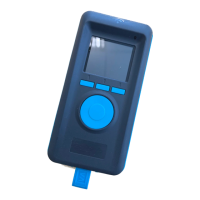
The FS Reader is a handheld device that is used for the registration of labour, as a part of
the labour and production registration system of Priva FS Performance.
Functions and intended use
The FS Reader is a device used for registrations done both in the greenhouse and pack-
house.
• It is a portable device that is carried with the greenhouse employee.
• In can also be used as a stationary registration device in the pack house. It is
then mounted or placed in a central place. Multiple employees use the same
device.
Most registrations are done through an RFID tag. Tags are used to register the employee,
activity, location and cart or container.
The FS Reader automatically transmits registration data when a wireless coverage is
available.
Installation
Labour managers are allowed to take the FS Reader into operation.
The FS Reader is packaged at production almost ready for use; the remaining steps to
make the FS Reader operational are:
1. First, register the FS Reader in the FS Reader software
1
; use the serial number of
the FS Reader that is printed on the sticker at the back side of the FS Reader.
2. Then, place the FS Reader in the FS Cradle, which triggers the FS Reader to:
a) Awake from its ‘transport mode’.
b) Pick up wireless communication that can be understood; this allows the
FS Reader to switch to the correct frequency that is used for the wireless
communication.
c) Switch to the ‘Linked’ status.
d) Synchronise the internal clock.
e) The latest firmware version will be loaded if this is different from the pre-
loaded firmware version in the FS Reader.
The FS Reader reports information about its status regularly to the server; this
can be inspected by means of the FS Reader Software.
3. Finally, leave the FS Reader in the FS Cradle to get its battery fully charged. The
led on the FS Reader turns blue when the battery is fully charged.
Troubleshooting
In case of problems, a message will be generated. This manual describes the problems
you might be able to resolve yourself.
1
For further instructions, please refer to the “FS Reader Software - User Manual”.


 To Next Page