EasyManua.ls Logo

Pro-face GP-3500L - Chapter 3 Replacement Procedure; Work Flow

Pro-face GP-3500L
49 pages
Print Icon
To Next Page IconTo Next Page
To Previous Page IconTo Previous Page
Loading...
Chapter 3 Replacement Procedure
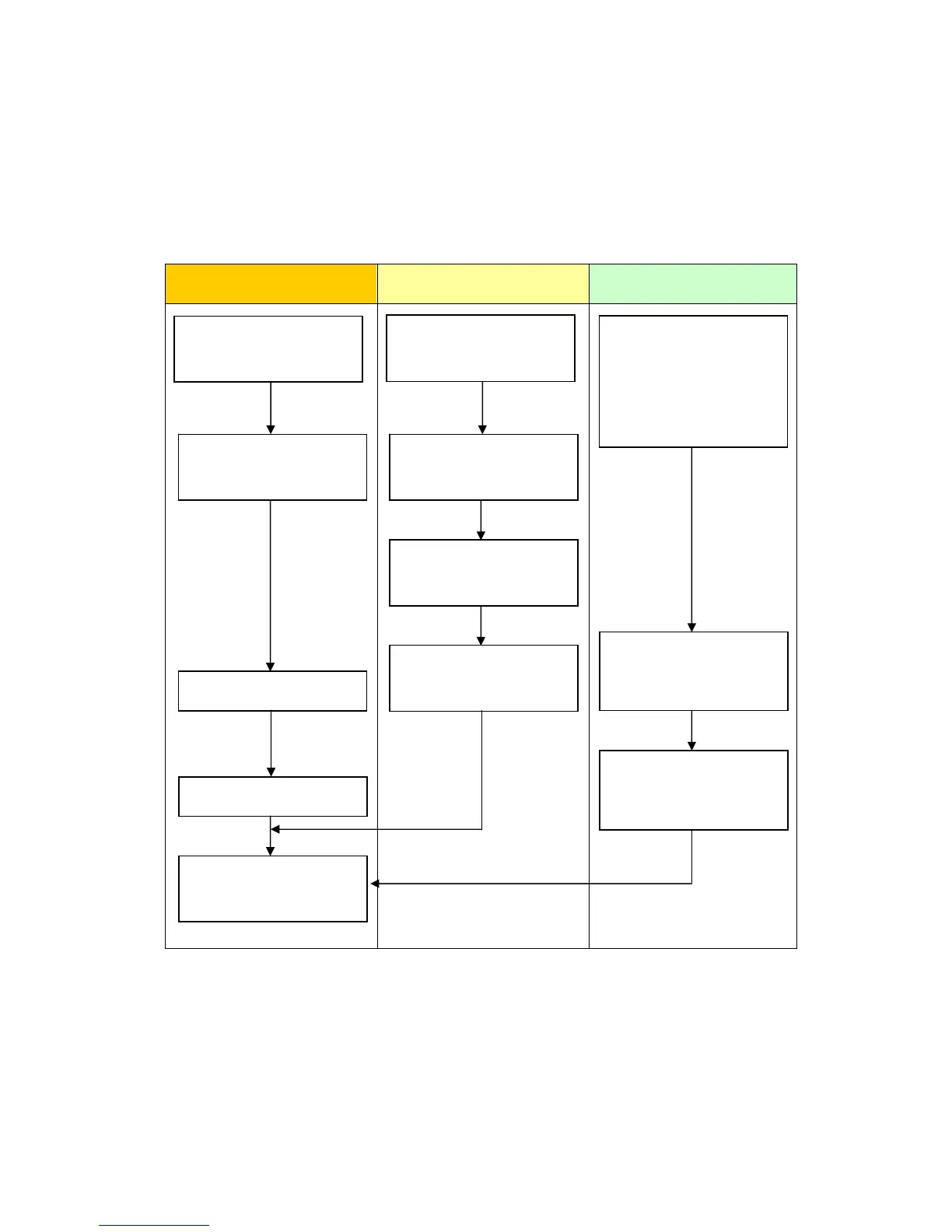
3.1 Work Flow
Installation Screen Communication
Check the compatibility of
hardware in Chapter 2.
Receive screen data from
GP/ST-3500 series. *1
Remove GP3000/ST3000
series.
Install GP-4501T/TW.
Connect the power cord.
Check the performance
and start operation.
Change the received data
on GP-Pro EX.
Check and modify the
data on GP-Pro EX.
Transfer the screen
data to GP-4501T/TW.
Check the connection
between GP-4501T/TW
and a PLC in the GP-Pro
EX Device/PLC
Connection Manual.
Connect GP-4501T/TW
and PLC with the PLC’s
cable.
Start connection and
check the communi-
cation.
*1: This step is required if screen data is saved only in the GP unit, not in any other device.
23/49

Other manuals for Pro-face GP-3500L

Related product manuals