(1) Connect your PC and the GP unit of GP-4501T/TW with a USB transfer cable. If the
driver of the cable has not been installed on you PC, a dialog box will appear.
Please follow the instructions.
NOTE
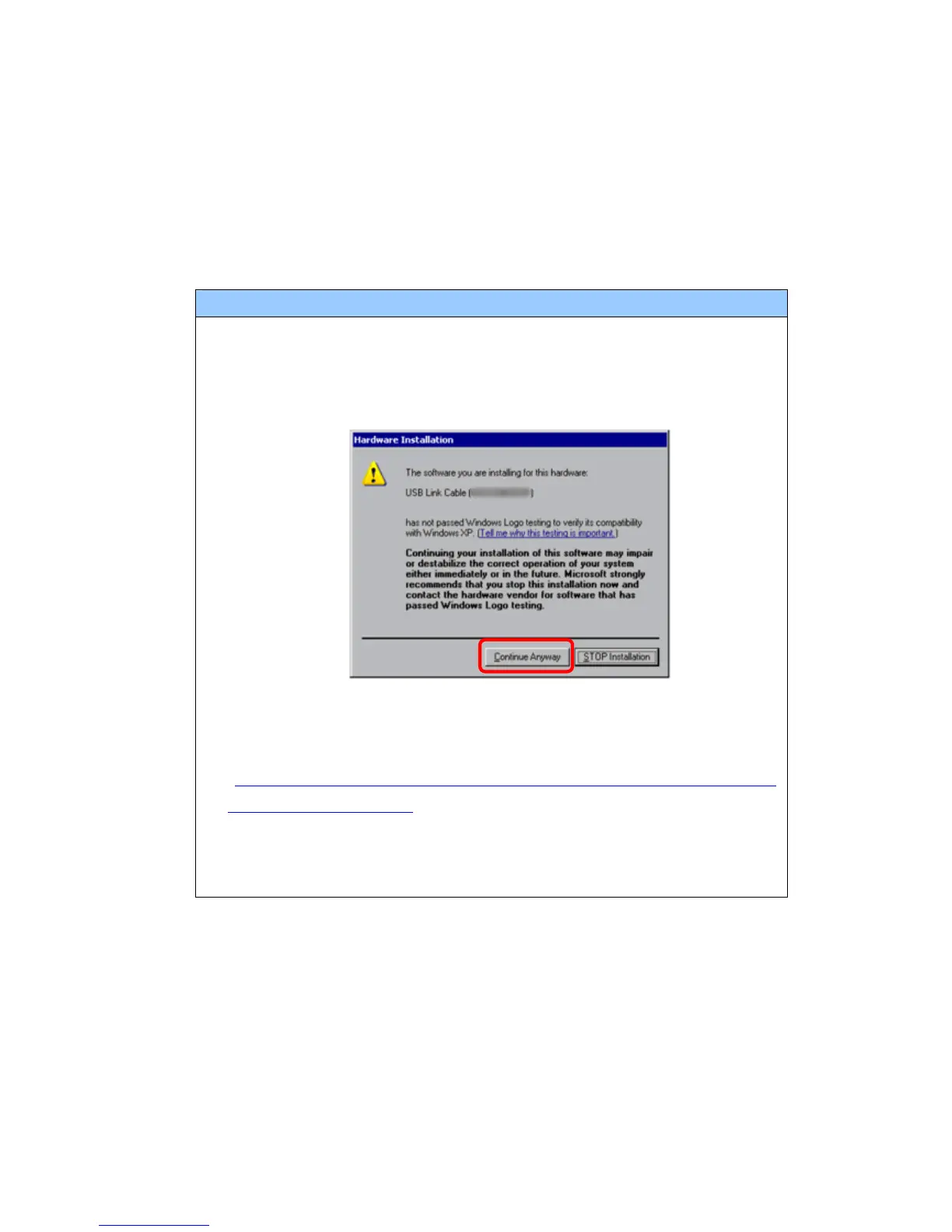
・ The “Hardware Installation” dialog box as shown below may appear during
installing the USB driver depending on the security level of Windows® XP.
Click [Continue Anyway] to start installing the driver. When installation is
completed, click [Finish].
・ If the following symptoms appear on Microsoft Windows® 7, go to updating
“USB Data Transfer Driver” on [OtasukePro!] for download
(http://www.pro-face.com/otasuke/download/update/proex/proex/v260/g
pproex_usb_transfer.htm).
- An error occurs when GP-Pro EX or Transfer Tool is installed
- An error occurs when data is transferred via a USB transfer cable
(model: CA3-USBCB-01).
32/49






 To Next Page