CAUTION:
Before operating the console, read the following precautions.
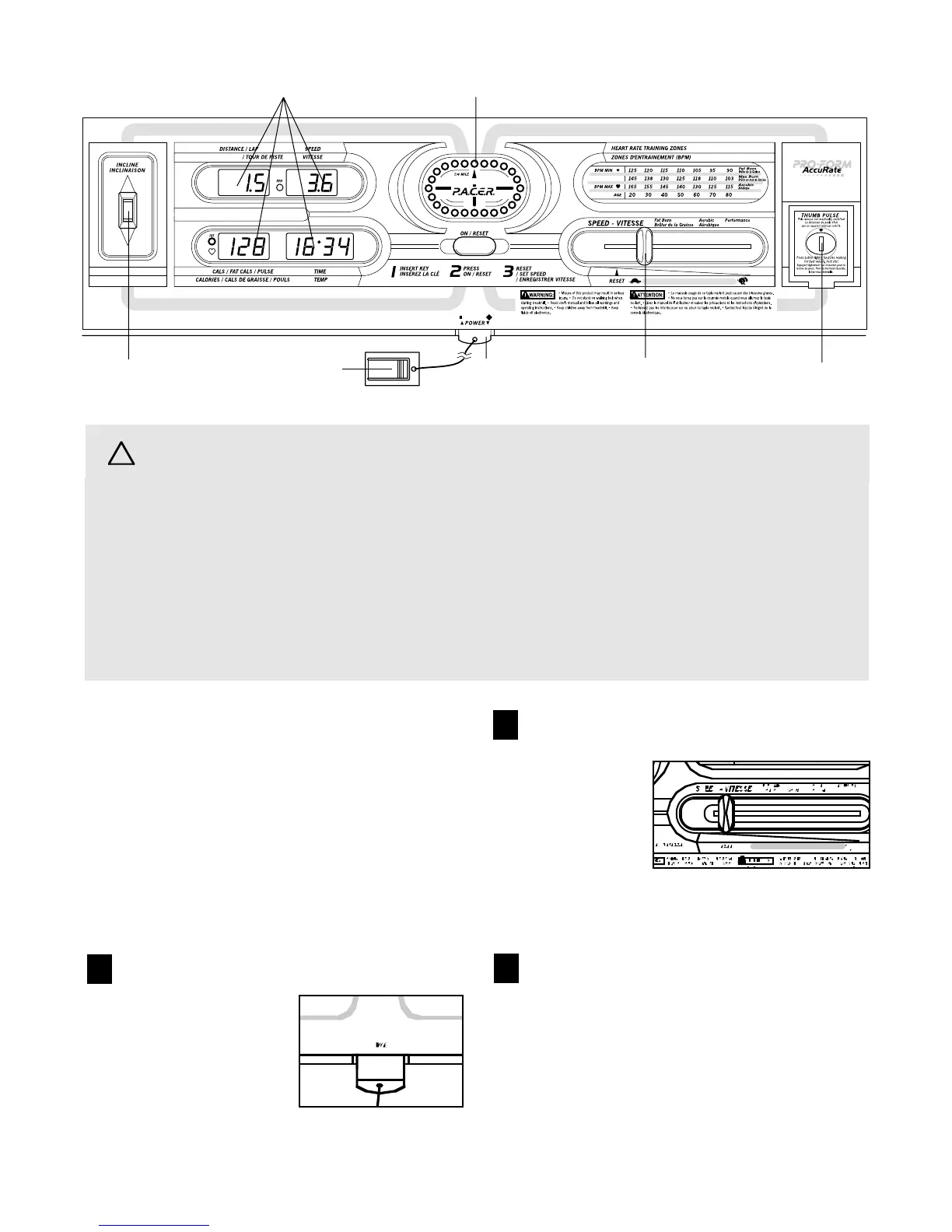
DIAGRAM OF THE CONSOLE
Pulse Sensor
Speed Control
Incline Control
Clip
Key
Monitor Displays
LED Track
8
• Do not stand on the walking belt when turning
on the power.
• Always wear the clip (see the drawing above)
while using the treadmill. When the key is re-
moved from the console, the walking belt will
stop.
• Adjust the speed in small increments.
• The settings marked above the speed control
(Fat Burn, Aerobic, and Performance) are gen-
eral guidelines only. See page 14 for more in-
formation.
• To reduce the possibility of electric shock,
keep the console dry. Avoid spilling liquids on
the console and use only a sealable water
bottle.
STEP BY STEP CONSOLE OPERATION
If there is a thin sheet of clear plastic on the face of the
console, remove it. Next, make sure that the power
cord is properly plugged in (see HOW TO PLUG IN
THE POWER CORD on page 7).
Stand on the foot rails of the treadmill. Find the clip
attached to the key (see the drawing above), and
slide the clip onto the waistband of your clothing.
Follow the steps below to operate the console.
Insert the key fully into the power switch.
After a moment, the
four displays and one
indicator in the LED
track will light.
Reset the speed control.
Slide the speed
control to the
the RESET
position. Note:
Each time the
walking belt is
stopped, the
speed control
must be moved to the RESET position before
the walking belt can be restarted.
Start the walking belt.
Slowly slide the speed control to the right until the
walking belt begins to move at slow speed. Step
onto the walking belt. Change the speed of the
walking belt as desired by sliding the speed control.
To stop the walking belt, step onto the foot rails
and slide the speed control to the RESET posi-
tion. After a few seconds, the displays will pause.
2
3
1



 To Next Page