8
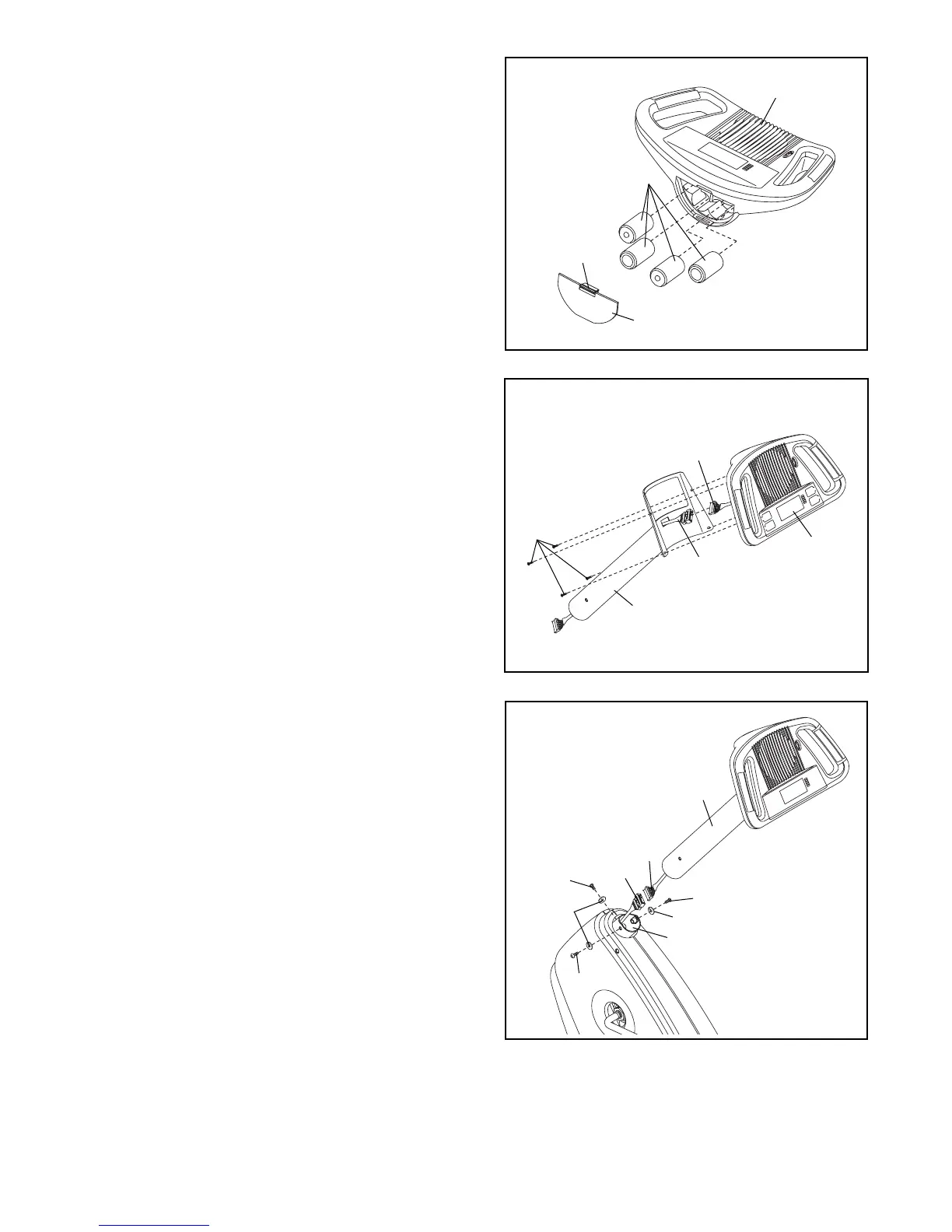
7. Connect the console wire harness to the Upper
Wire Harness (36). Insert the console wire harness
into the Upright (13). Attach the Console (16) to the
Upright with four M4 x 16mm Round Head Screws
(52).
7
16
13
36
Console
Wire
Harness
52
6
Tab
Battery Door
Batteries
16
6. The Console (16) requires four “D” batteries (not
included); alkaline batteries are recommended.
IMPORTANT: If the exercise cycle has been
exposed to cold temperatures, allow it to warm
to room temperature before inserting batteries
into the Console. If you do not do this, the con-
sole displays or other electronic components
may become damaged. Press the tab on the bat-
tery door and remove it. Insert four batteries into
the Console as shown. Make sure that the batter-
ies are oriented as shown by the markings on
the battery door. Reattach the battery door.
13
36
8
8. Connect the Upper Wire Harness (36) to the Lower
Wire Harness (8). Attach the Upright (13) to the
Frame (1) with three M8 x 25mm Button Screws
(33) and three M8 Split Washers (59). Be careful
to avoid pinching the Wire Harnesses.
8
33
33
33
59
59
1





 To Next Page