EasyManua.ls Logo

Pro-Form TOUR DE FRANCE CBC - User Manual

Pro-Form TOUR DE FRANCE CBC
28 pages
Print Icon
To Next Page IconTo Next Page
Loading...
Model No. PFEX39420-INT.0
Serial No.
Write the serial number in the space
above for reference.
CAUTION
Read all precautions and
instructions in this manual before
using this equipment. Keep this
manual for future reference.
Serial
Number
Decal
USER’S MANUAL
iconeurope.com
CUSTOMER SERVICE
UNITED KINGDOM
Call: 0330 123 1045
From Ireland: 053 92 36102
Website: iconsupport.eu
E-mail: csuk@iconeurope.com
Write:
ICON Health & Fitness, Ltd.
Unit 4, Westgate Court
Silkwood Park
OSSETT
WF5 9TT
UNITED KINGDOM
AUSTRALIA
Call: 1800 993 770
E-mail: australiacc@iconfitness.com
Write:
ICON Health & Fitness, Inc.
PO Box 635
WINSTON HILLS NSW 2153
AUSTRALIA

Questions and Answers

Summary

WARNING DECAL PLACEMENT

WARNING DECAL PLACEMENT

Shows the location of warning decals and instructions for replacement. Apply decals as shown.

IMPORTANT PRECAUTIONS

IMPORTANT PRECAUTIONS

Lists critical safety precautions and instructions for using the exercise bike safely.

PART IDENTIFICATION CHART

PART IDENTIFICATION CHART

Identifies small parts required for assembly, referencing key numbers from the part list.

ASSEMBLY

ASSEMBLY PROCESS AND WARRANTY REGISTRATION

Details assembly requirements, including tools, number of people, and warranty registration process.

EXERCISE BIKE USAGE AND ADJUSTMENTS

CONSOLE OPERATION AND FEATURES

MANUAL MODE OPERATION

Detailed steps for using the console in manual mode, including resistance and display options.

CONNECTIVITY OPTIONS

CONNECTING YOUR TABLET

Steps to download the iFit app, connect your tablet via Bluetooth, and record workout data.

CONNECTING YOUR HEART RATE MONITOR

Instructions on connecting Bluetooth Smart heart rate monitors to the console for real-time monitoring.

MAINTENANCE AND TROUBLESHOOTING

CONSOLE TROUBLESHOOTING

Steps to troubleshoot common console issues like dim display or CH0/CH1 messages.

DRIVE BELT ADJUSTMENT

Summary

WARNING DECAL PLACEMENT

WARNING DECAL PLACEMENT

Shows the location of warning decals and instructions for replacement. Apply decals as shown.

IMPORTANT PRECAUTIONS

IMPORTANT PRECAUTIONS

Lists critical safety precautions and instructions for using the exercise bike safely.

PART IDENTIFICATION CHART

PART IDENTIFICATION CHART

Identifies small parts required for assembly, referencing key numbers from the part list.

ASSEMBLY

ASSEMBLY PROCESS AND WARRANTY REGISTRATION

Details assembly requirements, including tools, number of people, and warranty registration process.

EXERCISE BIKE USAGE AND ADJUSTMENTS

CONSOLE OPERATION AND FEATURES

MANUAL MODE OPERATION

Detailed steps for using the console in manual mode, including resistance and display options.

CONNECTIVITY OPTIONS

CONNECTING YOUR TABLET

Steps to download the iFit app, connect your tablet via Bluetooth, and record workout data.

CONNECTING YOUR HEART RATE MONITOR

Instructions on connecting Bluetooth Smart heart rate monitors to the console for real-time monitoring.

MAINTENANCE AND TROUBLESHOOTING

CONSOLE TROUBLESHOOTING

Steps to troubleshoot common console issues like dim display or CH0/CH1 messages.

DRIVE BELT ADJUSTMENT

Overview

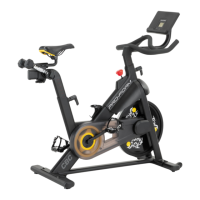
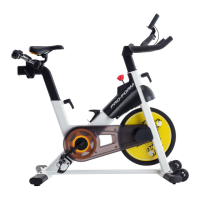
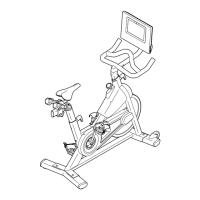
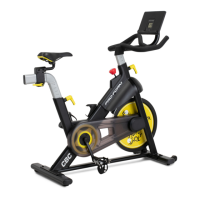
The PRO-FORM® LE TOUR DE FRANCE CBC exercise bike is a fitness device designed for cardiovascular workouts, endurance building, and body toning. It offers a range of features to enhance home exercise routines, providing users with an effective and enjoyable way to improve their physical fitness.

Function Description

The exercise bike operates by allowing users to pedal, engaging various muscle groups and elevating heart rate for cardiovascular benefits. It features a console that provides real-time workout feedback and allows for resistance adjustments. The bike does not have a freewheel, meaning the pedals continue to move until the flywheel stops, requiring controlled reduction in pedaling speed to stop. A brake knob is integrated for quickly stopping the flywheel.

Usage Features

The LE TOUR DE FRANCE CBC exercise bike offers several adjustable components to ensure a comfortable and effective workout experience for different users:

  • Leveling: The bike can be leveled by adjusting the leveling feet beneath the rear stabilizer, eliminating any rocking motion during use.
  • Saddle Adjustment:
    • Angle: The saddle angle can be adjusted to the most comfortable position by loosening nuts on the saddle clamp, tilting the saddle, and then retightening the nuts.
    • Horizontal Position: The saddle can be slid forward or backward to adjust comfort or distance from the handlebar. This is done by loosening the carriage handle, moving the saddle, and then firmly tightening the handle. The carriage handle functions as a ratchet, allowing for precise adjustments.
    • Height: The saddle post height can be adjusted by pulling the adjustment handle outward, moving the saddle post to the desired position, releasing the handle into an adjustment hole, and then tightening it four turns. It's crucial that the adjustment handle is firmly engaged in an adjustment hole. For proper exercise, the saddle should allow for a slight bend in the knees when pedals are in the lowest position.
  • Handlebar Adjustment:
    • Height: The handlebar height can be adjusted by loosening the adjustment handle four turns and pulling it outward. The handlebar can then be moved up or down, the handle released into an adjustment hole, and then tightened four turns. Similar to the saddle, the adjustment handle must be firmly engaged.
    • Horizontal Position: The handlebar's horizontal position can also be adjusted.
  • Pedals: The pedals feature toe cages and straps to secure shoes. The toe straps can be adjusted by pressing and holding tabs on the buckles. Users also have the option to attach their own pedals.
  • Resistance Control: The resistance of the pedals can be changed by pressing increase and decrease buttons on the console. There is a slight delay for the pedals to reach the selected resistance level.
  • Brake Knob: The brake knob is used to quickly stop the flywheel by pushing it downward. When the bike is not in use, the brake knob should be tightened completely to prevent flywheel movement.
  • Console Features:
    • Display: The console displays various workout information such as speed, pulse, calories burned, resistance level, RPM, elapsed time, and distance pedaled. It features a scan mode that cycles through these metrics.
    • Heart Rate Monitoring: The console is compatible with Bluetooth® Smart heart rate monitors, allowing users to track their heart rate during workouts. An optional chest heart rate monitor can be purchased for continuous monitoring.
    • Tablet Connectivity: The console supports Bluetooth connections to tablets via the iFit® app. Users can download the iFit app, connect their tablet to the console, and record/track their workout information. If connecting both a heart rate monitor and a tablet, the heart rate monitor should be connected first.
    • Auto-Off: The console has an auto-off feature that activates if the pedals are not moved and no buttons are pressed for a few minutes. It's important to disconnect any connected tablets or heart rate monitors to prevent faster battery drain.
  • Exercise Guidelines: The manual provides guidelines for planning an exercise program, including recommendations for exercise intensity (fat burning vs. aerobic exercise) based on heart rate zones, how to measure heart rate, and workout structure (warming up, training zone exercise, cooling down, and exercise frequency). Suggested stretches are also included to improve flexibility and prevent post-exercise problems.

Maintenance Features

Regular maintenance is crucial for the optimal performance and longevity of the exercise bike:

  • Inspection and Tightening: All parts should be inspected and properly tightened each time the exercise bike is used. Worn parts should be replaced immediately.
  • Cleaning: The exercise bike can be cleaned with a damp cloth and a small amount of mild detergent. It's important to keep liquids away from the console and avoid direct sunlight to prevent damage.
  • Console Batteries: If the console display becomes dim, the AA batteries need to be replaced. If the bike will not be used for an extended period, the batteries should be removed from the console.
  • Resistance System Recalibration: If "CH0" or "CH1" appears on the display when adjusting resistance, the resistance system needs recalibration. This involves removing the batteries, pressing and holding any console button for 20 seconds, releasing the button, and reinserting the batteries.
  • Reed Switch Adjustment: If the console does not display correct feedback, the reed switch may need adjustment. This involves locating the reed switch on the left side of the bike, loosening its screws, aligning the left crank arm with the magnet, sliding the reed switch, and then retightening the screws.
  • Tablet Holder Adjustment: If the tablet holder does not stay in place, it can be adjusted by rotating it backward and tightening the locknut inside the bracket mount.
  • Drive Belt Adjustment: If the pedals slip during use, even at the highest resistance, the drive belt may need adjustment. This involves removing the idler cover, and then tightening a specific screw until the drive belt is tight, followed by reattaching the idler cover.

Pro-Form TOUR DE FRANCE CBC Specifications

General IconGeneral
TypeIndoor Cycling Bike
Resistance TypeMagnetic
ConnectivityBluetooth
Adjustable HandlebarsYes
Weight Capacity250 lbs
iFit CompatibilityYes
Adjustable SeatYes
PedalsToe Cage and Strap
ProgramsiFit-enabled
Warranty1-Year Parts & Labor
Resistance Levels16

Related product manuals