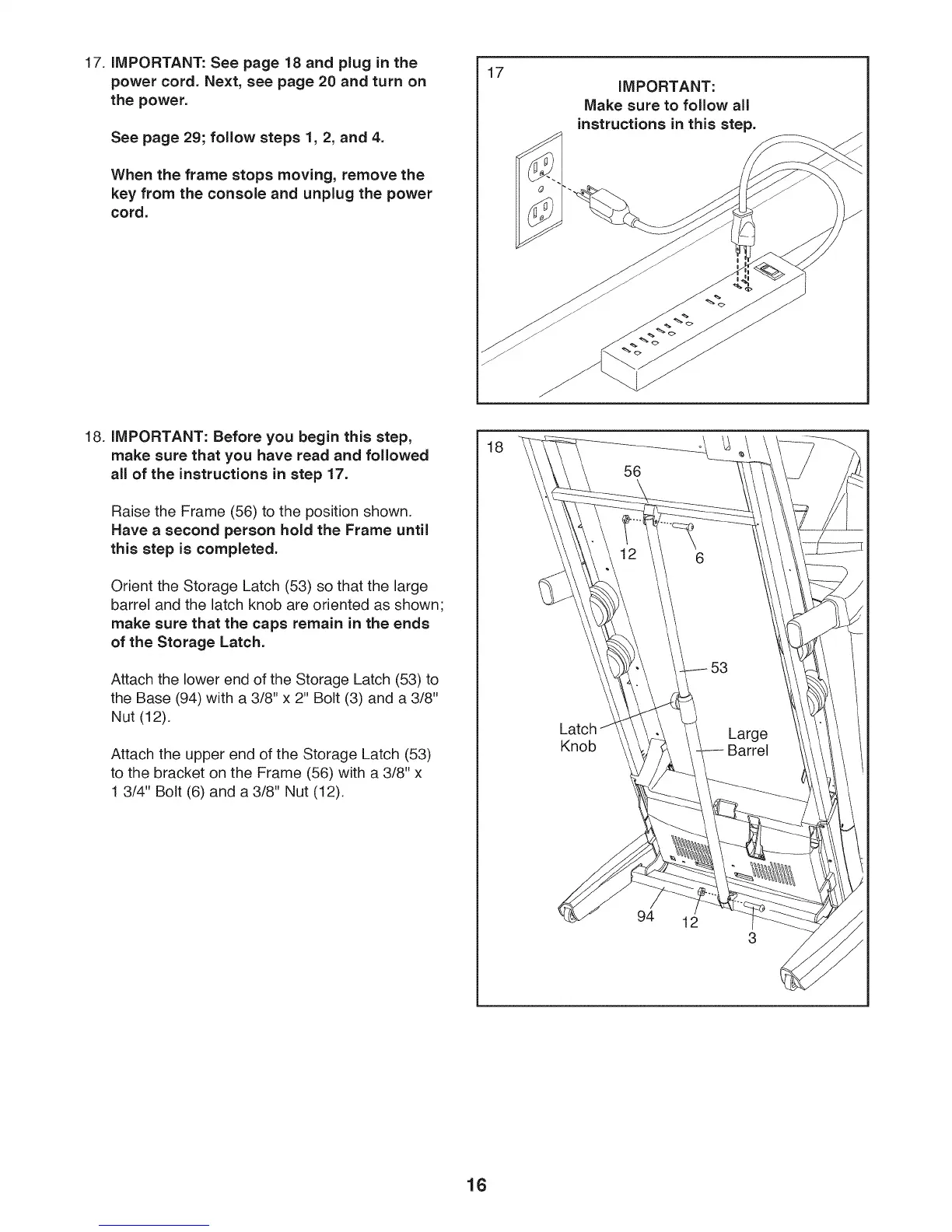
17. iMPORTANT: See page 18 and plug in the
power cord. Next, see page 20 and turn on
the power.
See page 29; follow steps 1, 2, and 4.
When the frame stops moving, remove the
key from the console and unplug the power
cord.
17
IMPORTANT:
Make sure to follow all
instructions in this step.
18. iMPORTANT: Before you begin this step,
make sure that you have read and followed
all of the instructions in step 17.
Raise the Frame (56) to the position shown.
Have a second person hold the Frame until
this step is completed.
Orient the Storage Latch (53) so that the large
barrel and the latch knob are oriented as shown;
make sure that the caps remain in the ends
of the Storage Latch.
Attach the lower end of the Storage Latch (53) to
the Base (94) with a 3/8" x 2" Bolt (3) and a 3/8"
Nut (12).
Attach the upper end of the Storage Latch (53)
to the bracket on the Frame (56) with a 3/8" x
1 3/4" Bolt (6) and a 3/8" Nut (12).
18
Knob
94
12
16




 To Next Page