14
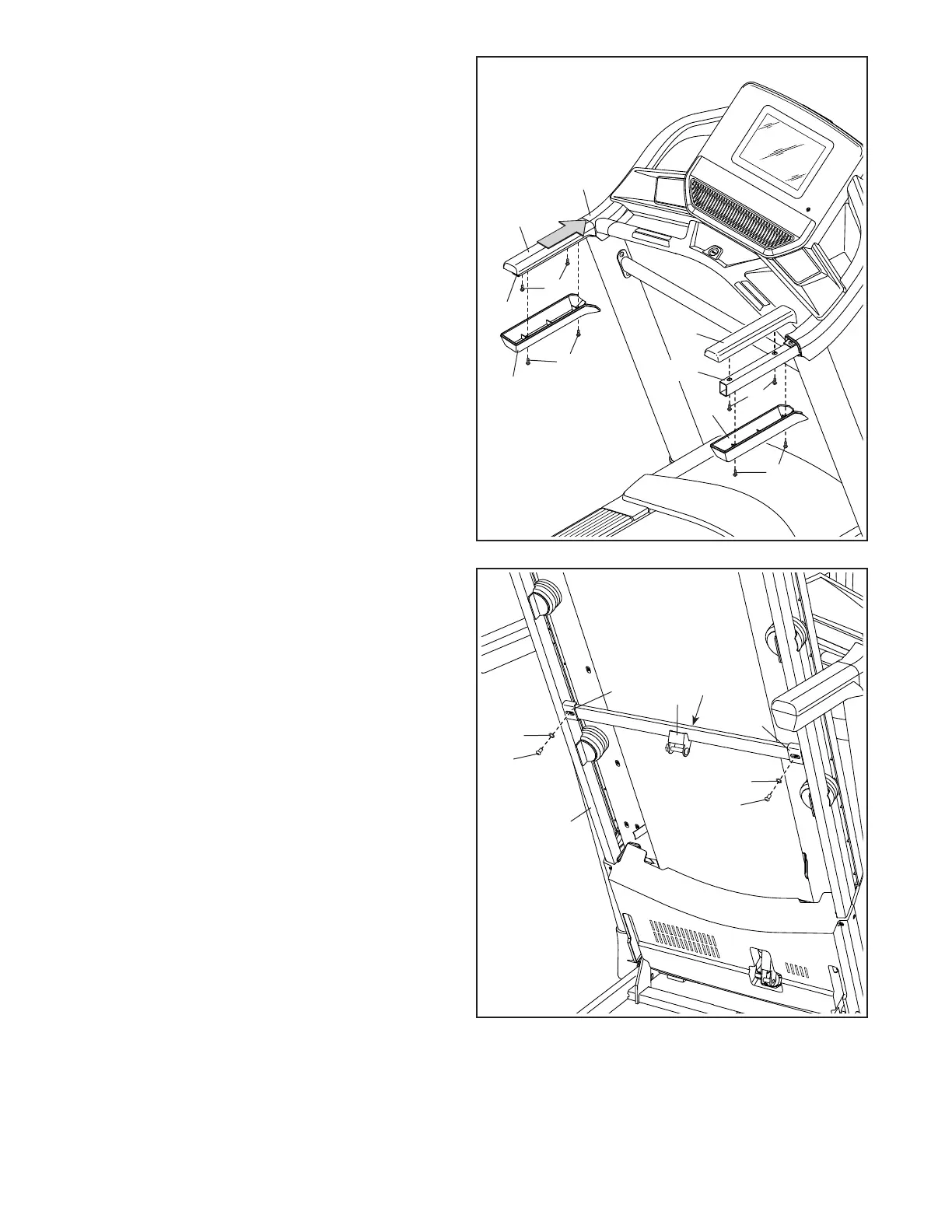
14. Set the Left Handrail Cover (70) on the left
Handrail (72). Start two #8 x 3/4" Screws (11)
into the left Handrail and the Left Handrail Cover.
Next, slide the Left Handrail Cover forward
against the console assembly (H) as shown.
Then, tighten both Screws.
Then, attach the Left Handrail Bottom (73) to the
Handrail (72) with two #8 x 3/4" Screws (11).
Attach the Right Handrail Cover (71) and
the Right Handrail Bottom (74) to the right
Handrail (72) as described above.
11
11
14
72
74
73
72
71
70
H
11
11
15
15. Raise the Frame (54) to the upright position.
Have a second person hold the Frame until
step 17 is completed.
Remove the two 5/16" x 3/4" Screws (13) from
the Latch Crossbar (51).
Next, orient the Latch Crossbar (51) as shown.
Make sure that the “This side toward belt”
sticker (L) is facing the treadmill. Attach the
Latch Crossbar to the brackets (M) on the Frame
(54) with the two 5/16" x 3/4" Screws (13) that
you just removed and two 5/16" Star Washers (7).
54
51
L
13
M
M
7
13
7




 To Next Page