EasyManua.ls Logo

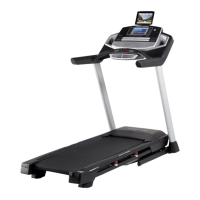
Pro-Form PRO 9000 - User Manual

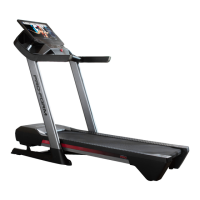
Pro-Form PRO 9000
40 pages
Print Icon
To Next Page IconTo Next Page
Loading...
Serial
Number
Decal
Model No. PFTL15820.0
Serial No.
Write the serial number in the space
above for reference.
CAUTION
Read all precautions and
instructions in this manual before
using this equipment. Save this
manual for future reference.
proform.com
USER’S MANUAL
REGISTER YOUR
PRODUCT
To register your product and
activate your warranty today,
go to my.proform.com.
CUSTOMER CARE
For service at any time, go to
support.proform.com.
Or call 1-888-533-1333
Mon.–Fri. 6 a.m.–6 p.m. MT
Sat. 8 a.m.–12 p.m. MT
Please do not contact the store.

Questions and Answers

  • D
    Destiny HernandezAug 16, 2025
    How to fix Pro-Form PRO 9000 Treadmill when the power does not turn on?
    • D
      Dana PowellAug 16, 2025
      First, ensure the power cord is securely plugged into a surge suppressor and that the surge suppressor is connected to a properly grounded outlet. If you are using an AFCI-equipped outlet and the circuit breaker trips repeatedly, you may need to purchase an arc filter. Also, verify that the key is correctly inserted into the console. If the power switch has tripped, wait five minutes before pressing it back in to reset it.
  • A
    Aaron StevensAug 19, 2025
    What to do if Pro-Form PRO 9000 power turns off during use?
    • A
      Angel ThompsonAug 19, 2025
      If the Pro-Form Treadmill turns off during use, check the power switch. Ensure the power cord is properly plugged in; if it is, unplug it, wait five minutes, and then plug it back in. Also, try removing and reinserting the key from the console. If the issue persists, further assistance may be needed.
  • K
    Kristen VelazquezAug 22, 2025
    Why do the displays of the Pro-Form Treadmill console not function properly?
    • S
      Sean SmithAug 22, 2025
      If the console of your Pro-Form Treadmill isn't functioning correctly, you can reset it to the factory default settings. Note that this will erase any custom settings. To reset, turn the power switch off. Locate the small opening on the console's side and, using a bent paper clip, press and hold the button inside. Have someone else press the power switch to the on/reset position. Keep holding the button until the console turns on, completing the reset. If it doesn’t turn on, switch the treadmill off and on again using the power switch.
  • D
    Desiree HansenAug 25, 2025
    What to do if Pro-Form Treadmill walking belt is off-center or slips?
    • J
      John NelsonAug 26, 2025
      If the walking belt on your Pro-Form Treadmill is off-center, first remove the key and unplug the power cord. If the belt has shifted left, turn the left idler roller screw clockwise 1/2 turn. If it has shifted right, turn the left idler roller screw counterclockwise 1/2 turn. If the belt slips when walked on, remove the key and unplug the power cord, then turn both idler roller screws clockwise 1/4 of a turn.
  • E
    erica75Aug 28, 2025
    Why does my Pro-Form PRO 9000 Treadmill power off during use?
    • P
      porterdianaAug 28, 2025
      If your Pro-Form Treadmill's power turns off unexpectedly during use, there are a few things you can try. First, give the power switch a check; if it has tripped, wait five minutes before pressing it back in. Also, ensure the power cord is securely plugged in. If it is, unplug it, wait five minutes, and then plug it back in. Another simple solution is to remove and reinsert the key from the console.
  • K
    Kevin WeberAug 31, 2025
    What to do if Pro-Form PRO 9000 walking belt slows when walked on?
    • A
      Amanda SmithAug 31, 2025
      If the walking belt on your Pro-Form Treadmill slows down when you walk on it, it might be overtightened. To fix this, first remove the key and unplug the power cord. Then, use the hex key to turn both idler roller screws counterclockwise by 1/4 of a turn. Properly tightened, you should be able to lift each edge of the belt 2 to 3 inches off the platform. Also, make sure you are not applying any silicone spray or other substances to the walking belt.
  • M
    Michael MyersSep 3, 2025
    How to adjust Pro-Form PRO 9000 Treadmill walking belt if it is off-center or slips?
    • M
      Meghan ThompsonSep 3, 2025
      If the walking belt on your Pro-Form Treadmill is off-center or slips when you walk on it, first remove the key and unplug the power cord. If the belt is off-center to the left, turn the left idler roller screw clockwise 1/2 turn. If it's off-center to the right, turn the left idler roller screw counterclockwise 1/2 turn. If the belt slips, turn both idler roller screws clockwise 1/4 turn.
  • H
    Hannah JohnsonSep 6, 2025
    What to do if the displays of the Pro-Form PRO 9000 console do not function properly?
    • K
      Kelly MillsSep 6, 2025
      If the displays on your Pro-Form Treadmill console aren't working right, try resetting the console to its factory default settings. To do this, turn the power switch off. Then, find the small reset opening on the right side of the console, and use a bent paper clip to press and hold the reset button inside. While holding the reset button, have someone else turn the power switch back on. Keep holding the reset button until the console turns on. After it turns on, check for firmware updates.
  • E
    Erika DonaldsonSep 9, 2025
    Why Pro-Form Treadmill will not connect to the wireless network?
    • D
      Deborah FriedmanSep 9, 2025
      To fix a Pro-Form Treadmill that will not connect to the wireless network, verify that the wireless settings are correct both on the console and for your wireless network.
  • J
    Jack WilliamsSep 12, 2025
    Why does Pro-Form PRO 9000 walking belt slow when walked on?
    • W
      wilsontriciaSep 12, 2025
      If the walking belt on your Pro-Form Treadmill slows down when you walk on it, it might be overtightened. Remove the key and unplug the power cord. Use the hex key to turn both idler roller screws counterclockwise 1/4 of a turn. Never apply silicone spray or other substances to the walking belt or the walking platform unless instructed by an authorized service representative.

Summary

Safety and Setup Guidance

Important Precautions

Essential safety guidelines to prevent injury, fire, and electric shock during use.

Assembly Parts Identification

Treadmill Assembly

Assembly Preparation and Tips

Guidance on assembly, tools required, and hiring service technicians.

Treadmill Operation

Connecting the Power Cord

Instructions for properly connecting the power cord and using a surge suppressor.

Console Features

Console Interaction

Turning On the Power

Step-by-step guide to powering on the treadmill safely.

Console Setup

Console Setup and Configuration

Steps for connecting to wireless, customizing settings, and iFit account setup.

Workout Modes

Using the Manual Mode

Guide to operating the treadmill in manual mode, adjusting speed and incline.

Advanced Workout Modes

Using a Map Workout

Instructions for selecting and performing pre-defined map workouts.

Custom Workout Creation

Drawing Your Own Map Workout

Guide to creating custom workout routes by drawing on the map.

iFit Workout Scheduling

Console Settings and Calibration

Calibrating the Incline System

Procedure to ensure the incline system functions correctly.

Network Connectivity

Treadmill Folding and Movement

Maintenance and Troubleshooting

Troubleshooting Power Issues

Steps to resolve problems with the treadmill not turning on or turning off.

Treadmill Troubleshooting

Walking Belt Performance

Troubleshooting issues with the walking belt slowing, slipping, or being off-center.

Console Troubleshooting

Console Display Functionality

Steps to reset the console and resolve display issues.

Exercise Guidelines

Parts Ordering and Warranty

Pro-Form PRO 9000 Specifications

General IconGeneral
BluetoothYes
Cooling FanYes
Incline12%
Speed0 – 12 MPH
Display10" HD Touchscreen
FoldingYes
Weight Capacity300 lbs

Related product manuals