10
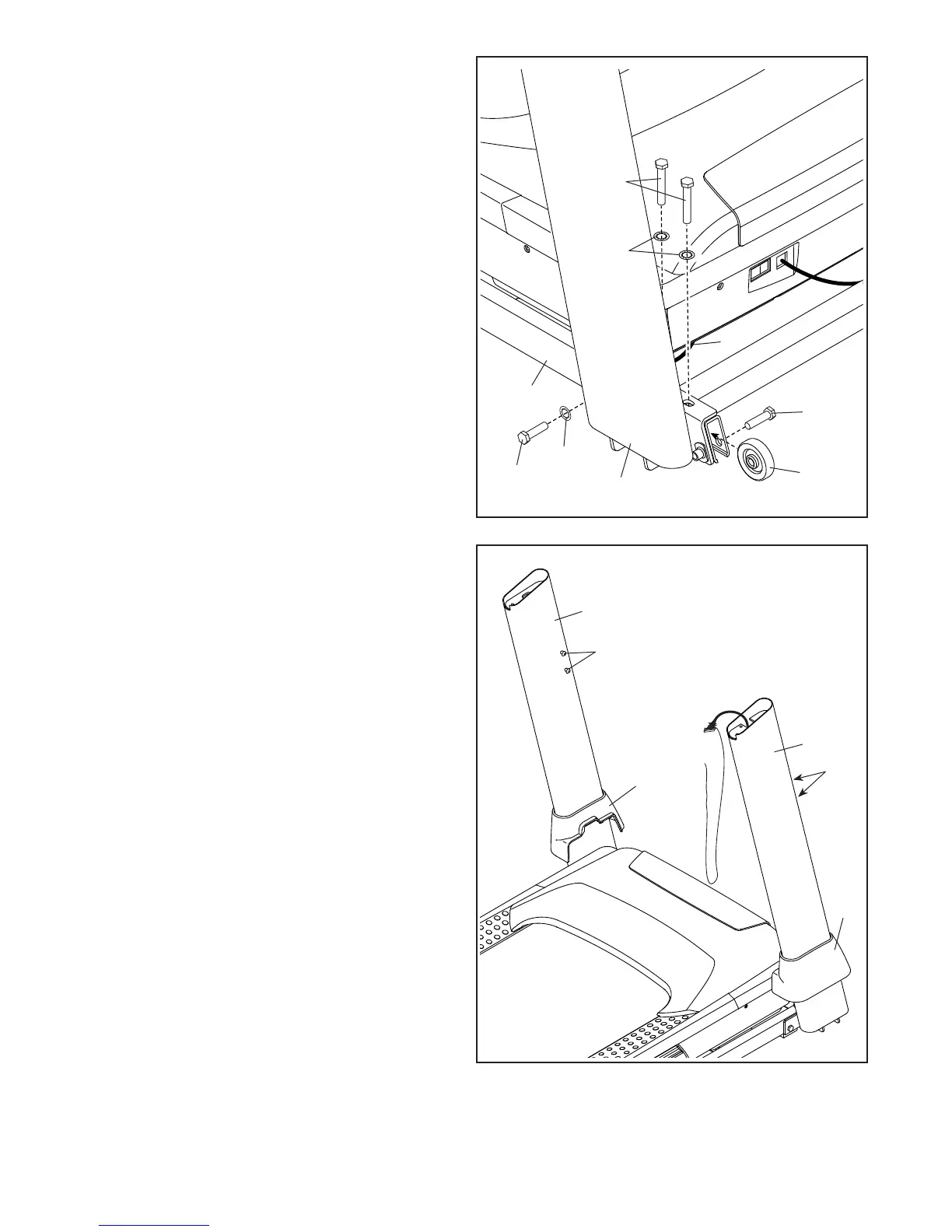
4. Hold the Right Upright (90) against the Base
(94). Make sure not to pinch the Upright Wire
(81).
Next, hold a Wheel (97) inside the Base (94),
and insert a 3/8" x 1 3/4" Screw (62) through
the Base and the Wheel as shown; do not fully
tighten the Screw yet.
Insert two 3/8" x 2 1/4" Screws (7) with two
3/8" Star Washers (13) and a 3/8" x 1 1/4"
Screw (63) with a 3/8" Star Washer (13) into the
bracket at the bottom of the Right Upright (90),
and partially tighten the three Screws into the
Base (94); do not fully tighten the Screws yet.
Attach the Left Upright (not shown) in the
same way. Note: There are no wires on the left
side.
4
63
62
97
94
13
90
7
13
81
5. Remove and save the four 5/16" x 3/4"
Screws (31).
Identify the Left and Right Base Covers (82, 83).
Slide the Left and Right Base Covers onto the
Left and Right Uprights (89, 90) as shown.
83
90
31
82
89
31
5







 To Next Page