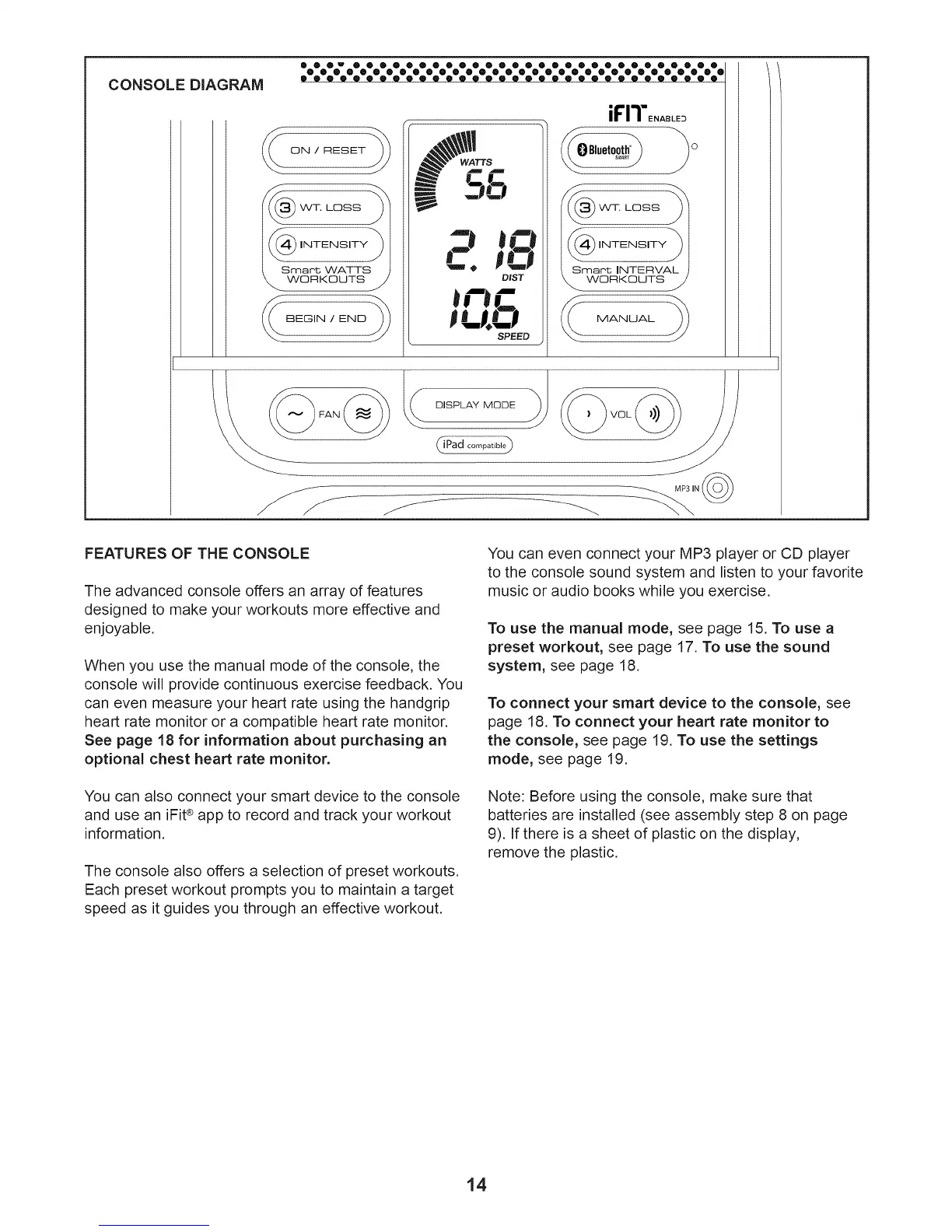
CONSOLE DIAGRAM
000 u 000000000000000 0000000000000
000000000000000000000000000000000®000000000000000000000000000000
-J mO
C. po
DIST
mr'mC
pu? J
SPEED
MANUAL
DISPLAY MODE
dPaa
FEATURES OF THE CONSOLE
The advanced console offers an array of features
designed to make your workouts more effective and
enjoyable.
When you use the manual mode of the console, the
console will provide continuous exercise feedback. You
can even measure your heart rate using the handgrip
heart rate monitor or a compatible heart rate monitor.
See page 18 for information about purchasing an
optional chest heart rate monitor.
You can also connect your smart device to the console
and use an iFiP app to record and track your workout
information.
The console also offers a selection of preset workouts.
Each preset workout prompts you to maintain a target
speed as it guides you through an effective workout.
You can even connect your MP3 player or CD player
to the console sound system and listen to your favorite
music or audio books while you exercise.
To use the manual mode, see page 15. To use a
preset workout, see page 17. To use the sound
system, see page 18.
To connect your smart device to the console, see
page 18. To connect your heart rate monitor to
the console, see page 19. To use the settings
mode, see page 19.
Note: Before using the console, make sure that
batteries are installed (see assembly step 8 on page
9). If there is a sheet of plastic on the display,
remove the plastic.
14





 To Next Page