Locating Individual Wire Pairs with the MT-7068 Analog
Function
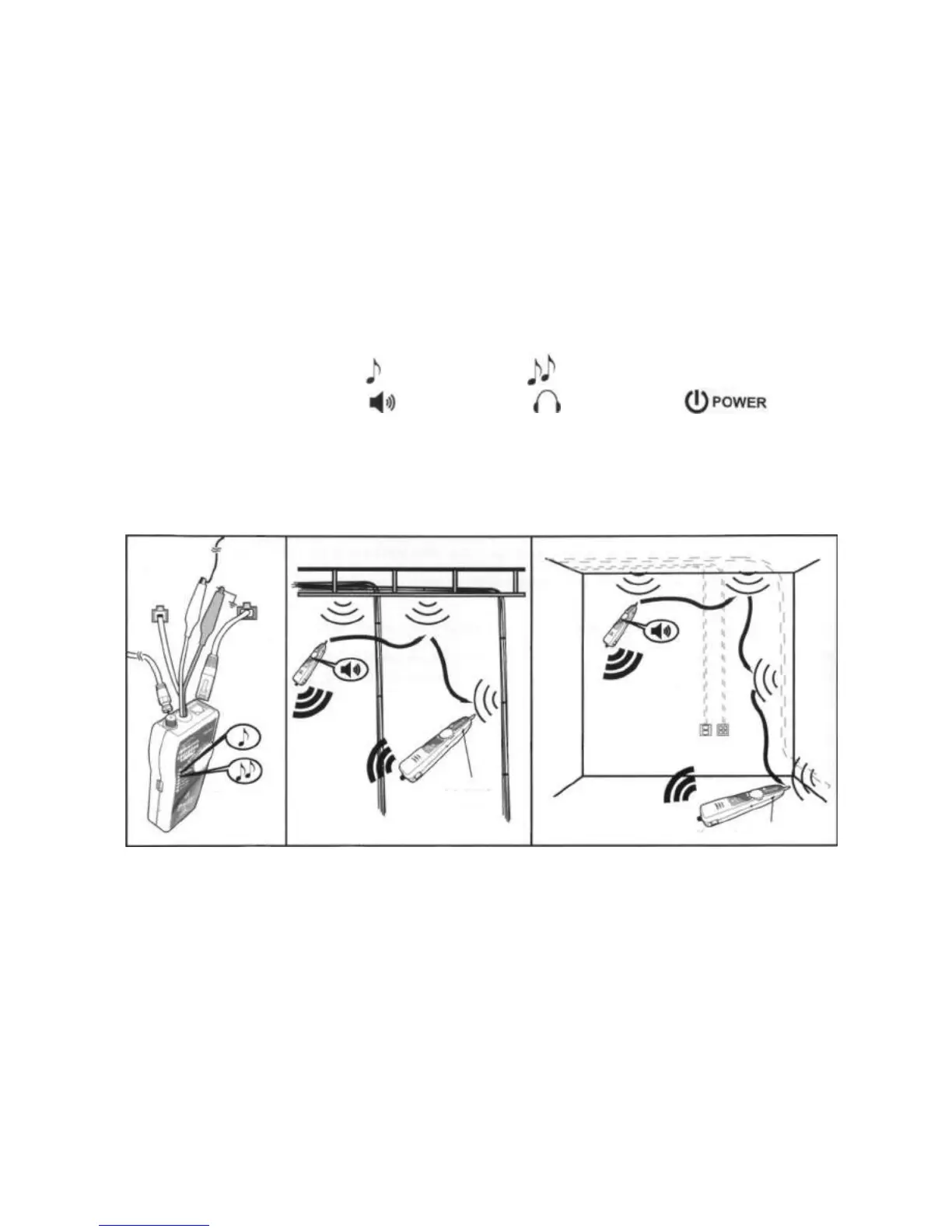
To locate cables, do the following (Figure 3):
1. Connect the black alligator clip of the Toner to the ground, and then connect the red clip to a jack or
punch-down block as shown in Figure 3.
2. Turn the Toner's rotary switch to for a one-note tone or for a two-note tone.
3. Turn the Probe's rotary switch to . Turn the rotary to position when the LED
flickers.
4. Use the Probe to find the general location of the tone at a cable rack, patch panel, or behind a wall. In
locating mode, the Probe's LEDs light up in red from 1 to 8, then wrap back and light up from 1 to 8
again as the signal strength increases.
5. Adjust the Volume Control on the Probe to locate the wire pairs from 10cm to 30cm.
Figure 3 Locating Cables
Two-note
Tone
One-note
Tone
Volume
Control
Ground
Volume Control


 To Next Page