Cable Map Testing:
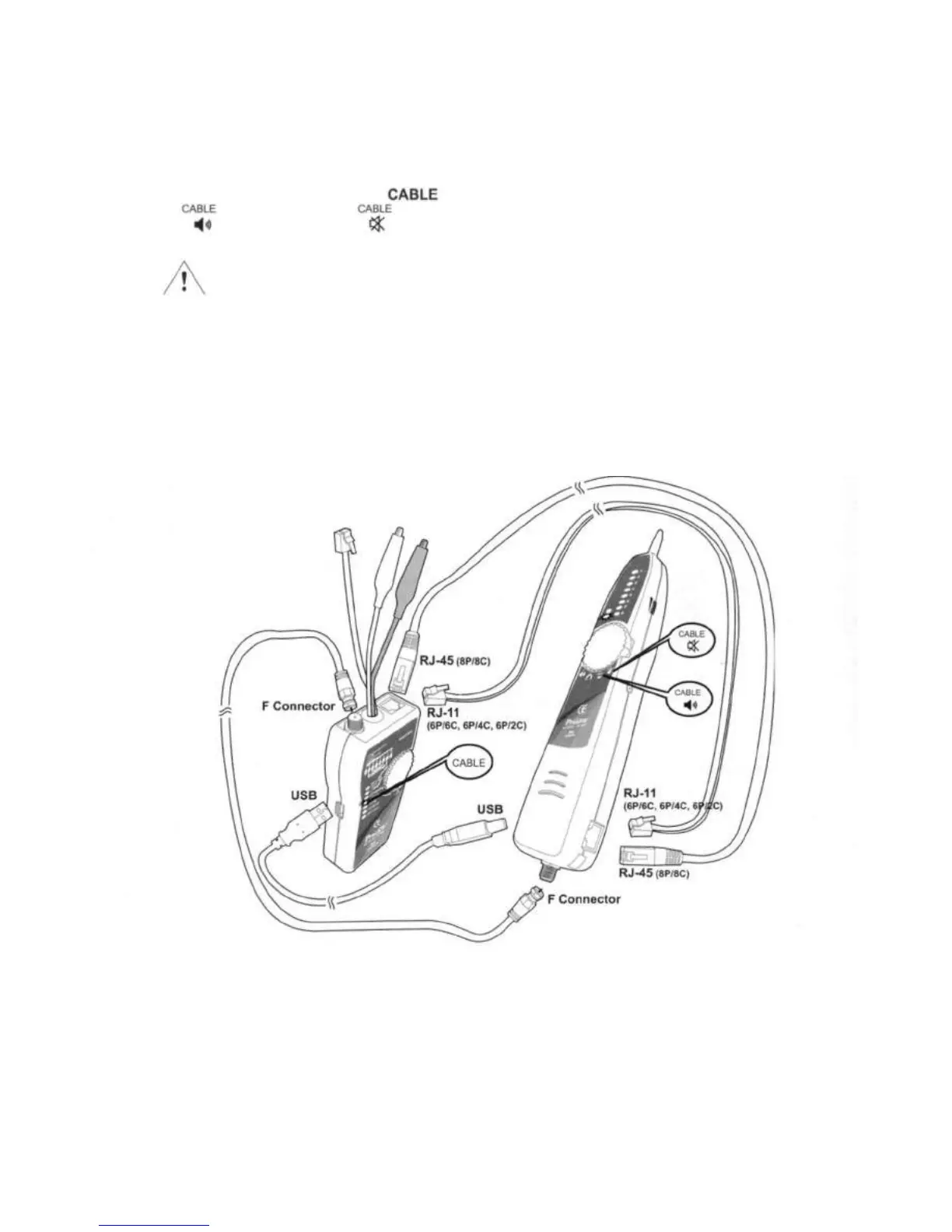
You can use the MT-7068 Toner or Probe to validate the cable map on RJ45, RJ11(6P/6C, 6P/4C, 6P/2C)
jacks, USB, F(BNC, RCA) adapters and connectors. The cable map function finds the most common wiring
faults on twisted pair cabling: shorts, opens, and crossed pairs.
1. Connect the MT-7068 Toner or Probe to RJ45 (8P/8C), RJ11 (6P/6C, 6P/4c, 6P/2C) jacks, or USB, F
(BNC, RCA) connectors.
2. Turn the Toner's rotary switch to and wait until the LED flickers; then turn the Probe's switch to
for beeper alarm or for mute indication. The Probe's LEDs and beeper indicate the cable
map.
Caution
• Each LED that corresponding to an active pin flashes briefly, and then should light for about 1 second.
The brief flash shows which LED is next in the sequence.
• The Probe also beeps in different tones to indicate good wiring, miswires, shorts, and opens.
• While testing Cable Map from 2 wires or less, the on and off tones may occur even if the LED lights
normally.
• Before Cable Map testing, repeat the procedures of "Locating Cables" on page 7 to identify the correct
connector or wires on the other end of the cable if necessary.
10


 To Next Page