©2022 Pro-Vision Solutions, LLC. Page 33 of 56
CONFIGURATION
After the installation is completed, the DVR must be configured to fully utilize its functionality. This requires the vehicle
ignition to be powered ON and a smart device (tablet, laptop, smartphone) to connect and configure the system.
Note: The DVR must be powered ON for configuration; when the DVR is powered ON, the green PWR light will be ON
solid. (If the PWR light is blinking, the system is in standby mode.)
Minimum Recommended Changes
There are hundreds of settings on the DVR unit to allow it to be customized to each customer’s unique requirements. If
you are an installer and are unsure of what special settings should be set, you should at least set the minimum settings
and then the other settings can always be changed later. The minimum recommended changes are:
• Unit ID - Each system should be set with a unique Unit ID to indicate which unit the video was recorded on.
• Time Zone – This is required to ensure the device has the proper date/time during recording.
• Wi-Fi AP SSID – This is the name of the DVR’s Wi-Fi used for configuration, it is recommended to match this in
some way to the Unit ID of the vehicle, so it is easy to identify the unit when multiple are on in the same area.
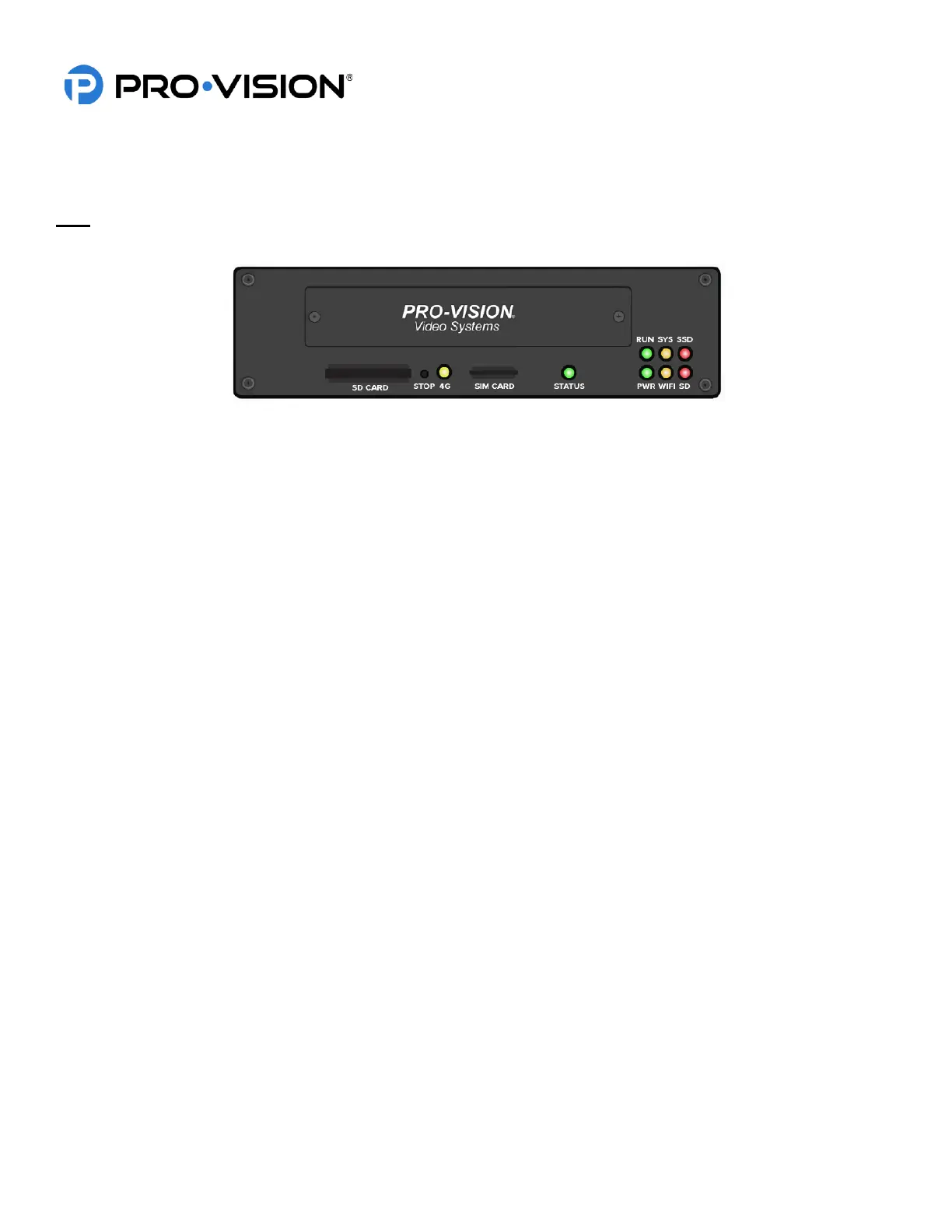
DVR Status Lights
• 4G AMBER Normally OFF. Indicates when the DVR is connected to a 4G network. This light requires
the DVR to be configured with the optional 4G modem.
• STATUS GREEN/RED Solid green indicates the DVR is on, operating and recording normally. Flashing green
indicates the DVR is still booting up, or is operating properly, but is not set to record.
Flashing red indicates the system is operating but cannot record; this can be due to a
missing or full storage device or DVR issue.
• PWR GREEN Solid green indicates DVR is on. Blinking with green RUN indicates there is no ignition
signal and DVR is in the time-delayed shutoff mode.
• RUN GREEN Blinking indicates DVR is on. Blinking with green PWR indicates there is no ignition signal
and DVR is in the time-delayed shutoff mode.
• WIFI AMBER Blinking amber indicates the DVR is connected to a Wi-Fi network.
• SYS AMBER Blinking amber indicates the number of cameras configured to record that are not
recording, this requires configuration to be accurate.
• SD RED Flashing indicates data is recording to SD card. Solid indicates the SD card is present,
but no data is being recorded. OFF indicates no SD card is present.
• SSD RED Flashing indicates data is recording to the solid-state drive. Solid indicates solid-state
drive is present but is not recording. OFF indicates there is no solid-state drive present.


 To Next Page
 Loading...