
 Need help?
Do you have a question about the Pro XK3190-DS3 and is the answer not in the manual?
Details the indicator model, load cell interface, display, and keyboard.
Covers scoreboard, serial communication, printing interfaces, and data storage.
Specifies power source, operating temperature, and humidity requirements.
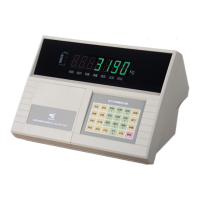
Illustrates indicator panel layouts and load cell connection.
Explains RS485 interface pin assignments for load cells.
Details connections for printers and scoreboards.
Covers serial communication signals and scoreboard data format.
Guides on connecting the indicator to a computer via serial interfaces.
Explains ASCII data formats and communication modes.
Details the structure of data output by the indicator.
Lists commands sent from the host computer to the indicator.
Describes how to set communication address, baud rate, and method.
Covers initial power-up, self-check, and zero setting procedures.
Explains normal, preset, and vehicle tare input methods.
Provides guidance on using and charging the indicator's battery.
Details data saving methods, vehicle/article numbers, and auto save.
Covers general printing functions and settings.
Explains how to print various types of reports.
Procedure for retrieving weighing records based on the date.
Method for querying records using a vehicle number.
Steps to find records associated with an article number.
Lists different modes for clearing stored data.
Provides step-by-step instructions for data clearing.
Manual input of tare weight using the keypad.
Procedure for saving tare weight through a weighing operation.
Details the indicator's automatic power saving feature.
Explains how to adjust the display brightness levels.
Describes how to toggle between gross and net weight displays.
Guidelines for optimal placement and environmental conditions.
Ensuring proper connections, grounding, and electrical safety.
Precautions regarding flammable environments, lightning, and static.
Details on company responsibility, warranty scope, and battery care.
Explains regular status cues and various error messages.
Lists error codes related to component failures and troubleshooting.
Examples of weighing sheet formats for different printers.
Sample daily reports for printer types 2, 3, and 4.
Sample weighing sheet formats specific to printer type 6.
Display of accumulated weight totals in printouts.
Example of printing a manual gross weight record.
Example of printing manual article weighing records.
Examples of twice weighing and auto tare printing.
Example of manual weighing with multiple tare presets.
Example of printing records using the once weighing mode.
The XK3190-DS3 is a weighing display controller designed to manage and display weighing data, functioning as a control system weighing indicator. It offers a comprehensive set of features for various weighing applications, from basic operation to detailed data management and printing.
The primary function of the XK3190-DS3 is to accurately measure and display weight. It supports both gross and net weight display, with the ability to switch between them. The device integrates a real-time clock, automatically tracking the year, month, date, hour, minute, and second, ensuring time accuracy even after power interruptions.
For data management, the indicator can store a significant number of records, including vehicle numbers, tare weights, article numbers, and weighing records. This allows for efficient tracking and retrieval of past weighing operations. The device also supports various printing functions, enabling users to generate daily reports, summary reports, and detailed weighing sheets. These reports can be classified by time sequence, vehicle number, or article number, providing flexible reporting options.
The XK3190-DS3 is designed to connect with digital load cells, ensuring precise weight measurement. It also features interfaces for a printer and a scoreboard, expanding its utility in different operational environments. The serial communication interface allows for connection to a computer, facilitating data exchange and system integration.
Operating the XK3190-DS3 is designed to be straightforward, with several features enhancing user experience. Upon startup, the device performs a self-check and automatically sets the zero point if the weight on the scale is within the defined range. Manual zero setting is also available for fine-tuning.
The tare deduction function is versatile, offering normal tare, preset tare, and the ability to call tare weight by vehicle number. This flexibility is crucial for operations involving different containers or vehicles. Date and time settings are easily adjustable, ensuring all records are time-stamped accurately.
The device includes a power-saving function, which automatically enters a low-power state after a period of inactivity at the null position, helping to conserve battery life. The display brightness is adjustable, allowing users to optimize visibility in various lighting conditions.
Data saving is a core feature, supporting different scenarios such as saving weight for empty and full vehicles, or for articles with known tare weights. The indicator can automatically save data and print records based on predefined settings, streamlining the weighing process. It also provides options for inquiring about past records based on date, vehicle number, or article number, making data retrieval efficient.
For printing, the XK3190-DS3 offers various print forms and allows for settings such as minimum weight for auto print, rows per printer, and discount rate. It supports different printer types, providing compatibility with a range of external printing devices. The device can also print supplementary records if a previous printing attempt failed, ensuring no data is lost.
The XK3190-DS3 is built with considerations for durability and ease of maintenance. It is recommended to use the indicator in a flat place, away from direct sunlight, excessive dust, serious vibration, or humidity to ensure its longevity and display clarity. Proper grounding of the system and reliable connections between the load cell and indicator are essential to prevent damage from high electric and magnetic fields.
The device should be kept away from corrosive, inflammable, and explosive materials. Special attention is required in areas with high thunder frequency, where reliable lightning protectors must be installed to safeguard both personnel and equipment. As the load cell and indicator are static-sensitive, anti-static precautions are necessary during use, and welding operations on the weighing platform are strictly prohibited.
Cleaning the machine housing should be done with mild solvents, avoiding strong chemicals like benzene or nitro oil. Care must be taken to prevent fluids or conductive particles from entering the indicator to avoid damage or electric shock.
Before connecting or disconnecting any external equipment, it is crucial to cut off the electricity supply to both the indicator and the external device to prevent damage. The company advises customers to check and accept the instrument products before use, emphasizing responsibility for the quality of the indicator itself.
In case of any failure, unauthorized modifications to the connections are not allowed. The device should be unplugged and sent to a professional manufacturer for maintenance, as unprofessional repairs can cause greater damage and void the warranty.
Batteries are considered consumables and are not covered under warranty. To extend battery life, it should be fully charged before first use and recharged every two months if unused for a long time. During transportation and installation, the device should be handled with care to avoid strong vibration, strikes, or impacts that could damage internal components or batteries.
The product comes with a 1-year warranty for damages not caused by human error under normal use conditions. For warranty service, the product and warranty card should be mailed to an authorized maintenance point or supplier. The manufacturer also provides life-long maintenance service for the indicator.
The device provides various information cues, including regular operation messages, error operation messages (e.g., overload alarm, no matched record, parameter setting issues, printing errors), and error connection messages (e.g., printer connection error, digital load cell communication failures). It also provides information cues for component failures (e.g., keyboard failure, RAM data loss, calibration data loss, RAM or E²PROM destruction) along with suggested elimination methods, aiding in troubleshooting and maintenance.
 General
| Model | XK3190-DS3 |
|---|---|
| Display | 6-digit LED |
| Max. number of load cells | 8 (350Ω) |
| Capacity | Configurable |
| Power Supply | AC 220V, 50/60Hz |
| Operating Temperature | 0°C to 40°C |
| Humidity | < 85% RH, non-condensing |
| Communication Interface | RS232 |

 To Next Page