ENGLISH
11
Spotify
Search for a song or station
1
Press .
2 Turn the volume knob to select a list type, then press the knob.
The list types displayed differ depending on the information sent from
Spotify.
3 Turn the volume knob to select the desired song or station.
4 Press the volume knob to confirm.
You can browse through the list quickly by turning the volume knob
quickly.
To cancel, press and hold
.
You can listen to music from a portable audio player via the auxiliary input
jack.
Preparation:
Select
[ON]
for
[BUILT-IN AUX]
in
[SOURCESELECT]
. (Page6)
Start listening
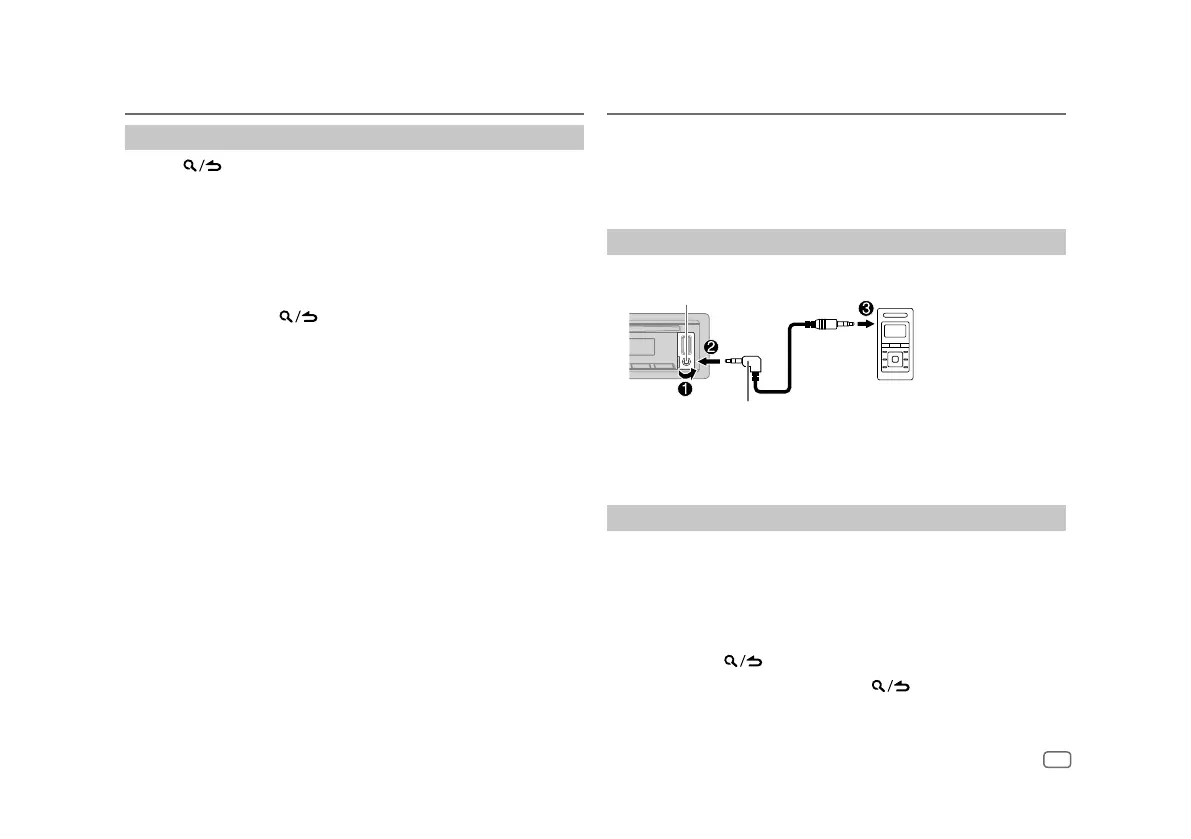
1
Connect a portable audio player (commercially available).
Portable audio player
3.5 mm (1/8") stereo mini plug with “L”
shaped connector (commercially available)
Auxiliary input jack
2 Press B SRC repeatedly to select AUX.
3 Turn on the portable audio player and start playback.
Set the name of the external device
While listening to a portable audio player connected to the unit...
1 Press the volume knob to enter
[FUNCTION]
.
2 Turn the volume knob to select
[SYSTEM]
, then press the knob.
3 Turn the volume knob to select
[AUX NAME SET]
, then press the knob.
4 Turn the volume knob to select an item, then press the knob.
[AUX]
(default)/
[DVD]
/
[PORTABLE]
/
[GAME]
/
[VIDEO]
/
[TV]
5 Press and hold to exit.
To return to the previous setting item, press
.
AUX


 To Next Page