ENGLISH
21
[DISPLAY]
[DIMMER]
Dims the illumination.
[ON]: Dimmer is turned on.
[OFF]: Dimmer is turned off.
[DIMMER TIME]: Set the time to turn on dimmer and to turn off dimmer.
1
Turn the volume knob to adjust the [ON] time, then press the knob.
2
Turn the volume knob to adjust the [OFF] time, then press the knob.
Default: [ON]: [6:00PM] ; [OFF]: [6:00AM]
[BRIGHTNESS]
Sets the brightness for day and night separately.
1
[DAY]/[NIGHT]: Select day or night.
2
Select a zone. (See the illustration on page
20
.)
3
[LVL00] to [LVL31]: Set the brightness level.
[TEXT SCROLL]
[ONCE]: Scrolls the display information once. ;
[AUTO]: Repeats scrolling at 5-second intervals. ;
[OFF]: Cancels.
[CLOCK]
[CLOCK DISPLAY]
[ON]: The clock time is shown on the display even when the unit is
turned off. ;
[OFF]: Cancels.
Display Settings Installation/Connection
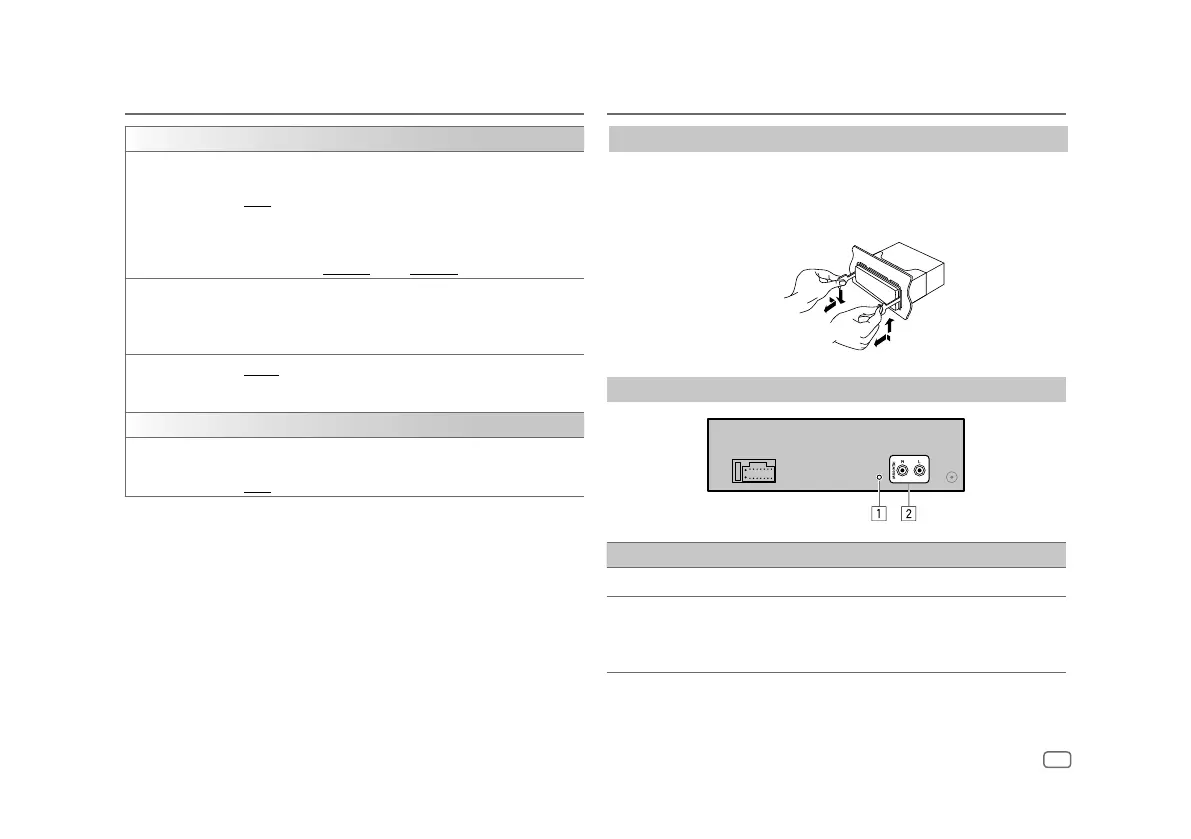
Removing the unit
Insert the extraction keys deeply into the slots on each side, then
follow the arrows as shown on the illustration.
Connect external components
No Part
1
Microphone input jack (Page
12
)
2
Output terminals
REAR/SW: Rear/subwoofer output
•
When connecting an external amplifier to the output terminals of this unit, securely
connect the amplifier ground wire to the car chassis to prevent damage to the unit.


 To Next Page