Audio Settings
[SW LPF SLOPE] [–6DB]/[–12DB]/[–18DB]/[–24DB]: Adjusts the
crossover slope.
(Selectable only if a setting other than [THROUGH] is
selected for [SW LPF FRQ].)
[SW LPF
PHASE]
[REVERSE] (180°)/[NORMAL] (0°): Selects the
phase of the subwoofer output to be in line with the
speaker output for optimum performance.
[SW LPF GAIN]
[–8] to [0]: Adjusts the output volume of the
subwoofer.
[DTA SETTINGS]
For settings, see the following “Digital Time Alignment settings”.
[CAR SETTINGS]
• The following item is selectable only if
[SWITCH PREOUT]
is set to
[SUB-W]
(page 5):
–
[SUB-W LEVEL]
–
[SUBWOOFER SET]
–
[SW LEVEL]
of
[EASY EQ]
–
[SUBWOOFER]
of
[SPEAKER SIZE]
–
[SUBWOOFER LPF]
of
[X ‘ OVER]
–
[SUBWOOFER]
of
[DISTANCE]
and
[GAIN]
in
[DTA SETTINGS]
• The following item is selectable only if
[SUBWOOFER SET]
is set to
[ON]
(page 18):
–
[SUB-W LEVEL]
–
[SW LEVEL]
of
[EASY EQ]
–
[SUBWOOFER]
of
[SPEAKER SIZE]
–
[SUBWOOFER LPF]
of
[X ‘ OVER]
–
[SUBWOOFER]
of
[DISTANCE]
and
[GAIN]
in
[DTA SETTINGS]
• The following item is selectable only if a setting other than
[NONE]
is
selected for
[TWEETER]
,
[REAR]
and
[SUBWOOFER]
of
[SPEAKER SIZE]
:
–
[TWEETER]
,
[REAR HPF]
,
[SUBWOOFER LPF]
of
[X ‘ OVER]
20
ENGLISH
Display Settings
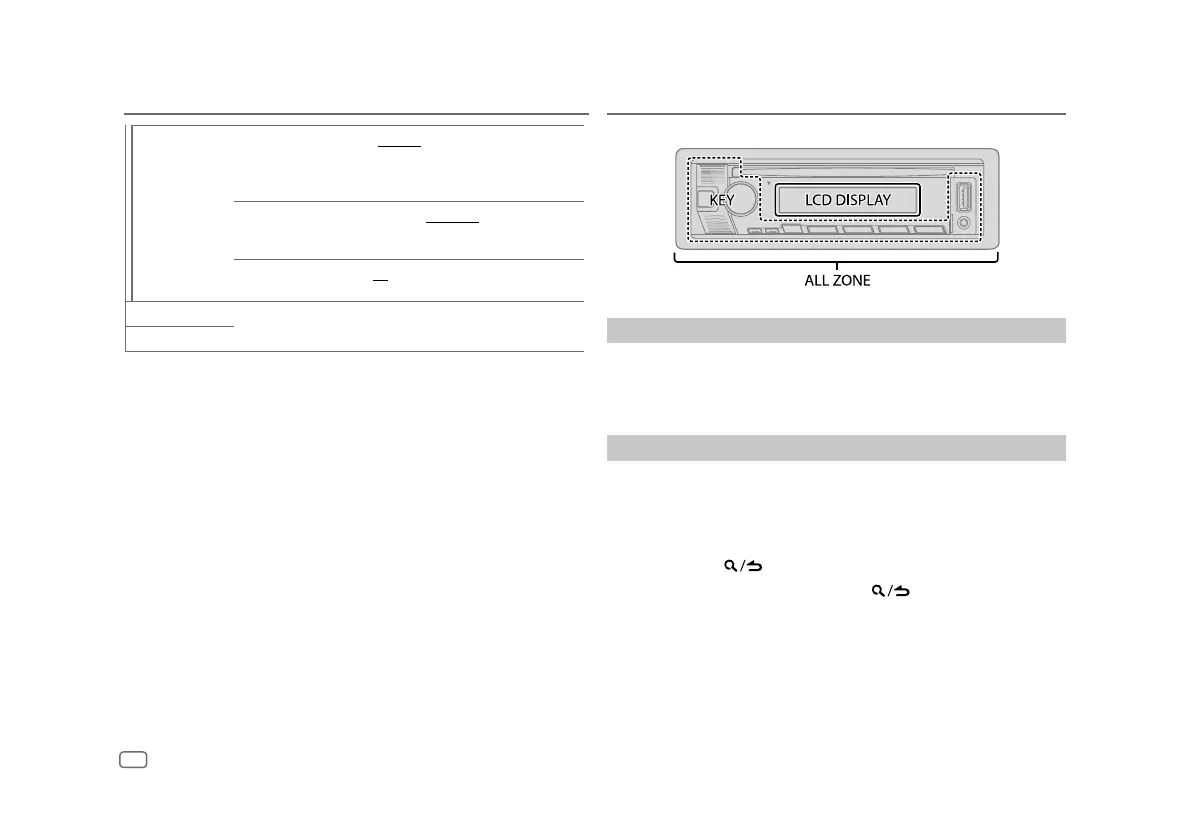
Zone identification for brightness setting
Set the dimmer
Press and hold DISP (DIM) to turn on or off the dimmer.
• Once you press and hold this button,
[DIMMER]
setting (page 21) will be
overwritten.
Change the display settings
1 Press the volume knob to enter
[FUNCTION]
.
2 Turn the volume knob to select an item (page 21), then press the
knob.
3 Repeat step 2 until the desired item is selected/activated or follow the
instructions stated on the selected item.
4 Press and hold to exit.
To return to the previous setting item, press
.


 To Next Page