[SOUND EFFECT]
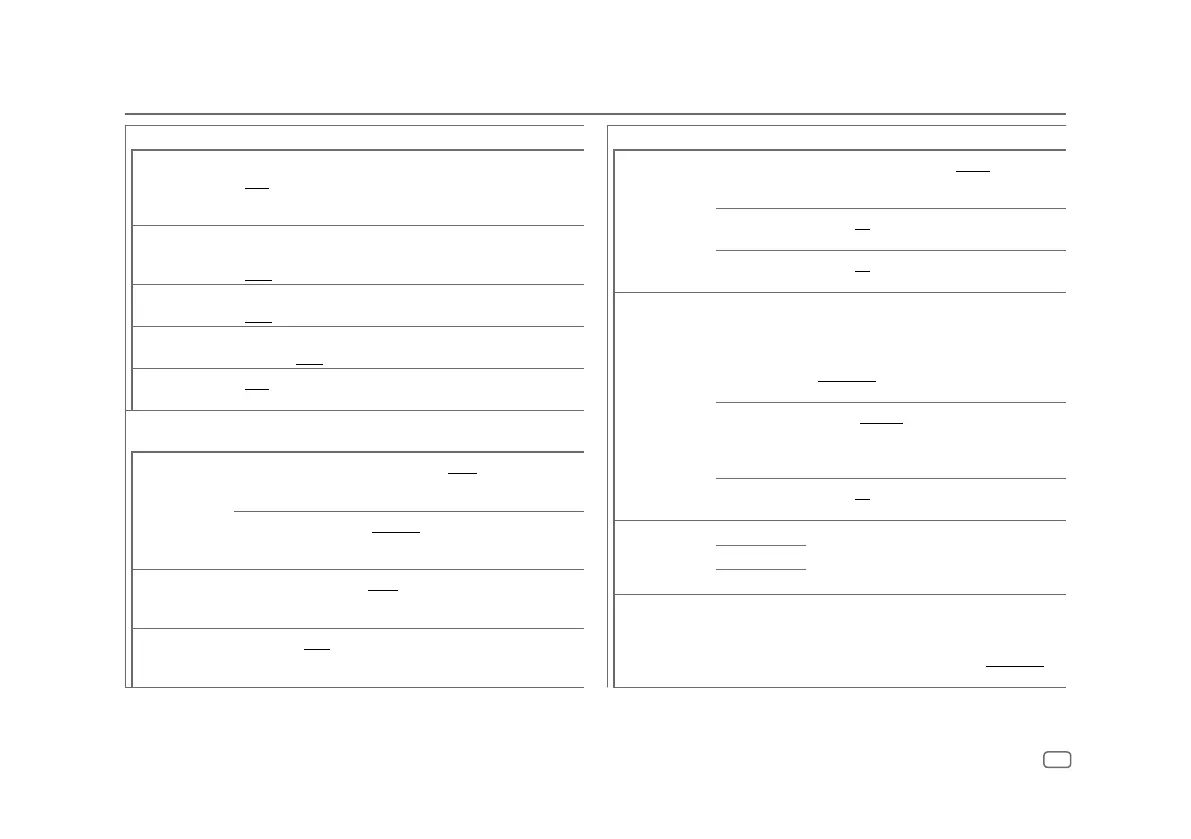
[SOUND RECNSTR]
(Sound
reconstruction)
(Not applicable for RADIO source and AUX source.)
[ON]: Creates realistic sound by compensating the high-frequency
components and restoring the rise-time of the waveform that are lost in
audio data compression. ; [OFF]: Cancels.
[SPACE ENHANCE]
(Not applicable for RADIO source.)
[SML]/[MED]/[LRG]: Virtually enhances the sound space. ;
[OFF]: Cancels.
[SND REALIZER]
[LV1]/[LV2]/[LV3]: Virtually makes the sound more realistic. ;
[OFF]: Cancels.
[STAGE EQ]
[LOW]/[MID]/[HI]: Virtually adjusts the sound position heard from the
speakers. ; [OFF]: Cancels.
[DRIVE EQ]
[ON]: Boosts the frequency to reduce the noise heard from outside the
car or running noise of the tyres. ; [OFF]: Cancels.
[SPEAKER SIZE] The frequency and slope settings are automatically set for the crossover
of the selected speaker.
[FRONT] [SIZE]
[3.5”]/[4”]/[4.75”]/[5”]/[6.5”]/[6.75”]/[7”]/[4×6]/
[5×7]/[6×8]/[6×9]/[7×10]: Selects according to the
connected speaker size for optimum performance.
[TWEETER]
[SMALL]/[MIDDLE]/[LARGE]: Selects according to
the size range of the connected tweeter for optimum
performance. ; [NONE]: Not connected.
[REAR]
[3.5”]/[4”]/[4.75”]/[5”]/[6.5”]/[6.75”]/[7”]/[4×6]/[5×7]/[6×8]/
[6×9]/[7×10]: Selects according to the connected speaker size for
optimum performance. ; [NONE]: Not connected.
[SUBWOOFER]
[6.5”]/[8”]/[10”]/[12”]/[15” OVER]: Selects according to the
connected speaker size for optimum performance. ; [NONE]: Not
connected.
Audio Settings
[X ‘ OVER]
[TWEETER] [FRQ]
[1KHZ]/[1.6KHZ]/[2.5KHZ]/[4KHZ]/[5KHZ]/
[6.3KHZ]/[8KHZ]/[10KHZ]/[12.5KHZ]: Adjusts the
crossover frequency for the tweeter speaker.
[GAIN LEFT]
[–8] to [0]: Adjusts the output volume of the left
tweeter.
[GAIN RIGHT]
[–8] to [0]: Adjusts the output volume of the right
tweeter.
[FRONT HPF] [F-HPF FRQ]
[30HZ]/[40HZ]/[50HZ]/[60HZ]/[70HZ]/[80HZ]/
[90HZ]/[100HZ]/[120HZ]/[150HZ]/[180HZ]/
[220HZ]/[250HZ]: Adjusts the crossover frequency
for the selected speakers (high pass filter). ;
[THROUGH]: All signals are sent to the selected
speakers.
[F-HPF SLOPE]
[–6DB]/[–12DB]/[–18DB]/[–24DB]: Adjusts the
crossover slope.
(Selectable only if a setting other than [THROUGH] is
selected for [F - HPF FRQ].)
[F-HPF GAIN]
[–8] to [0]: Adjusts the output volume of the
selected speaker.
[REAR HPF] [R-HPF FRQ]
Configure the settings for the rear speakers similarly
to the front speakers.
[R-HPF SLOPE]
[R-HPF GAIN]
[SUBWOOFER LPF] [SW LPF FRQ]
[30HZ]/[40HZ]/[50HZ]/[60HZ]/[70HZ]/[80HZ]/
[90HZ]/[100HZ]/[120HZ]/[150HZ]/[180HZ]/
[220HZ]/[250HZ]: Adjusts the crossover frequency
for the subwoofer (low pass filter). ; [THROUGH]: All
signals are sent to the subwoofer.
ENGLISH
19


 To Next Page