ENGLISH
7
Default: [XX]
[TUNER SETTING]
[SEEK MODE]
Selects the searching method for
S
/
T
buttons when pressed.
[AUTO1]: Automatically search for a station. ; [AUTO2]: Search for a preset
station. ; [MANUAL]: Manually search for a station.
[AUTO MEMORY]
[YES]: Automatically starts memorizing 6 stations with good reception. ;
[NO]: Cancels.
• Selectable only if [NORMAL] is selected for [PRESET TYPE]. (Page 5)
[MONO SET]
[ON]: Improves the FM reception, but the stereo effect will be lost. ;
[OFF]: Cancels.
[TI]
[ON]: Allows the unit to temporarily switch to Traffic Information if
available (“TI” indicator lights up). ; [OFF]: Cancels.
[PTY SEARCH]
Select the available Program Type (see the following), then press
S
/
T
to start.
[CLOCK]
[TIME SYNC]
[ON]: Synchronizes the unit’s time to the Radio Broadcast Data System
station time. ; [OFF]: Cancels.
•
[MONO SET]
/
[TI]
/
[PTY SEARCH]
is selectable only when the band is FM1/FM2/
FM3.
• If the volume is adjusted during reception of traffic information or news
bulletin, the adjusted volume is memorized automatically. It will be applied
the next time traffic information or news bulletin is turned on.
• Program Type:
[SPEECH]
:
[NEWS]
,
[INFORM]
(information),
[SPORTS]
,
[TALK]
,
[LANGUAGE]
,
[REL TALK]
(religious talk),
[PERSNLTY]
(personality),
[PUBLIC]
,
[COLLEGE]
,
[HABL ESP]
(spanish talk),
[WEATHER]
[MUSIC]
:
[ROCK]
,
[CLS ROCK]
(classic rock),
[ADLT HIT]
(adult hits),
[SOFT RCK]
(softrock),
[TOP 40]
,
[COUNTRY]
,
[OLDIES]
,
[SOFT]
,
[NOSTALGA]
(nostalgia),
[JAZZ]
,
[CLASSICL]
(classical),
[R & B]
(rhythm and blues),
[SOFT R&B]
(soft rhythm and
blues),
[REL MUSC]
(religious music),
[MUSC ESP]
(spanish music),
[HIP HOP]
Radio CD/USB/iPod
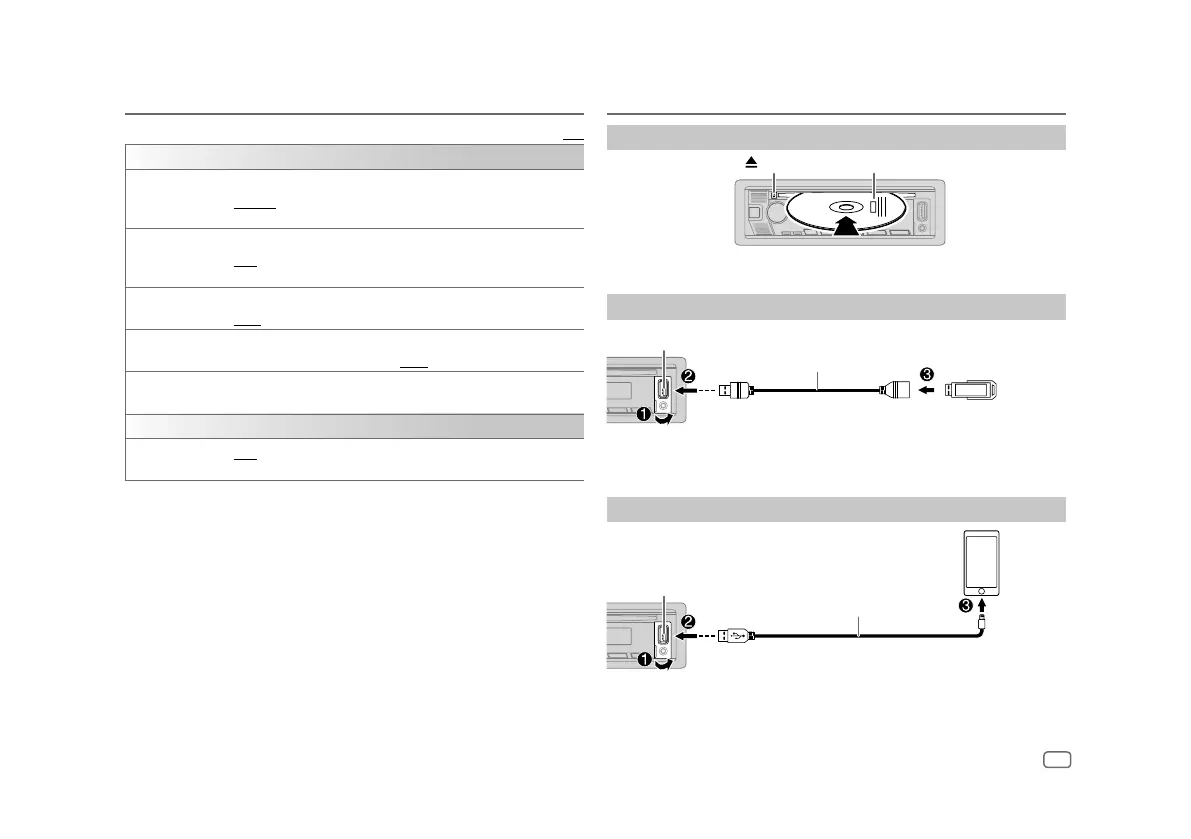
Insert a disc
Eject disc
Label side
The source changes to CD automatically and playback starts.
Connect a USB device
USB device
USB input terminal
USB cable*
(commercially available)
The source changes to USB automatically and playback starts.
* Do not leave the cable inside the
vehicle
when not in use.
Connect an iPod/iPhone
USB input terminal
Accessory of the iPod/iPhone*
iPod/iPhone
The source changes to iPod USB automatically and playback starts.
• You can also connect iPod/iPhone via Bluetooth. (Page12)
* Do not leave the cable inside the
vehicle
when not in use.


 To Next Page