ENGLISH
15
[LOCK SETTING] [MATURE CH]: Selects the SiriusXM-defined lock setting. ;
[USER DEFINED]: Selects the individual channels the user wants to
lock. ; [OFF]: Cancels.
[CHANNEL EDIT]*1
1
Turn the volume knob to select a category, then press the knob.
2
Turn the volume knob to select a channel you want to lock, then
press the knob.
“L” appears in front of the channel number.
3
Press and hold to exit.
[CHANNEL CLEAR]*1
[YES]: Clears all the locked channels. ; [NO]: Cancels.
[TUNE START]*2
[ON]: All qualified music channels in the SmartFavorites will start
playback from the beginning of the song. ; [OFF]: Cancels.
[SIGNAL LEVEL] Shows the strength ([NO SIGNAL]/[WEAK]/[GOOD]/[STRONG]) of
the current received signal.
[BUFFER USAGE] Shows the memory usage ([0%] to [100%]) for Replay buffer.
[SXM RESET]
[YES]: Resets all SiriusXM settings to default. ; [NO]: Cancels.
*1 Displayed only when [LOCK SETTING] is set to [USER DEFINED].
*2 Available only if the connected SiriusXM Vehicle Tuner is SXV200 or later which supports
SmartFavorites.
AUX
You can listen to music from a portable audio player via the auxiliary input
jack.
Preparation:
Select
[ON]
for
[BUILT-IN AUX]
in
[SOURCESELECT]
. (Page6)
Start listening
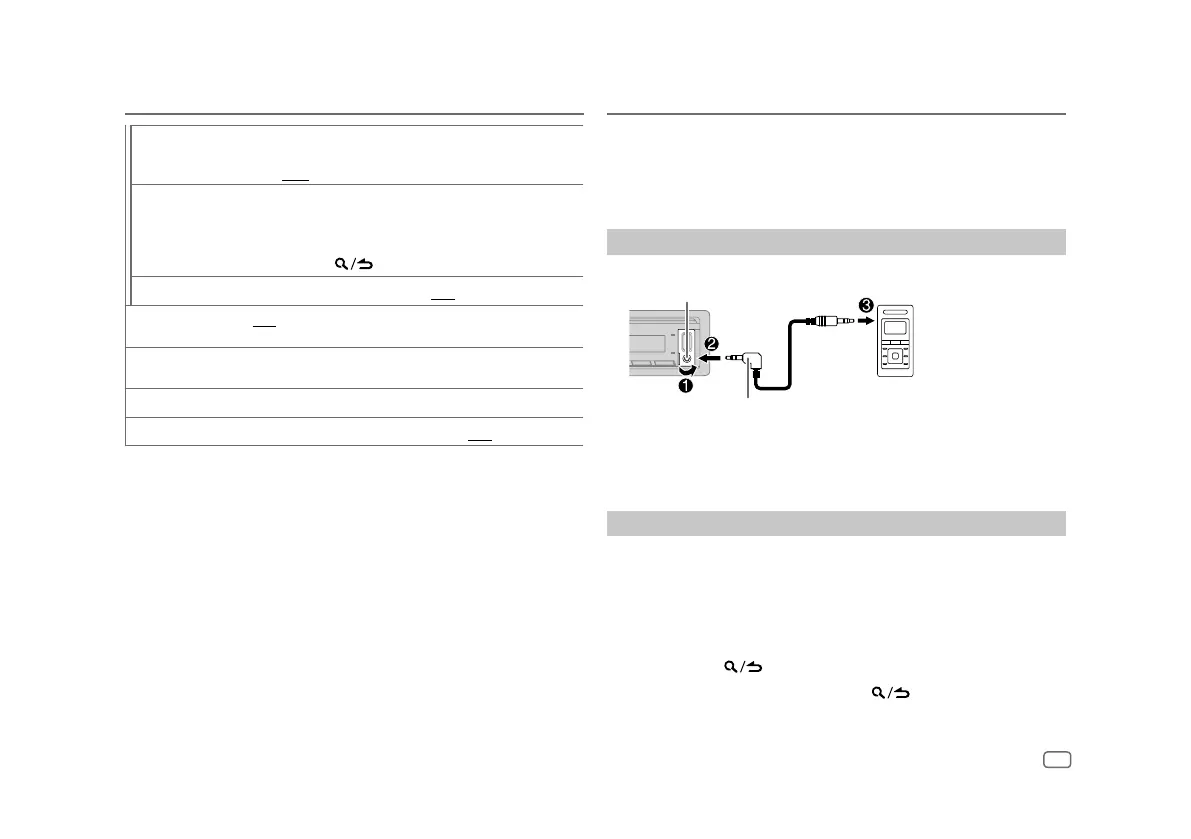
1
Connect a portable audio player (commercially available).
Portable audio player
3.5 mm (1/8") stereo mini plug with “L”
shaped connector (commercially available)
Auxiliary input jack
2 Press B SRC repeatedly to select AUX.
3 Turn on the portable audio player and start playback.
Set the name of the external device
While listening to a portable audio player connected to the unit...
1 Press the volume knob to enter
[FUNCTION]
.
2 Turn the volume knob to select
[SYSTEM]
, then press the knob.
3 Turn the volume knob to select
[AUX NAME SET]
, then press the knob.
4 Turn the volume knob to select an item, then press the knob.
[AUX]
(default)/
[DVD]
/
[PORTABLE]
/
[GAME]
/
[VIDEO]
/
[TV]
5 Press and hold to exit.
To return to the previous setting item, press
.
SiriusXM® Radio


 To Next Page