Bluetooth®
• Depending on the Bluetooth version, operating system and the firmware
version of your mobile phone, Bluetooth features may not work with this
unit.
• Be sure to turn on the Bluetooth function of the device to make the
following operations.
• Signal conditions vary depending on the surroundings.
Bluetooth — Connection
Supported Bluetooth profiles
– Hands-Free Profile (HFP)
– Advanced Audio Distribution Profile (A2DP)
– Audio/Video Remote Control Profile (AVRCP)
– Serial Port Profile (SPP)
– Phonebook Access Profile (PBAP)
Supported Bluetooth codecs
– Sub Band Codec (SBC)
– Advanced Audio Coding (AAC)
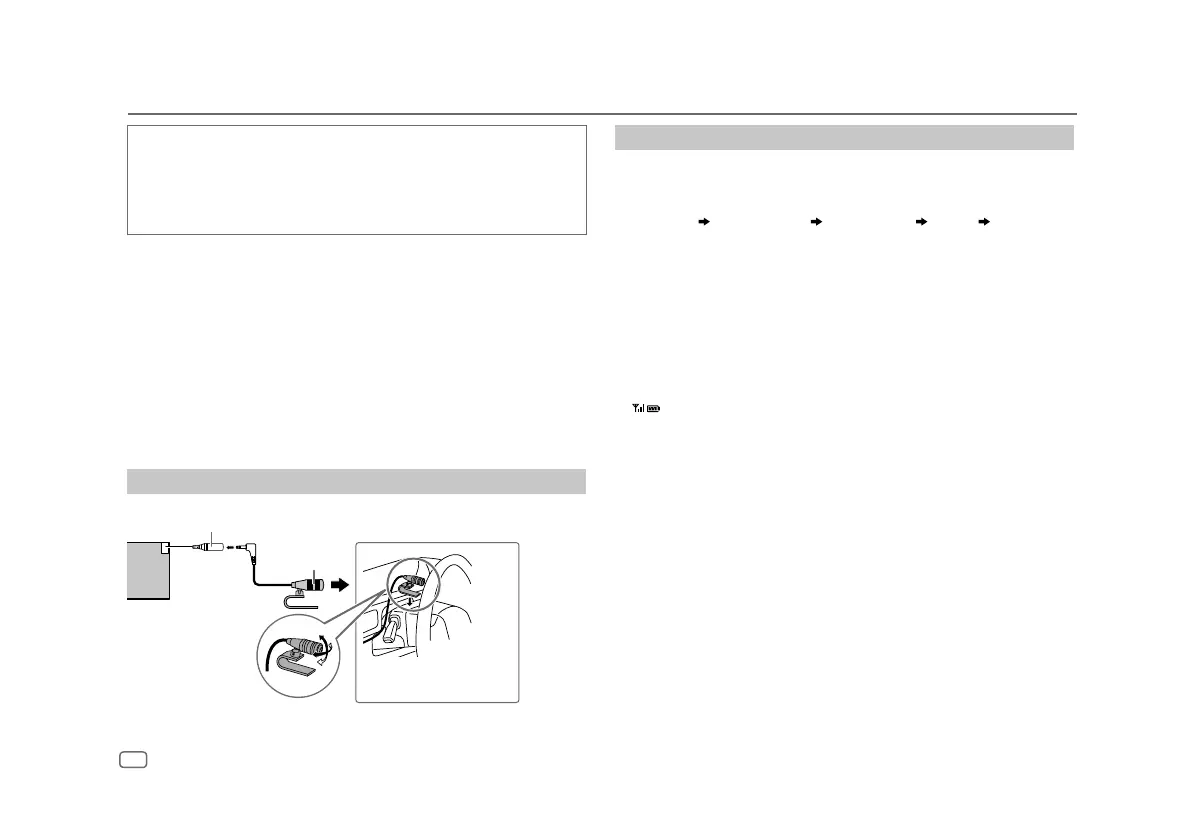
Connect the microphone
Adjust the
microphone angle
Secure using cord clamps
(not supplied) if necessary.
Microphone input terminal
Microphone
(supplied)
Rear panel
16
ENGLISH
Pair and connect a Bluetooth device for the first time
1
Press B SRC to turn on the unit.
2 Search and select the name of your receiver (“PP-BT-RADIO”) on the
Bluetooth device.
“PAIRING” “PASS XXXXXX” “Device name” “PRESS” “VOLUME
KNOB” appears on the display.
• For some Bluetooth devices, you may need to enter the Personal
Identification Number (PIN) code immediately after searching.
3 Press the volume knob to start pairing.
“PAIRING OK” appears when pairing is completed.
Once pairing is completed, Bluetooth connection is established
automatically.
• “BT1” and/or “BT2” indicator on the faceplate lights up.
• “
” indicator lights up to show the strength of the battery and signal of
the connected device.
• This unit supports Secure Simple Pairing (SSP).
• Up to five devices can be registered (paired) in total.
• Once the pairing is completed, the Bluetooth device will remain registered
in the unit even if you reset the unit. To delete the paired device, see
[DEVICE DELETE]
on page20.
• A maximum of two Bluetooth phones and one Bluetooth audio device can
be connected at any time. To connect or disconnect the registered device,
see
[PHONE SELECT]
or
[AUDIO SELECT]
in
[BT MODE]
. (Page 20)
However, while in BT AUDIO source, you can connect to five Bluetooth
audio devices and switch between these five devices. (Page21)
• Some Bluetooth devices may not automatically connect to the unit after
pairing. Connect the device to the unit manually.
•
Refer to the instruction manual of the Bluetooth device for more
information.


 To Next Page