ENGLISH
29
References
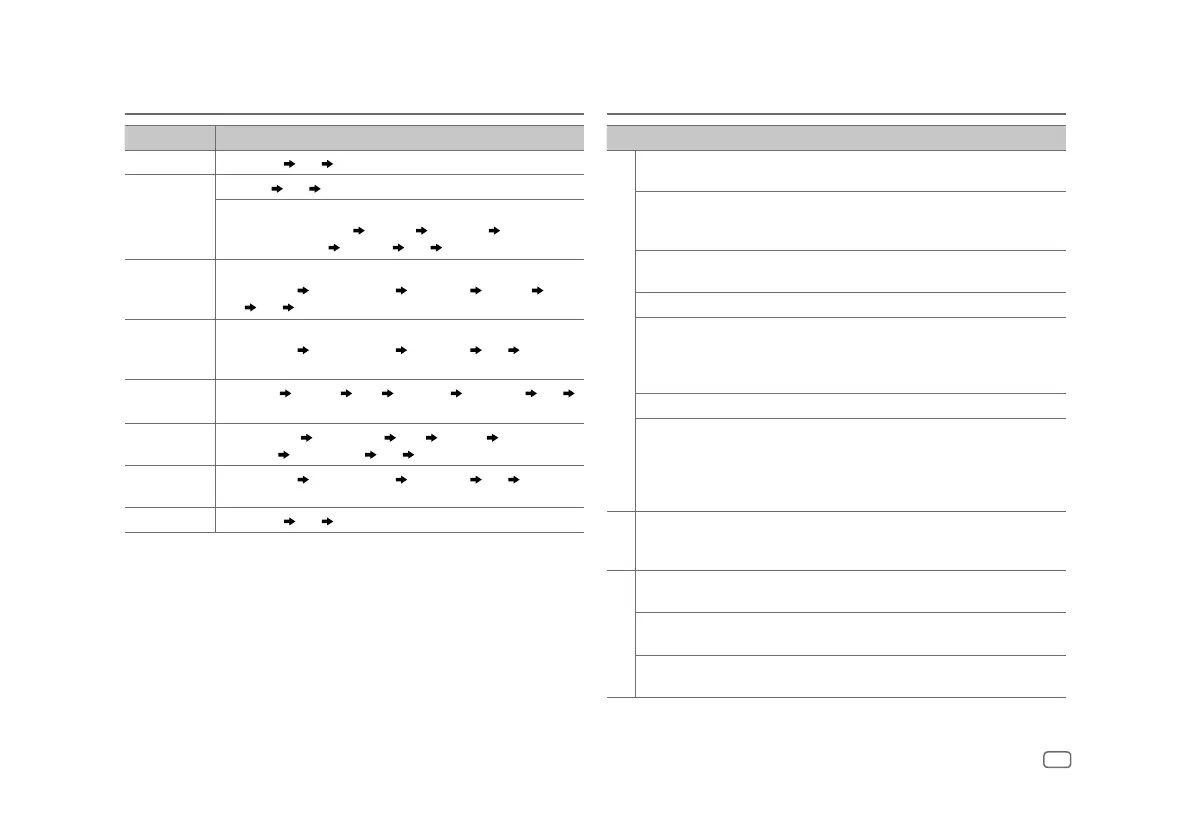
Source name Display information: Main display
STANDBY Source name
Date back to the beginning
RADIO Frequency
Date back to the beginning
For FM Radio Broadcast Data System only:
Station name/Program type
Radio text Radio text+ Radio text+ song
title/Radio text+ artist
Frequency Date back to the beginning
USB For MP3/WMA/AAC/WAV/FLAC files:
Song title/Artist
Album title/Artist Folder name File name Playing
time
Date back to the beginning
iPod USB/iPod BT When [MODE OFF] is selected (page 9):
Song title/Artist
Album title/Artist Playing time Date back to the
beginning
SPOTIFY/
SPOTIFY BT
Context title
Song title Artist Album title Playing time Date
back to the beginning
SIRIUS XM Channel number
Channel name Artist Song title Content
information
Category name Date back to the beginning
BT AUDIO Song title/Artist
Album title/Artist Playing time Date back to the
beginning
AUX Source name
Date back to the beginning
Troubleshooting
Symptom Remedy
General
Sound cannot be heard. • Adjust the volume to the optimum level.
• Check the cords and connections.
“MISWIRING CHECK WIRING
THEN PWR ON” appears.
Turn the power off, then check to be sure the terminals of
the speaker wires are insulated properly. Turn the power
on again.
“PROTECTING SEND SERVICE”
appears.
Send the unit to the nearest service center.
Source cannot be selected. Check the [SOURCESELECT] setting. (Page 6)
• Sound cannot be heard.
• The unit does not turn on.
• Information shown on the
display is incorrect.
Clean the connectors.
The unit does not work at all. Reset the unit. (Page 4)
Correct characters are not
displayed.
• This unit can only display uppercase letters, numbers,
and a limited number of symbols.
• Depending on the display language you have selected
(page 6), some characters may not be displayed
correctly.
Radio
• Radio reception is poor.
• Static noise while listening
to the radio.
Connect the antenna firmly.
USB/iPod
Playback order is not as
intended.
The playback order is determined by the order in which
file name were recorded (USB).
Elapsed playing time is not
correct.
This depends on the recording process earlier (USB).
“READING” keeps flashing. • Do not use too many hierarchical levels and folders.
• Reattach the device (USB/iPod/iPhone).


 To Next Page