12
ENGLISH
Spotify
Search for a song or station
1
Press .
2 Turn the volume knob to select a list type, then press the knob.
The list types displayed differ depending on the information sent from
Spotify.
3 Turn the volume knob (or press J/K on the remote control) to select
the desired song or station.
4 Press the volume knob (or press ENT IW on the remote control) to
confirm.
You can browse through the list quickly by turning the volume knob
quickly.
To cancel, press and hold
.
SiriusXM® Radio
Only SiriusXM® brings you more of what you love to listen to, all in one place.
Get over 140 channels, including commercial-free music plus the best sports,
news, talk, comedy and entertainment. Welcome to the world of satellite
radio. A SiriusXM Vehicle Tuner and Subscription are required. For more
information, visit <www.siriusxm.com>.
Preparation:
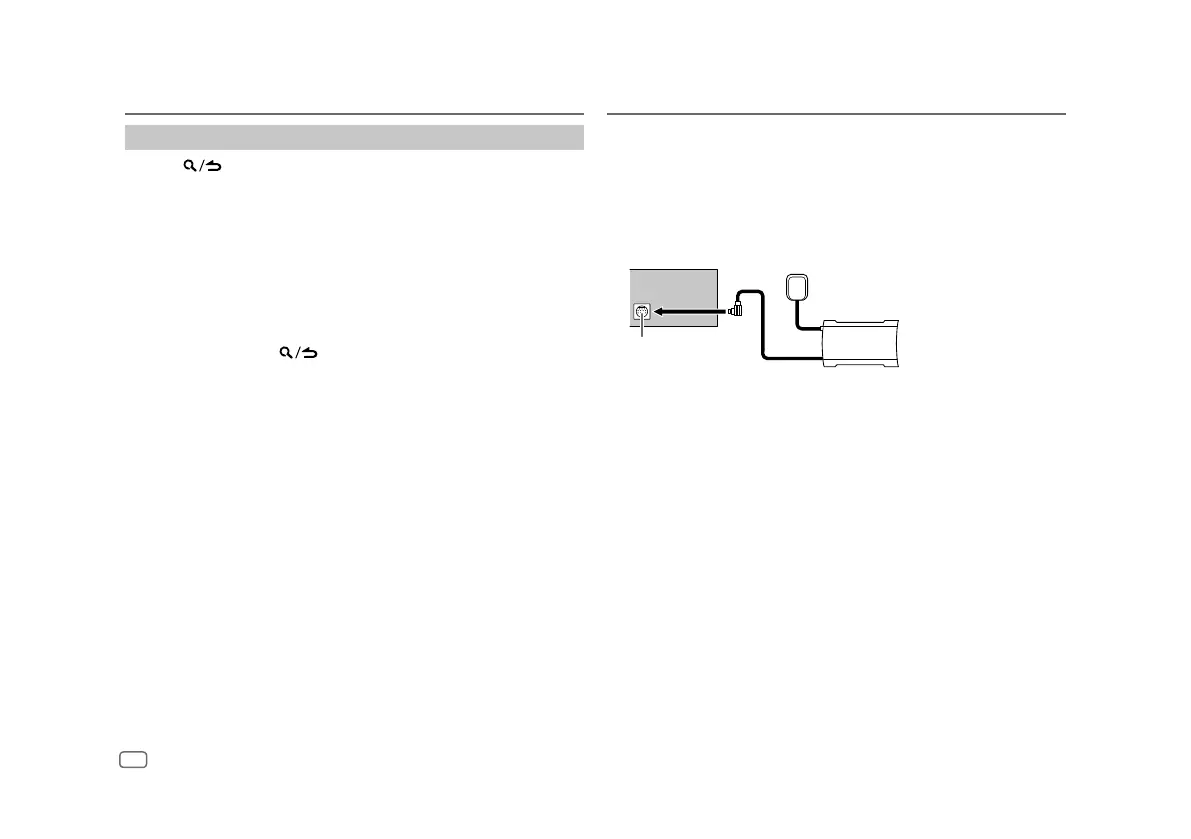
1 Connect the optional SiriusXM Vehicle Tuner (commercially available).
Antenna
Expansion port on
the rear panel
SiriusXM Vehicle Tuner
2 Check your Radio ID for activation.
The SiriusXM Radio ID is required for activation and can be found by
tuning to Channel 0 as well as on the label found on the SiriusXM Vehicle
Tuner and its packaging.
The Radio ID does not include the letters I, O, S or F.
3 Activate the subscription.
For users in the U.S.A.:
Online: Go to <www.siriusxm.com>
Phone: Call 1-866-635-2349
For users in Canada:
Online: Go to <www.siriusxm.ca/subscribe-now>
Phone: Call 1-877-438-9677
4 Press B SRC repeatedly to select SIRIUSXM to start updating.


 To Next Page