8
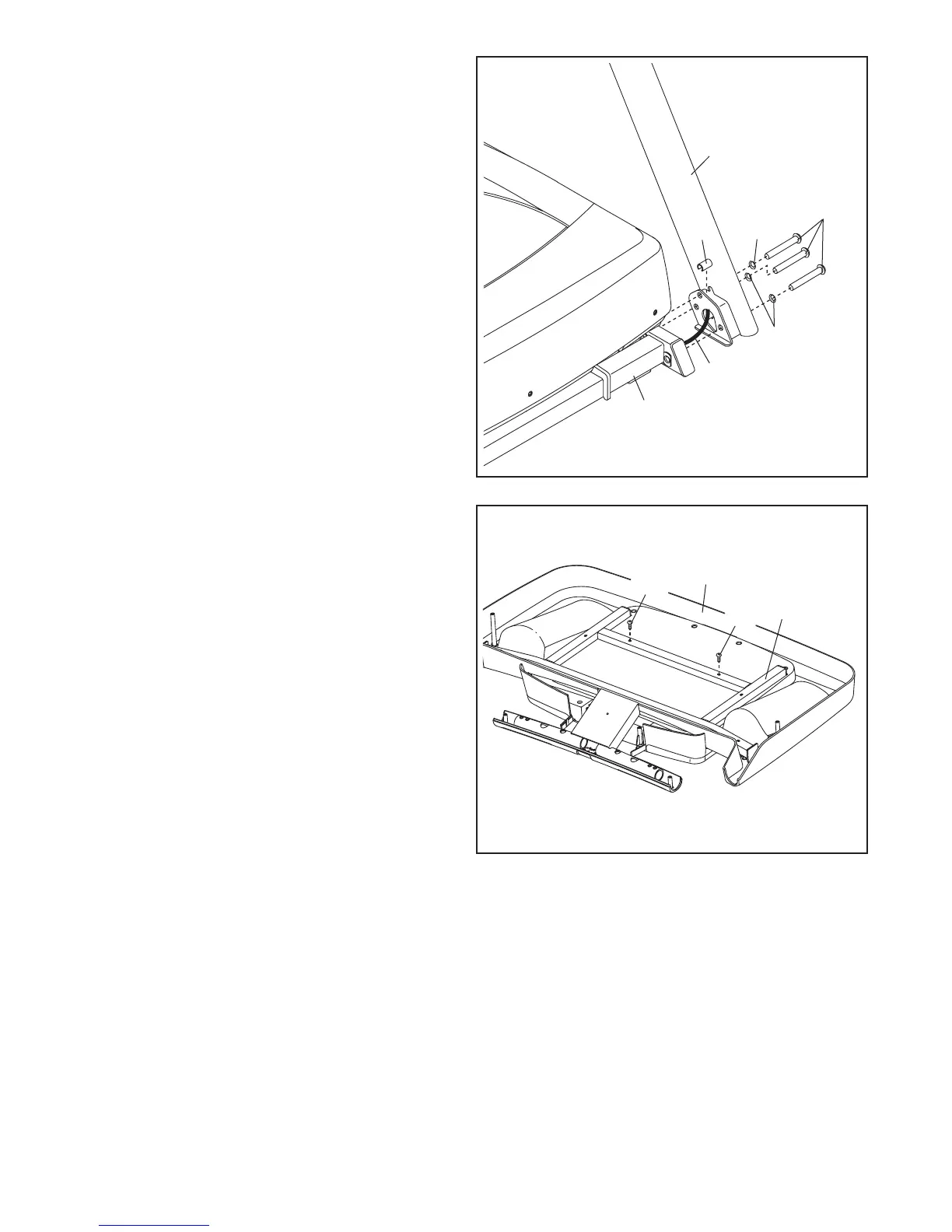
5. Set the Console Base (83) face down on a soft
surface to avoid scratching the Console Base.
Remove the two Screws (A) from the Console
Frame (87). Remove the Console Frame.
Discard the Screws.
83
87
5
4. Hold the Left Upright (75) against the Base (80).
Be careful not to pinch the wires. Insert a 3/8"
x 3 1/2" Screw (4) with a 3/8" Star Washer (5)
into the top hole in the Left Upright.
Insert the 3/8" x 3 1/2" Screw (4) partially
through the Left Upright (75). Next, slide a
Screw Spacer (93) onto the end of the Screw.
Then, tighten the Screw partially into the Base
(80).
Partially tighten two more 3/8" x 3 1/2" Screws
(4) with two 3/8" Star Washers (5) into the Left
Upright (75); do not fully tighten the Screws
yet.
Attach the Right Upright (not shown) in the
same way. Note: There are no wires on the right
side.
75
93
4
5
5
4
80
Wires
A
A










 To Next Page